How to Test AI Models: Step-by-Step Testing Process
Dhrumil Mistry
Published: Apr 02, 2026
AI is no longer experimental, it’s already impacting real business decisions and customer experiences. But when AI goes wrong, it doesn’t just fail silently, it damages trust, revenue, and brand reputation. The real challenge isn’t just building AI systems, but understanding how to test AI models effectively before deployment.
In today’s AI-driven landscape, testing is what separates reliable systems from costly failures.
Key Takeways :
AI model testing enables you to measure an AI model’s stability, performance and accuracy. This ensures that it works as expected.
Common AI model testing types are performance, functional, regression, bias, security, and fairness testing.
One of the best practices to optimize an AI model is to develop a robust training strategy, utilizing real-world data and checking the correct metrics.
A significant number of US tech companies, including major tech firms like Meta, are putting more focus on testing. This enables them to detect hallucination.
In 2024, Air Canada was ordered to pay compensation to a passenger after the virtual assistant provided incorrect data at a critical time. The passenger took legal steps claiming that the airline had misrepresented information.
In another scenario, McDonald’s AI bot continuously adds more chicken nuggets to an existing order even when the customer asks to stop. These weren’t technical glitches; these are AI methodology failures in business.
The reason behind this failure?
Non-testing of AI models. This isn’t a one-shot requirement. Instead, this is an absolute must for the business to thrive in this competitive market.
According to the QA trends report in 2026, 77% of QA teams are adopting AI-first quality engineering practices. This reflects how AI model testing is critical to bridge the gap between real-world deployment and experimentation.
If you’re running a business and facing issues like McDonald’s or Air Canada with current models, AI model testing is a must. This becomes even more important when deploying AI agent development solutions, where multiple systems, workflows, and decision-making layers must be validated thoroughly. The question is not about how to test AI models, but it’s deeper rooted than you think.
In this guide, we’ll share insights about everything required to test AI models, ensuring fairness, accuracy, and reliability.
Before digging deeper, let’s have a nuanced approach to real-world AI failures.
Real World AI-Model Failures
AI’s evolution and its humongous leaps have everyone overwhelmed. However, AI models also caused severe anomalies due to undetected errors.
According to Pymnts, businesses faced an annual loss of approx $118 billion. The damage has covered the significant business lifecycles. Many organizations now partner with an experienced AI development company to ensure proper testing and validation before deployment.
1. Tesla Autopilot Crash
As a reputable global car brand, the increased sales of next-gen Tesla cars have made the entire team proud. However, one miserable incident transformed all the happy moments into a disheartening one when an autopilot Tesla car hit a stationary fire truck. This caused the death of the driver and injured four firefighters and a passenger.
The reason for this accident is the lack of data simulation across multiple scenarios. Especially during testing an AI model, synthetic data is important, as real-time data for every scenario isn’t available.
2. Amazon Alexa’s Biased Answer
Released in 2014, Amazon’s Alexa can generate shopping lists, schedule appointments, and answer questions. In 2024, Alexa picked up a side for US presidential race. Fox News asked the software to provide a few reasons for Donald Trump. The response from Alexa is “I can’t provide any answers about a political party or its leader.”
However, when the same question was asked about Democratic Candidate Kamala Harris, it took her side. Alexa said, “There are specific reasons to vote for Kamala…” It’s clearly evident that Alexa behaved like supporting a party, despite Amazon’s claim that their chatbot isn’t a political entity.
The issue occurred because Amazon didn’t pay attention to the testing phase. Therefore, the AI tool behaved abruptly as it tried to mimic human emotions.
3. Facebook’s Promotion of Harmful Content
As one of the largest and most reputable social media platforms, it constantly uses AI content models to analyze user behavior. This determines which content is most effective based on the user’s previous content consumption history.
During COVID-19, Facebook’s algorithm started pushing users towards multiple groups. From there, the misinformation spread, creating panic in the already panicked environment. Meta has admitted that this incident happened due to poor model design.
The above-mentioned incidents are the result of inadequate measures taken during AI model testing. Furthermore, this created anomalies and provided erroneous results.
What is AI Model Testing?
AI model testing is the process of assessing how well an AI model performs, defines, behaves, and repeats in real-world conditions. In other words, it’s about ensuring accuracy, actual performance, and fairness of an AI model.
Testing AI models enables you to answer the following questions:
Does the AI model handle edge cases?
Can the model make continuous predictions?
Can it perform well over time as the data evolves?
Will it integrate properly with the larger system?
Without ideal testing, an AI model may collapse in production. This leads to compliance issues, bad decisions, and user trust.
For organizations building AI agent systems, testing becomes even more critical as multiple workflows and decision layers interact dynamically.
AI Model Testing Lifecycle: From Training to Production
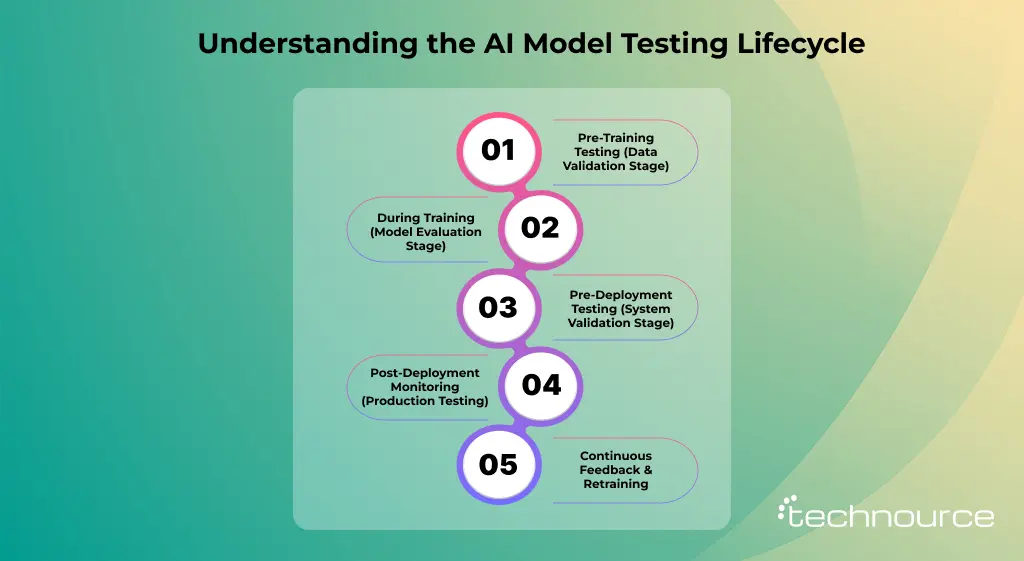
AI model testing is not a one-time activity—it’s a continuous process that spans the entire lifecycle of the model. To ensure reliability, you must test your AI system at every stage, not just before deployment.
Here’s how testing evolves across the lifecycle:
1. Pre-Training Testing (Data Validation Stage)
Before training begins, the focus is on data quality
You should check:
Missing or inconsistent values
Data imbalance
Bias in datasets
Duplicate or noisy entries
Poor data = poor model, no matter how advanced your algorithm is.
Before pushing to production, test the model in a controlled environment.
Validate:
Integration with APIs and pipelines
Real-world scenarios and edge cases
Performance under expected load
This is your last chance to catch critical failures. Many teams collaborate with a cloud application development company to simulate scalable environments during this phase.
Once deployed, continuous monitoring is essential.
Track:
Model drift (performance decline)
Data drift (changing input patterns)
Unexpected outputs or anomalies
AI models degrade over time—monitoring prevents silent failures.
5. Continuous Feedback & Retraining
Use real-world data to improve the model.
Collect user feedback
Identify failure cases
Retrain and revalidate
The best AI systems evolve continuously.
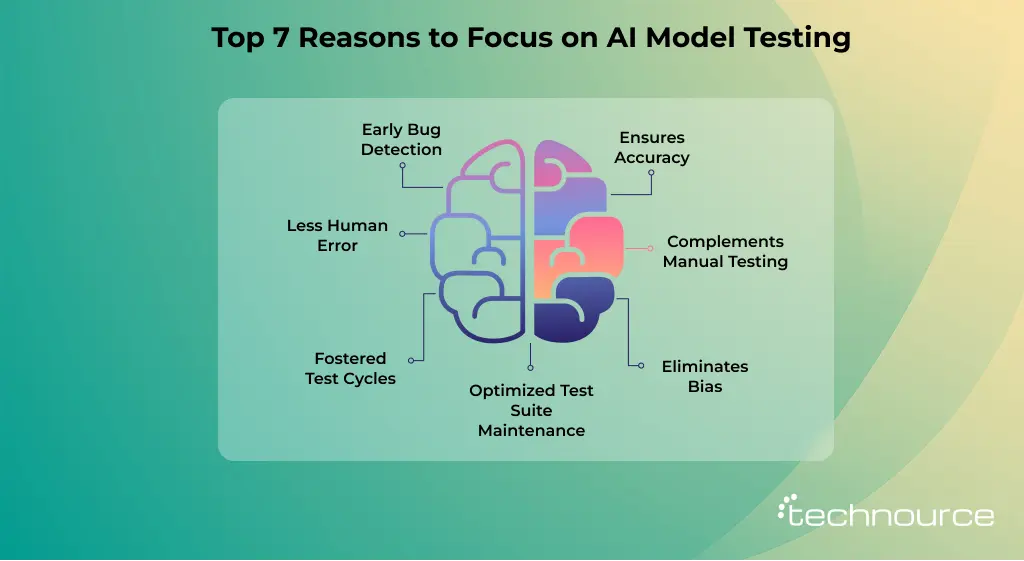
7 Reasons Why AI Model Testing is Important
AI models are the decision makers. From diagnosing anomalies to detecting fraud or recommending content, AI models can make realistic decisions. Therefore, having a proper AI testing strategy to get results isn’t optional; it’s important.
1. Ensures Accuracy
AI model validation through testing minimizes human errors by following redundant processes, ensuring consistent results. The AI testing process validates the code across a wide range of complex situations and delivers dependable software. This fosters trust for both users and developers.
2. Complements Manual Testing
AI automates time-consuming and redundant tasks. However, it doesn’t replace human testers. Instead, it works well alongside humans, handling routine checks and performing tasks. It enables manual testers to focus on creative, complex, and exploratory testing activities.
3. Eliminates Bias
Anomalies in AI may result in unfair outcomes, affecting both users and businesses. With rigorous testing, it detects and minimizes bias.
4. Fostered Test Cycles
This is one of the most significant advantages of AI-powered testing tools: they can execute consistent tests, assess results, and generate reports. This is done more quickly than manual methods, reducing test cycles.
5. Less Human Error
“To err is human.” This phrase is true even when testing an AI model, even if a human makes a small mistake due to oversight, fatigue, or redundant tasks. AI eliminates human errors and ensures consistent test execution across cycles.
6. Early Bug Detection
AI integration throughout the pipeline development enables consistent testing for defect identification. Detecting bugs early helps achieve critical cost reductions. Otherwise, it would cost more during the later cycles.
7. Optimized Test Suite Maintenance
AI identifies outdated test cases and recommends optimizations to keep any test suite efficient, lean, and relevant. This enables an internal team to maintain an AI model and keep it deployment-ready.
AI Testing vs Traditional Software Testing
According to Wikipedia, software testing, or traditional software testing, has multiple tools and frameworks, including Cypress, Appium, and Selenium. A tester needs to choose the elements, structure a logic, and develop assertions. From choosing a framework to structure a test suite and setting up a CI pipeline, handling test environments, etc., are all setups involved in this process, too.
Once it runs, testers consistently face interruptions. Also, knowledge is paramount here, as a tester may encounter complex edge cases or need custom integrations.
On the other hand, AI-powered model testing pushes the complex work of fixing test scenarios, setting up test suites, and enabling test evolution.
According to Precedence Research, North America dominated the gen AI testing market, driving adoption and the development of autonomous testing ecosystems.
Comparing AI vs. Traditional Test Automation
AI testing goes beyond fixed scripts and predictable outcomes used in traditional test automation.
It deals with uncertainty, learning behavior, and real-world variability, making validation more complex but far more critical.
1. Speed of Test Creation
In traditional test automation, this process is slower. Individuals find themselves stuck when writing, reviewing, and debugging code, especially for dynamic apps. Also, creating test coverage for the user flow may take weeks.
On the other hand, AI model testing is faster. It generates test cases utilizing natural language. As a result, it cuts the time spent writing the scenarios, which may help increase test coverage.
2. Setup & Maintenance
In a traditional setup, this involves a test framework, configuring and developing a project structure. From setting up browser drivers to writing tests from scratch and maintaining them, the process is complex.
On the other hand, AI tools make the setup process easier, saving time in automating redundant processes. QA engineers can skip some steps and maintain control over the test scripts.
3. Scalability
The traditional testing procedure contains huge tasks for scalability. Once the test procedures require more volume and complexity, the pressure consistently increases. Thus, it severely affects the scalability.
With AI-driven testing, the testers can solve the issues efficiently. This ensures the setup is clean and avoids redundant code development. Also, reusing code across multiple scenarios enables testers to write clean code. This is a great option for scalability.
4. Debugging
Traditional: Error happens consistently during screenshot diffs, stack traces, and console logs.
On the other hand, multiple tools provide full screenshots and visual differences to understand test failures. During result comparison, these tools also highlight the elements that interacted in each step.
What is an AI Model Testing Framework?
An AI model testing framework is a structured approach to validate the performance, reliability, and fairness of machine learning models. It defines how, when, and what to test across the model lifecycle—from data preparation to post-deployment monitoring.
Instead of focusing only on code correctness, this framework evaluates:
Data quality
Model behavior
Output accuracy
Real-world performance
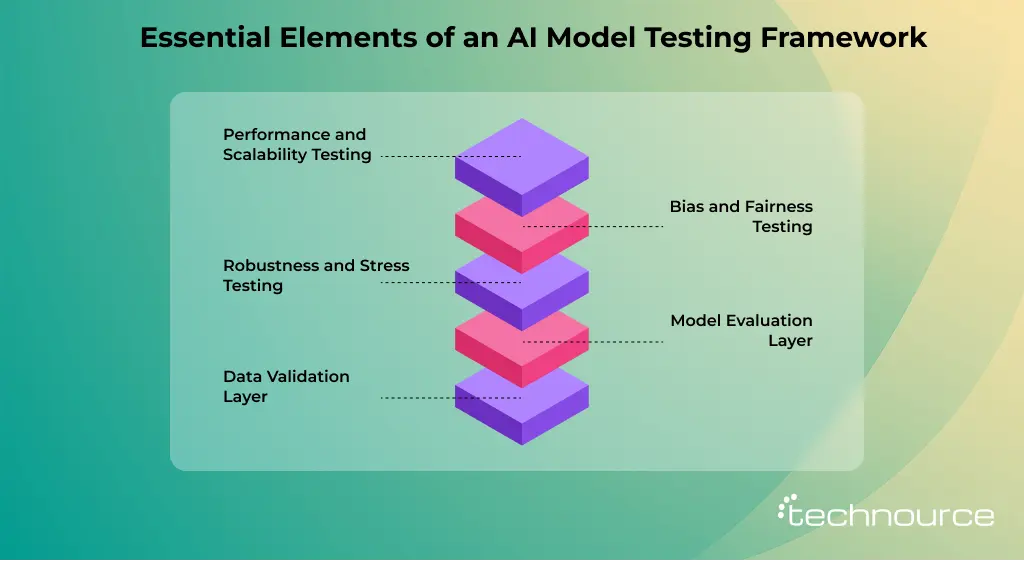
Core Components of an AI Model Testing Framework
A strong AI testing framework is built on multiple components working together to ensure reliability and performance. From data validation to model evaluation and monitoring, each part plays a key role in delivering accurate and trustworthy results.
1. Data Validation Layer
AI models are only as good as the data they learn from. This layer ensures:
Clean, consistent, and unbiased datasets
Proper handling of missing or anomalous values
Balanced class distributions
Without strong data validation, even the most advanced models can fail silently.
2. Model Evaluation Layer
This stage focuses on measuring how well the model performs using predefined metrics such as:
Accuracy
Precision and recall
F1-score
ROC-AUC
The goal is to validate whether the model meets business and technical expectations before moving forward.
3. Robustness and Stress Testing
Real-world data is unpredictable. This layer tests how models behave under:
Noisy or corrupted inputs
Adversarial examples
Edge cases
A robust model should maintain performance even under less-than-ideal conditions.
4. Bias and Fairness Testing
AI systems must be fair and unbiased. This component checks:
Demographic bias
Data representation imbalance
Discriminatory predictions
Ensuring fairness is critical, especially in domains like healthcare, finance, and hiring.
5. Performance and Scalability Testing
Beyond accuracy, models must perform efficiently. This includes:
Latency (response time)
Throughput (handling large volumes)
Resource utilization
This step ensures the model can handle production-level workloads without degradation.
6. Integration Testing
AI models rarely operate in isolation. Integration testing verifies:
Compatibility with APIs and applications
Data pipeline consistency
End-to-end workflow reliability
This ensures the model works seamlessly within the broader system.
7. Continuous Monitoring and Feedback Loop
Testing doesn’t stop after deployment. Continuous monitoring tracks:
Model drift
Data drift
Performance degradation over time
A feedback loop enables teams to retrain and optimize models using real-world insights.
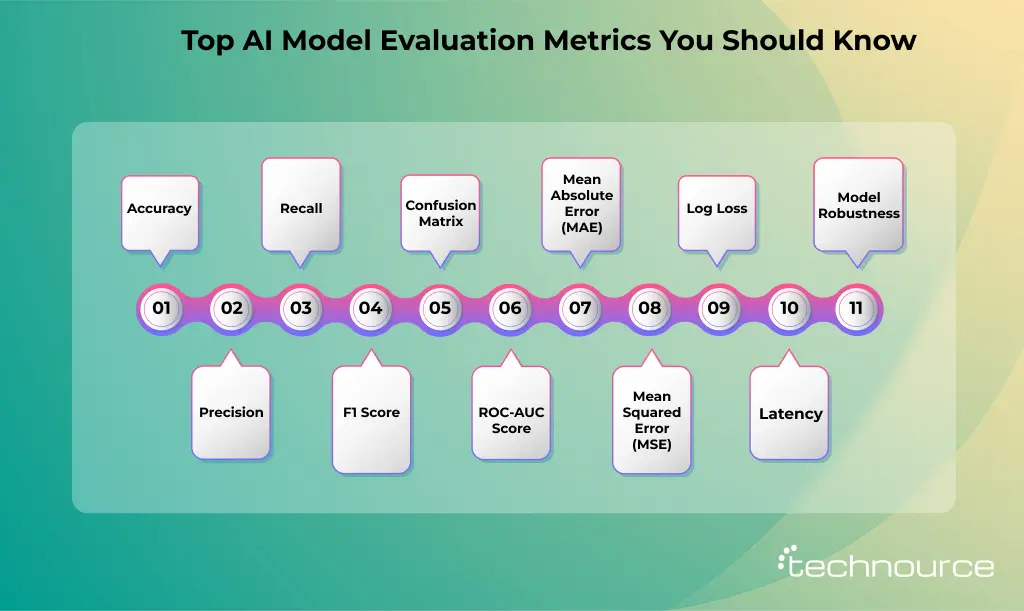
Key Metrics to Evaluate AI Models
When testing an AI model, one big question always comes up: How do you know if it’s actually good?
That’s where evaluation metrics come in. These are simple ways to measure how well an AI model is performing. You don’t need to be a data scientist to understand them—just a basic idea of what each metric tells you.
Let’s break down the most important ones clearly and easily.
1. Accuracy
Accuracy is the most common metric. It tells you how often the model gives the correct answer.
When to use it:
Accuracy works best when your data is balanced (for example, an equal number of “yes” and “no” cases).
Limitation:
If one category is much larger than the other, accuracy can be misleading.
2. Precision
Precision answers this question:
Out of all the times the model said “yes,” how many were correct?
Example:
If an AI detects spam emails, precision tells you how many flagged emails were truly spam.
Why it matters:
High precision means fewer false alarms.
3. Recall
Recall focuses on coverage. It answers:
Out of all actual “yes” cases, how many did the model correctly find?
Example:
In bug detection, recall measures how many bugs are correctly identified.
Why it matters:
High recall means fewer missed cases.
4. F1 Score
Sometimes, you need both precision and recall to be strong. That’s where the F1 Score comes in.
It combines both into a single number.
Simple idea:
If precision and recall are both high, the F1 score is high.
Why it matters:
Useful when you want a balance between avoiding false alarms and not missing real cases.
5. Confusion Matrix
A confusion matrix is like a report card for your model. It shows:
True Positives
True Negatives
False Positives
False Negatives
Why it matters:
It helps you see exactly where the model is making mistakes.
6. ROC-AUC Score
This metric measures how well a model separates two classes.
ROC Curve: Shows performance at different thresholds
AUC Score: A number between 0 and 1
1 = Perfect model
0.5 = Random guessing
Why it matters:
It helps compare models and choose the better one.
7. Mean Absolute Error (MAE)
Used when the model predicts numbers (like prices or temperatures).
What it does:
Measures the average difference between predicted and actual values.
Example
If your model predicts house prices, MAE tells you how far off the predictions are on average.
8. Mean Squared Error (MSE)
Similar to MAE, but it gives more weight to larger errors.
Why it matters:
Useful when big mistakes are more serious than small ones.
9. Log Loss
Log Loss checks how confident the model is in its predictions.
Lower value = Better model
Higher value = Worse model
Why it matters:
It doesn’t just care about right or wrong, but also how sure the model was.
10. Latency
Accuracy alone isn’t enough. A model also needs to be fast.
Why it matters:
In real-world use (like chatbots or apps), slow models can ruin user experience.
11. Model Robustness
A good model should work well even with:
Noisy data
Missing values
Slight changes in input
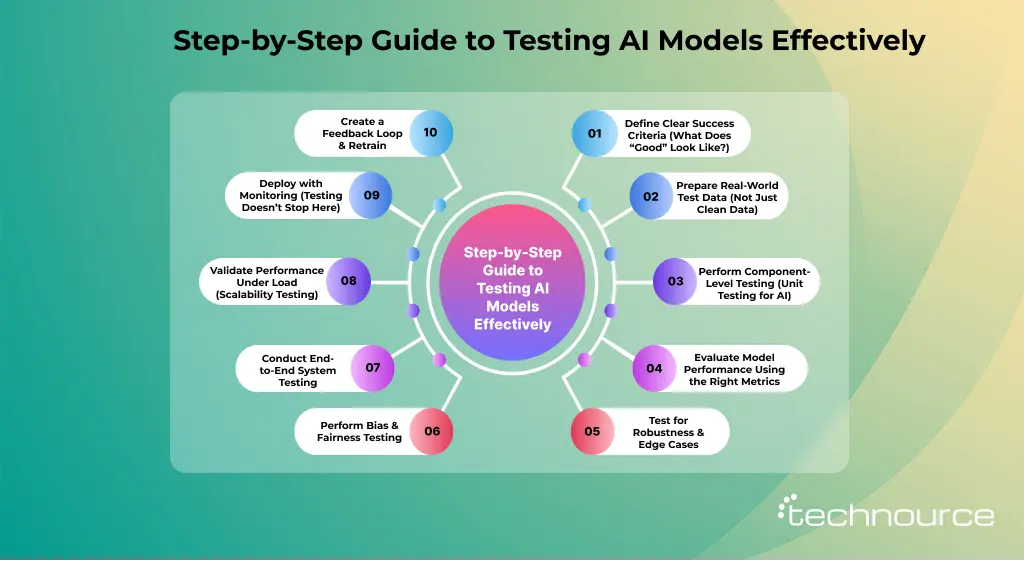
How to Test AI Models: A Step-by-Step Practical Framework
Testing AI models is not just about checking accuracy—it’s about ensuring your model performs reliably in real-world conditions. Below is a practical, execution-focused framework that teams actually use to test AI systems before and after deployment.
Before testing anything, you need clarity on what success means for your model.
Ask:
What problem is the model solving?
What level of accuracy is acceptable?
What is the cost of a wrong prediction?
Example:
Fraud detection → prioritize high recall (catch fraud)
Medical diagnosis → prioritize precision (avoid false positives)
Define:
Target metrics (Accuracy, Precision, Recall, F1)
Acceptable thresholds (e.g., Recall > 92%)
Business KPIs (conversion, risk reduction, etc.)
Without this, testing becomes guesswork.
Step 2: Prepare Real-World Test Data (Not Just Clean Data)
Most AI models fail because they are tested on perfect datasets, not real-world data.
Your test dataset should include:
Edge cases → rare but critical scenarios
Noisy data → incomplete, messy inputs
Out-of-distribution data → unseen patterns
Balanced samples → avoid bias toward one class
Example:
If you’re testing a chatbot:
Include slang, typos, and incomplete queries
Add unexpected or confusing inputs
Goal: Simulate what actually happens in production.
Step 3: Perform Component-Level Testing (Unit Testing for AI)
Before testing the entire system, validate individual components.
Check:
Data preprocessing pipelines
Feature engineering logic
Model input-output behavior
Ensure:
Inputs are transformed correctly
No data leakage
Predictions are consistent
This step helps catch early-stage errors before they scale.
Step 4: Evaluate Model Performance Using the Right Metrics
Do NOT rely only on accuracy.
Choose metrics based on your use case:
Precision → when false positives are costly
Recall → when missing cases are risky
F1 Score → balance between precision & recall
ROC-AUC → classification performance
MAE/MSE → regression models
Latency → real-time performance
Example:
Spam detection → prioritize precision
Disease detection → prioritize recall
Always align metrics with business impact.
Step 5: Test for Robustness & Edge Cases
Real-world data is unpredictable. Your model should handle it.
Test against:
Missing values
Noisy or corrupted inputs
Extreme scenarios
Adversarial inputs
Example:
What happens if the input data is incomplete?
Does the model crash or degrade gracefully?
A strong model should not break under pressure.
Step 6: Perform Bias & Fairness Testing
AI models can unintentionally create biased outcomes.
Check:
Performance across different user groups
Data representation imbalance
Discriminatory predictions
Example:
Hiring model favoring one demographic
Loan approval model rejecting specific groups
Use fairness metrics and balanced datasets to reduce bias.
Step 7: Conduct End-to-End System Testing
Now test the complete system, not just the model.
Validate:
API integrations
Data pipelines
UI interactions (if applicable)
End-to-end workflows
Example:
User → input → model → output → response
Everything should work seamlessly.
This ensures your model works in the real application environment.
Step 8: Validate Performance Under Load (Scalability Testing)
Your model should handle real traffic.
Test:
High user load
Concurrent requests
Response time (latency)
Resource usage
Example:
Can your chatbot handle 10,000 users at once?
A model that works in testing but fails at scale is useless.
Step 9: Deploy with Monitoring (Testing Doesn’t Stop Here)
AI testing doesn’t end after deployment.
Monitor:
Model drift (performance drop over time)
Data drift (input data changes)
Prediction anomalies
Real-world accuracy
Set alerts for:
Sudden accuracy drops
Unusual outputs
Continuous monitoring = long-term reliability.
Step 10: Create a Feedback Loop & Retrain
AI models improve over time.
Do this:
Collect real user data
Identify failure patterns
Retrain the model regularly
Re-run test cases
Example:
Chatbot learning from failed conversations
Recommendation system improvement based on user clicks
AI testing is a continuous cycle, not a one-time task.
How to Test LLMs (ChatGPT-like AI Models)
Testing Large Language Models (LLMs) is different from traditional AI models. Since LLMs generate text instead of fixed outputs, testing focuses more on behavior, consistency, and safety rather than just accuracy.
Here’s how to test LLMs effectively:
1. Prompt Testing
Test how the model responds to different prompts.
Check:
Variations in phrasing
Ambiguous queries
Multi-step instructions
A good LLM should handle different prompt styles consistently.
2. Hallucination Detection
LLMs sometimes generate incorrect but confident answers.
Test:
Factual accuracy
Source validation
Confidence vs correctness
This is one of the biggest risks in production AI.
3. Response Consistency
Ask the same question multiple times.
Check:
Does the answer change?
Is the tone consistent?
Inconsistent outputs reduce trust.
4. Toxicity & Safety Testing
Ensure the model does not generate harmful or biased content.
Test:
Offensive language
Sensitive topics
Ethical boundaries
Critical for public-facing applications.
5. Context Retention Testing
Evaluate how well the model remembers previous inputs.
Test:
Multi-turn conversations
Long context handling
Important for chatbots and assistants.
6. Latency & Cost Testing
LLMs are expensive and resource-heavy.
Measure:
Response time
Token usage
Cost per query
Performance + cost = business viability.
What are the Testing Strategies for AI Models?
By incorporating consistent monitoring and developing feedback loops, organizations may proactively address multiple issues. This ensures sustained AI model reliability and performance.
1. Unit Testing for AI Components
Testing varies by function or component-wise to ensure that a single entity is right. This enables the QA team to find bugs, thereby ensuring robustness. Also, this saves time by catching the bugs early in the system design procedure.
2. Integration Testing
It evaluates the interaction between components within a streamlined pipeline. This step is important to identify issues that may arise once the individual modules are intertwined. Therefore, it ensures smooth data flow and functionality across the entire data system.
3. System Testing
This verifies the integrated AI applications for specialized requirements. Here, the test suite assesses the system under multiple conditions, such as performance, end-to-end functionality, reliability, and stability.
4. Exploratory Testing
This involves parallel testing, design, and execution for uncovering defects. This may not be identified through normal testing methods. Exploratory testing is useful for AI systems in which sudden behavior changes may emerge.
5. Scenario Testing
A subset of exploratory testing, focusing on the evaluation of AI model performance. This ensures adaptability and robustness.
What are the Key Challenges in AI Model Testing?
AI and its subsets bring value in model testing. However, unlocking the full value requires overcoming unique challenges. The unique approaches, such as scale, adaptability, and complexity, make AI a powerful tool for testing models. On the flip side, these features pose unique challenges. Here you go:
1. The Black Box Issue
Many smart and advanced models operate with very little transparency. That is why understanding why a model made a decision is often difficult. This complicates the entire process of validation, debugging, and regulatory compliance.
2. Data Imbalance
Most AI models are trained on imbalanced datasets. This produces biased outcomes, leading to inadequate predictions. Addressing the same requires data collection and overall preprocessing. Techniques like synthetic data generation, resampling, and fairness-aware algorithms allow for mitigating the biases.
3. Computational Requirements
As AI models evolve on larger datasets, they demand more computational resources. The use of high-performance computing infrastructure, efficient algorithm design, and clear optimization techniques is important for managing these demands. This directly impacts the cost of developing an AI application, especially for enterprise-scale solutions
4. Malicious Inputs
AI systems may be affected by malicious inputs, resulting in inaccurate predictions. To protect against these adversarial attacks, the testing must be consistent.
5. Inconsistent Evaluations
The industry still lacks fairness, ideal testing tools, and explainability. Therefore, the ideal testing tools remain immature and produce fragmented approaches.
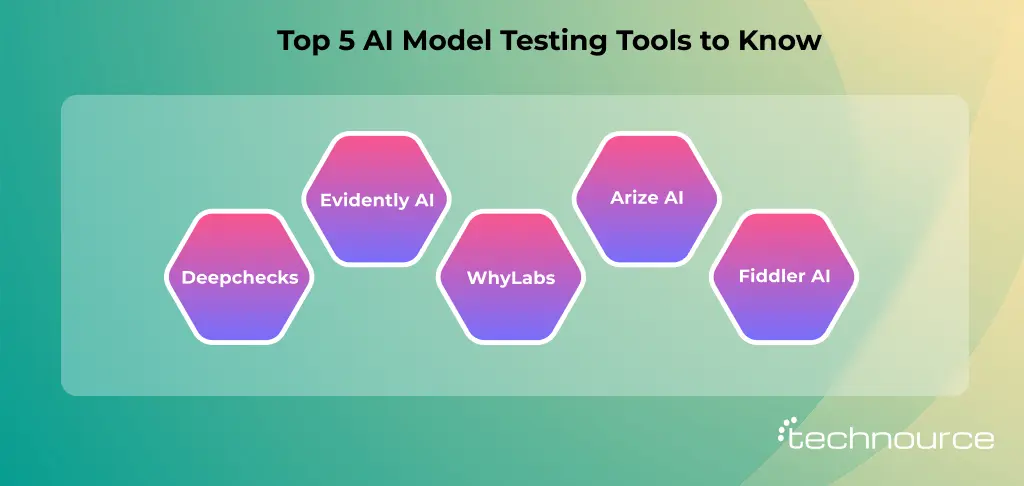
5 Best AI Model Testing Tools You Should Know in 2026
Testing AI models isn’t just about checking accuracy anymore. With models becoming more complex and widely deployed, you need tools that can evaluate performance, detect bias, ensure reliability, and monitor behavior in real-world conditions.
Below are five of the most effective AI model testing tools that teams are using in 2026 to build trustworthy and production-ready AI systems.
1. Deepchecks
Deepchecks is one of the most developer-friendly tools for validating machine learning models across the entire lifecycle. It helps you catch issues early—before they turn into production failures.
Why it stands out:
Automated validation checks for datasets and models
Detects data drift, concept drift, and anomalies
Works well with popular frameworks like TensorFlow and PyTorch
Easy-to-understand visual reports
Best for: Data scientists and ML engineers who want a quick, reliable way to validate models without writing complex test scripts.
2. Evidently AI
Evidently, AI is widely used for monitoring and testing models in production environments. It focuses heavily on tracking model performance over time and identifying when things start to go wrong.
Key features:
Real-time monitoring of model performance
Built-in reports for data drift and target drift
Custom dashboards for business and technical teams
Strong visualization capabilities
Best for: Teams deploying AI models in production who need continuous testing and monitoring, not just one-time validation.
3. WhyLabs
WhyLabs is designed for large-scale AI observability. It gives you deep insights into how your models behave in production, helping you identify issues such as bias, data-quality problems, and unexpected outputs.
What makes it useful:
Advanced data profiling and anomaly detection
Real-time alerts for model issues
Integration with ML pipelines
Focus on AI reliability and trust
Best for: Enterprises managing multiple AI models and needing a centralized monitoring and testing system.
4. Arize AI
Arize AI is another powerful platform focused on ML observability and model evaluation. It allows teams to debug model performance issues and understand why predictions are failing.
What makes it useful:
Root cause analysis for model errors
Drift detection across features and predictions
Performance tracking with detailed metrics
Strong support for large-scale deployments
Best for: Teams that need deep debugging capabilities and detailed insights into model behavior.
5. Fiddler AI
Fiddler AI focuses on explainability and fairness testing, which are becoming critical in modern AI systems. It helps teams ensure their models are transparent and compliant.
Key Highlights:
Model explainability tools
Bias detection and fairness analysis
Monitoring for model performance degradation
Easy-to-use dashboards for stakeholders
Best for: Organizations operating in regulated industries such as finance or healthcare, where explainability is essential.
What are the Best Practices for Testing Models?
AI model validation testing isn’t only a technical step. Instead, it’s a streamlined approach that ensures your model performs as expected. Therefore, it earns the trust of users and stakeholders.
1. Create a Full-Lifecycle Plan
Develop a plan that includes data collection, model training, checks, and monitoring of the live environment. This AI testing strategy must include clear goals, testing procedures, and success metrics. This becomes even more critical when you are developing AI software, as each phase directly impacts the model’s real-world performance.
2. Combine Data Science & QA
Testing works better when data scientists and QA engineers work closely. Data engineers understand model behavior, performance tuning, and data training. On the other hand, QA engineers bring software testing skills, system integration expertise, and edge-case validation.
3. Test in the Cloud
Sometimes, an AI model needs diverse data inputs and massive computing power. With cloud platforms, you can run big-scale simulations, test across multiple devices and geographies, and tackle peak loads.
4. Establish Clear Metrics
Define precise metrics for performance, accuracy, robustness, and accuracy. This will help you to set basic targets to check ongoing enhancements.
5. Automate Testing If Possible
Leverage AI-powered testing frameworks to automate redundant tasks like data generation, test execution, and reporting. This enables testers for complex and exploratory validation.
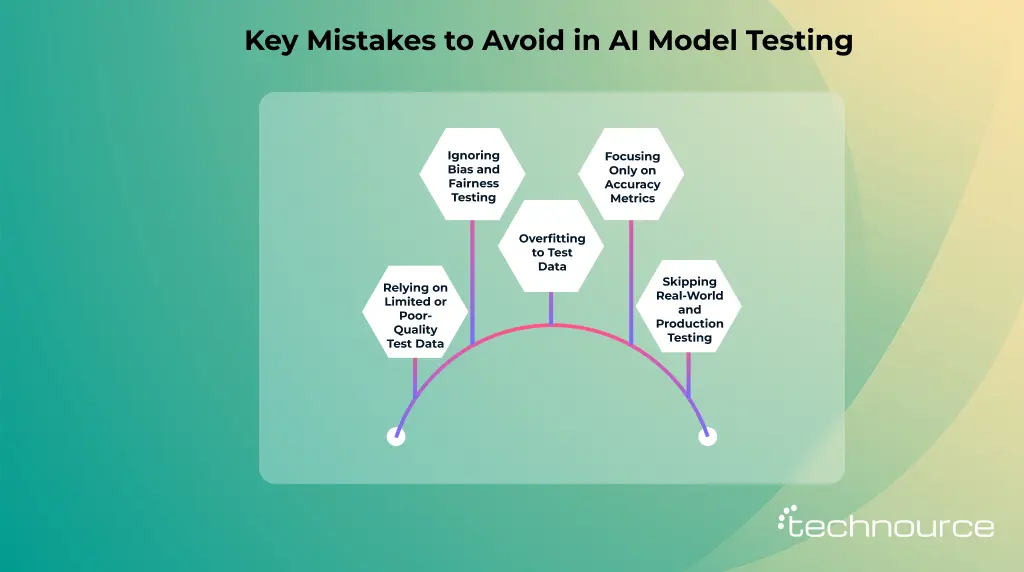
Common Mistakes to Avoid During AI Model Testing
AI model testing isn’t just a technical checkbox—it’s the difference between a model that works in theory and one that performs reliably in the real world. Yet, many teams rush through this phase or overlook critical aspects, leading to inaccurate predictions, biased outputs, and poor user trust.
If you want your AI system to deliver consistent, real-world value, here are five common mistakes you should actively avoid during AI model testing.
1. Relying on Limited or Poor-Quality Test Data
One of the most frequent mistakes is testing AI models on datasets that are either too small, unbalanced, or not representative of real-world scenarios.
A model trained on diverse data can still fail if it’s tested on narrow or “clean” datasets. For example, if your test data lacks edge cases, your model may perform well in controlled conditions but break down in production.
2. Ignoring Bias and Fairness Testing
AI models can unintentionally learn and amplify biases present in training data. Skipping bias testing is a serious mistake—especially if your model impacts decisions related to hiring, finance, or healthcare.
Many teams focus only on accuracy metrics and ignore whether the model treats all groups fairly.
3. Overfitting to Test Data
It might sound surprising, but models can “overfit” even during testing. This happens when teams repeatedly tweak the model based on the same test dataset.
Over time, the model starts to perform well only on that specific test set, without improving its general performance.
4. Focusing Only on Accuracy Metrics
Accuracy is important—but it’s not everything. Many AI teams make the mistake of optimizing only for accuracy while ignoring other critical metrics.
Depending on your use case, metrics such as precision, recall, F1 Score, latency, and robustness can matter far more.
5. Skipping Real-World and Production Testing
Testing in a controlled environment is not enough. Many models fail because they were never tested under real-world conditions, such as fluctuating data, user behavior, or system load. This becomes even more crucial when developing SaaS application platforms powered by AI, where scalability and real-time performance directly impact user experience.
Testing AI Systems: Your Journey Starts from Technource
If you’re ready for AI model testing but still looking for a reliable AI consulting services company, we’re here! At Technource, our team uses smart, automated, efficient data for testing.
Let us handle the heavy work, and you focus on your core business. Rest assured, the privacy and data policies will be handled through signed NDAs. Visit our website to know how we work and deliver consistently.
FAQs
AI model testing is the procedure of assessing an artificial intelligence model. This ensures that the model performs fairly, accurately, and reliably. This is important for assessing biases, preventing errors in real-world scenarios, and maintaining trust in an AI system.
First and foremost, we evaluate the AI model response. Then, we evaluate the AI model’s accuracy using metrics such as precision, recall, confusion matrices, and F1 score.
Common issues include overfitting, data bias, and changes in real-world conditions. Besides interoperability, fairness, and deep neural networks, there are also major hurdles.
Evaluate AI models using tools like Evidently AI, Deepchecks, or cloud platforms like Google Vertex AI, AWS SageMaker, and Azure ML.
We ensure AI models are reliable with bias detection, data validation, and continuous monitoring. Besides, we follow best practices that perform consistently.
Dhrumil Mistry is a tech expert and full-stack developer at Technource, skilled in PHP, Laravel, MySQL, and modern backend development. He contributes to building scalable, secure, and performance-focused digital solutions. Along with his backend expertise, he is proficient in frontend technologies such as React, Vue, and Next.js, enabling him to build seamless, responsive, and dynamic user interfaces. His interest in emerging technologies drives his work across AI/ML, data engineering, SaaS, blockchain, and IoT solutions, helping deliver innovative products for businesses.
Request Free Consultation
Amplify your business and take advantage of our expertise & experience to shape the future of your business.