The process of building AI software starts with a business problem, not a technology choice; skip this, and you’ll waste months building something nobody needs. This is especially true when you’re building AI agent systems where the temptation to start with tools instead of use cases is even higher.
Your data is more important than your algorithm. Seriously. 70–80% of your project time will go into collecting, cleaning, and preparing it.
There are 8 steps to building AI software properly, and the one everyone skips (post-launch monitoring) is usually the one that kills ROI.
Cost ranges from $15,000 for a basic chatbot to over $1M for an enterprise platform. What moves that number most is your data situation and where your dev team is based.
Most businesses in 2026 don’t build AI from scratch. They build on top of existing models using APIs, and they ship faster as a result.
You’ve seen the headlines. You’ve sat through the board meetings where someone inevitably says, “We need an AI strategy.” And you’ve probably watched a competitor quietly ship something that used to take a team of five people, now handled by a model running in the background.
So yeah. The pressure is real.
And it’s not just noise, the shift is measurable.
According to McKinsey & Company, over 55% of organizations are already using AI in at least one business function, and that number keeps climbing every year. At the same time, Gartner predicts that by 2026, more than 80% of enterprises will have used generative AI APIs or deployed AI-enabled applications in production environments.
But here’s what nobody tells you in those conversations: most businesses don’t fail at AI because the technology is too hard. They fail because they start building before they know what they’re actually trying to solve, instead of focusing on developing MVP solutions that validate the problem before scaling. They show up with a hammer looking for nails, and end up with an expensive proof-of-concept that never makes it to production.
This guide is written for people who want to get it right. Whether you’re a founder trying to figure out your first AI product, a CTO evaluating whether to build in-house or outsource, or a product manager who just got handed an “AI initiative” with no roadmap, this is the step-by-step breakdown you actually need.
We’ll cover the full AI software development process, the tools worth using in 2026, what it realistically costs, and how to decide whether to build with your own team or bring in an AI software development agency. No fluff, no vague “it depends” answers. Let’s get into it.
What Is AI Software Development?
AI software development creates applications that use artificial intelligence to make decisions and predictions and produce content that previously required human evaluation. Modern AI software development services are designed to help businesses automate processes, improve accuracy, and scale operations efficiently.
People become confused at this particular point. People have a tendency to regard AI as a single unified entity, which actually does not exist in that form. Machine learning, deep learning, natural language processing, computer vision, and generative AI represent distinct methods that require different data inputs and have different development workflows. Teams make their most expensive errors when they select the wrong solution to address their specific issues.
According to a report of McKinsey & Company, Over 55% of organizations have adopted AI in at least one function. AI software operates according to which precise method? The short version: you feed a model a large amount of labeled data, it learns patterns from that data, and then it uses those patterns to make predictions or decisions on new data it’s never seen before. The model does not execute the rules that you establish, but instead develops its own operational rules through learning from provided samples. The system achieves its strength through this feature. The feature creates difficulties when people attempt to develop systems effectively.
The types of AI software you’ll most commonly encounter:
Machine Learning Platforms: Predict outcomes from structured data (think: churn prediction, demand forecasting, credit scoring) using machine learning development services to build accurate, scalable models that turn historical data into actionable business insights.
NLP Tools: Understand and generate human language (chatbots, document summarization, sentiment analysis) using advanced NLP development solutions to deliver more accurate, scalable, and context-aware results.
Computer Vision Systems: Analyze and interpret visual data (quality inspection, medical imaging, facial recognition)
Generative AI Applications: Produce new content like text, images, or code (AI writing tools, code assistants, synthetic data generation), often delivered by a generative AI development company to help businesses scale creativity, automate workflows, and accelerate innovation.
Getting clear on which category your use case belongs to is the first real decision in any AI project, and it shapes everything that follows.
The AI Software Development Lifecycle: What the Full Picture Looks Like
Before we get into individual steps, it helps to zoom out and see the whole map. The AI software development lifecycle isn’t a straight line, and anyone who presents it as one has never actually shipped an AI product.
It’s a loop. A deliberate, iterative loop. Here’s what it looks like:
1. Problem Definition: getting specific about what you’re building and why
2. Data Collection & Preparation: gathering the raw material and making it usable
3. Model Development: picking, training, and validating your AI model
4. Integration: connecting the model to your actual software system
5. Testing & QA:validating accuracy, performance, and fairness before launch
6. Deployment & Monitoring: releasing to production and keeping the system healthy over time
Here’s the part that trips most teams up: if something goes wrong in phase five, you’re usually going back to phase two, not phase four. A model that fails validation usually has a data problem, not an algorithm problem. Teams that don’t understand this spend weeks tweaking model architecture when what they actually need to fix is their training set.
Build that expectation into your project plan early. It’ll save you a painful mid-project realization.
Why Build AI Software?
Look, the “AI is the future” pitch gets old. Let’s talk about why businesses are making real capital allocations toward AI software development right now, not in theory, but in practice.
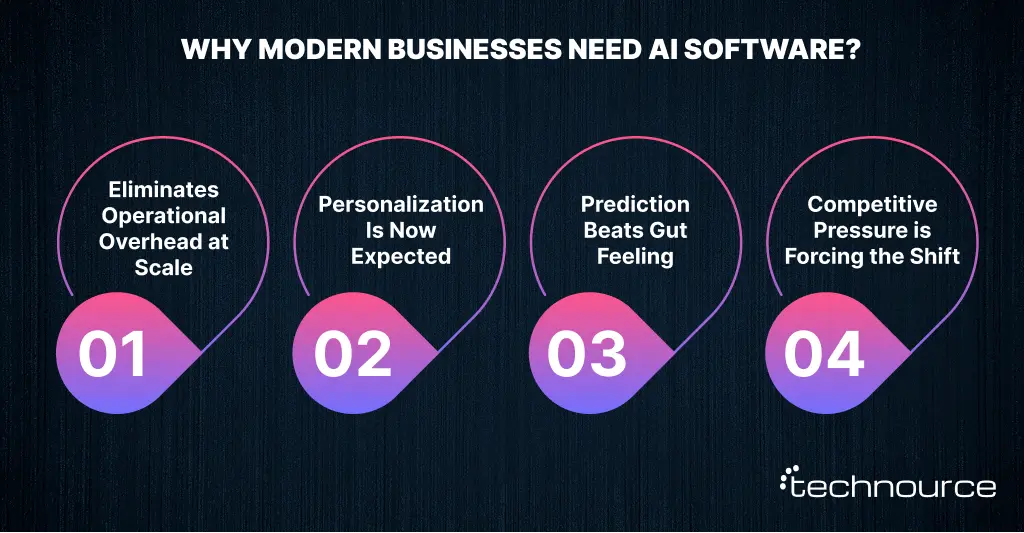
1. Eliminates Operational Overhead at Scale
McKinsey’s research puts the potential automation of business activities at up to 70% across industries. Most mid-size companies can replace their entire manual work processes, which include data entry and report generation, and tier-one customer support, through software solutions that cost less than hiring employees.
2. Personalization Is Now Expected
Customers, both B2C and B2B, now expect experiences that feel tailored to them. Amazon built roughly 35% of its revenue on a recommendation engine. That number isn’t special to Amazon. The same logic applies to SaaS platforms, healthcare apps, and e-commerce stores with a tenth of Amazon’s traffic.
3. Prediction Beats Gut Feeling
Finance teams using ML-based forecasting are outperforming spreadsheet-driven processes by 40–60% in accuracy. That’s not a marginal improvement; it’s a structural advantage that compounds over time, particularly for teams aiming for custom fintech software development into a more predictive, insight-driven operation.
4. Competitive Pressure is Forcing the Shift
When your competitors are using AI to move faster, price smarter, and serve customers better, standing still isn’t a neutral choice. It’s a losing one.
Real-World AI Use Cases by Industry
These aren’t projections from vendor whitepapers. These are outcomes from businesses that decided to stop waiting for a vendor to build their exact solution and built it themselves.
Industry
Problem Being Solved
AI Approach
Measurable Outcome
Healthcare
Patient no-shows, scheduling chaos
Predictive ML
28% reduction in missed appointments
Fintech
Fraudulent transactions slipping through
Anomaly detection
Fraud losses down 40–60%
Retail
Inventory mismatches, stockouts
Time-series ML
20–35% reduction in stockouts
Logistics
Inefficient routing, missed ETAs
ML + optimization
~15% reduction in fuel costs
HR Tech
Slow hiring, high attrition
NLP + classification
Time-to-hire cut by 50%
One trend that’s rapidly gaining traction is using agentic AI in SaaS applications. Unlike traditional AI features that respond to individual prompts, agentic AI systems can autonomously plan, make decisions, and execute multi-step workflows. SaaS companies are using agentic AI to automate customer onboarding, manage support tickets, optimize sales outreach, generate reports, and coordinate tasks across multiple business systems with minimal human intervention. What stands out across all these use cases isn’t the complexity of the models, it’s the clarity of the problem being solved. The teams that saw results didn’t start with “AI,” they started with a bottleneck they could measure and improve.
The ROI Reality Check Nobody Talks About
Here’s something worth saying plainly: AI software rarely pays for itself in the first few months.
The ROI curve is flat, sometimes negative, during months one through six while you’re building, integrating, and training. Then, somewhere between months nine and eighteen, if you’ve built it right, it starts climbing. Companies that lose patience at month four and kill the project are essentially stopping construction because the building isn’t livable yet.
Before you greenlight any AI project, run through these four questions:
What does the current manual process cost us per year, in time and money?
How much additional revenue could better personalization or prediction generate?
How many hours per week does this eliminate for our team?
How many months until we break even, under conservative assumptions?
If those numbers hold up, the business case usually does too.
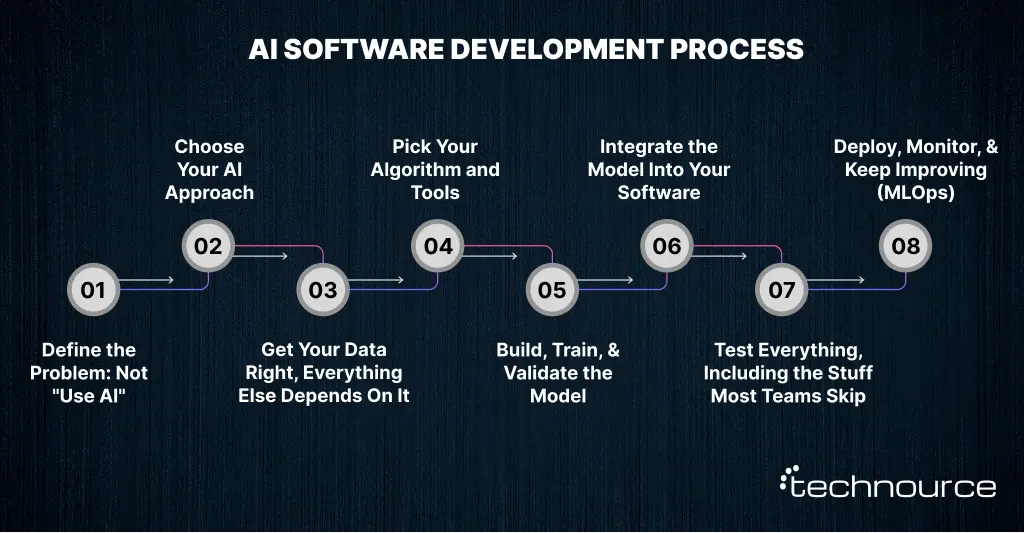
The AI Software Development Process: 8 Steps to Build It Right
Alright, this is the main event. Most guides on this topic give you a tidy five-step framework that looks clean in a diagram but glosses over exactly the parts where real projects hit trouble. This one won’t.
Step 1: Define the Problem: Not “Use AI”
The single most common mistake in AI development isn’t technical. It’s strategic. Teams come in with “we want to use AI” instead of “here’s the specific thing that’s broken and here’s what fixed looks like.”
A solid AI problem statement answers four questions before a single line of code gets written:
Current state:“Our support team manually resolves 1,200 tickets per week.”
Desired state: “We want 60% of common queries handled without human intervention.”
Data we have: “Two years of support ticket history with resolution tags and customer satisfaction scores.”
What success looks like: “CSAT stays above 4.2/5 while reducing support headcount by three FTEs.”
Can’t answer all four? You’re not ready to build yet.
One more thing, if your problem statement says “leverage AI to improve operations,” that’s a technology preference dressed up as a problem statement. Get more specific, or the project will drift.
Step 2: Choose Your AI Approach
This is where the AI software development process starts to branch. The right approach isn’t determined by what’s trending; it’s determined by what your problem actually requires.
AI Type
What It Does
Best Fit
Tools
Machine Learning
Finds patterns in structured data
Prediction, classification, forecasting
Scikit-learn, XGBoost
Deep Learning
Complex pattern recognition via neural networks
Images, speech, unstructured data
TensorFlow, PyTorch
NLP
Understands and generates human language
Chatbots, document analysis, sentiment
Hugging Face, spaCy
Generative AI
Creates new content — text, image, code
RAG apps, copilots, synthetic data
OpenAI API, Claude API, Gemini
Worth highlighting: generative AI software development has shifted dramatically in the last two years. In 2026, most enterprise AI projects use existing large language models to build their systems instead of developing new models from scratch. The solution delivers a system to businesses that needs shorter development times and produces lower operating costs while delivering unexpected results for their typical operational needs.
Quick decision rule: structured data + prediction = classical ML. Language or documents = NLP or generative AI. Images = deep learning or a computer vision API.
Step 3: Get Your Data Right, Everything Else Depends On It
This step deserves more space than most guides give it. Data isn’t just an input to AI software development; it’s the foundation. Get it wrong, and it doesn’t matter how good your algorithm is.
According to a report, data preparation accounts for 70–80% of your project time here. That number sounds extreme until you’ve hit a real project and found that 30% of your records have missing values, or your labeling is inconsistent across teams, or three years of historical data turns out to be irrelevant to the problem you’re solving. All of these things happen. Regularly.
Your data prep checklist:
Source your data: internal systems, public datasets (Kaggle, Hugging Face, UCI ML Repository), APIs, or synthetic generation
Handle missing values: impute, remove, or flag based on how critical each field is to the model
Remove duplicates and outliers: both will skew what your model learns
Normalize and standardize: scale numerical features so one variable doesn’t dominate the others
Label your training data: for supervised learning, every example needs a correct answer. Budget at least 3x what you think labeling will take.
Engineer useful features: create new variables that help the model see the patterns you care about
One truth: a simple algorithm trained on clean, representative data will almost always outperform a sophisticated algorithm trained on messy data. Fix the data first.
Step 4: Pick Your Algorithm and Tools
With clean data ready, you can now make a sensible algorithm choice. The criteria that actually matter:
Problem type: Classification, regression, clustering, or generation?
Dataset size: Deep learning needs volume; gradient boosting handles smaller datasets well
Interpretability: In finance or healthcare, you may legally need to explain why the model made a decision. Neural networks can’t do that easily. Decision trees can.
Response speed: Real-time applications have very different latency requirements than nightly batch jobs
And the question everyone should ask before choosing: should we train a custom model, fine-tune a pre-trained one, or just call a commercial API?
This decision directly impacts whether you even need a full team or if hiring AI developers can be deferred in favor of faster API-based implementation.
Step 5: Build, Train, and Validate the Model
This is the phase people picture when they think about machine learning software development. It’s more systematic than creative, and that’s actually a good thing, because it means you can manage it like a process.
Standard workflow:
Split data: 70% training / 15% validation / 15% test, and keep that test set completely locked until the very end
Train the model on training data, letting it adjust internal parameters to minimize prediction error
Tune hyperparameters using the validation set: learning rate, batch size, model depth
Evaluate final performance on the test set using metrics that actually match your business goal
Metric quick guide:
Metric
When to Use It
Accuracy
Balanced datasets where errors cost equally
Precision
When false positives are expensive (e.g., wrongly flagging fraud)
Recall
When false negatives are dangerous (e.g., missing a disease)
F1-Score
Imbalanced datasets — balance precision and recall
AUC-ROC
Comparing multiple models against each other
Watch out for overfitting, which is when your model performs brilliantly on training data and falls apart on anything new. It means the model memorized examples instead of learning patterns. The fix is usually more diverse data, regularization, or a simpler model.
Step 6: Integrate the Model Into Your Software
A trained model sitting in a notebook is not AI software. Integration is what makes it real and useful. This is the stage where teams often face real challenges in integrating AI in software product development, especially when aligning models with existing systems, APIs, and user-facing applications.
Three main approaches:
REST API (most common): Wrap your model in a Flask or FastAPI endpoint. Your main application calls it, gets a prediction, and acts on it. Simple, scalable, works across any tech stack.
Embedded Model: Runs directly in the application without a separate API call. Required for offline functionality and edge deployments.
Microservice Architecture: The AI model runs as an independent service. Best for enterprise systems with multiple AI components that need to scale independently.
Don’t skip security here. Validate all inputs before they reach your model. Rate-limit your API endpoints. Authenticate every request. AI APIs that accept raw user input are a surprisingly common attack surface; maliciously crafted inputs can sometimes manipulate model behavior in ways traditional software testing wouldn’t catch.
Step 7: Test Everything, Including the Stuff Most Teams Skip
Testing AI software is genuinely different from testing traditional software. Testing AI models requires validating probabilistic behavior, not fixed outputs.
Five types of testing every AI project needs:
Unit tests: Validate preprocessing logic and individual model components
Integration tests: Confirm the AI module connects correctly with the rest of your system
Performance tests: Measure prediction speed under realistic load
Bias and fairness audits: Check whether the model performs differently across demographic groups (tools: Fairlearn, IBM AI Fairness 360)
Adversarial tests: Try to break it with unexpected or deliberately manipulative inputs
If your AI software will make decisions affecting real people, credit approvals, hiring screening, or medical decisions, bias testing isn’t optional. It’s a legal and ethical requirement that regulators across industries are increasingly enforcing.
Step 8: Deploy, Monitor, and Keep Improving (MLOps)
Here’s the step that almost no one covers properly, including most of the competitors ranking above you right now.
Launching your AI model to production isn’t the finish line. It’s the start of a different phase called MLOps, managing your model in production the same way a good engineering team manages software: monitoring, versioning, automated testing, and continuous improvement.
The concept you need to internalize before launch is model drift. The world changes. Customer behavior shifts. Fraud patterns evolve. Your model’s training data, however, stays frozen at the point you collected it. Over time, that gap widens, and model performance quietly degrades, often without any obvious error being thrown.
What you need to monitor after go-live:
Prediction Accuracy Over Time: Establish baseline metrics on launch day and set alerts for degradation
Data Drift Score: track whether incoming data still looks statistically similar to training data
Latency and Error Rates: standard infrastructure monitoring, but critical for user experience
Business Outcome Metrics: whatever the model was built to move: conversion rate, fraud caught, CSAT
Build automated retraining triggers into your pipeline. Treat the model like a living system that needs maintenance, because that’s exactly what it is.
At Technource, MLOps isn’t an add-on; it’s built into every AI project we deliver. A model nobody’s watching is a model that’s getting worse every day.
AI Tools for Software Development: What’s Worth Using in 2026
The right tools cut development time by 30–50% and prevent architecture decisions you’ll regret six months later. Here’s the current stack, organized by category:
Category
Tool
Best For
Cost
Programming Language
Python
Universal AI development
Free
ML Framework
TensorFlow
Production-grade deep learning
Free
ML Framework
PyTorch
Research-oriented + flexible production
Free
ML Framework
scikit-learn
Classical ML on structured data
Free
GenAI API
OpenAI API
GPT-4, vision, code generation
Pay-per-token
GenAI API
Anthropic Claude API
Long-context reasoning, safety focus
Pay-per-token
GenAI API
Google Gemini API
Multimodal (text + image + audio)
Pay-per-token
Cloud AI Platform
AWS SageMaker
End-to-end ML on AWS
Pay-as-you-go
Cloud AI Platform
Google Vertex AI
ML + GenAI on GCP
Pay-as-you-go
Cloud AI Platform
Azure ML
ML on Microsoft infrastructure
Pay-as-you-go
Vector Database
Pinecone / Weaviate
RAG application embeddings
Freemium
MLOps
MLflow
Experiment tracking, model registry
Free
MLOps
Weights & Biases
Training monitoring, team visibility
Freemium
The most consequential tool decision you’ll make in 2026 isn’t which ML framework to use. It’s whether to build a custom model or go API-first. For most businesses building their first AI product, API-first wins—especially with the growing adoption of generative AI in business, where companies integrate pre-trained models to accelerate time-to-market.
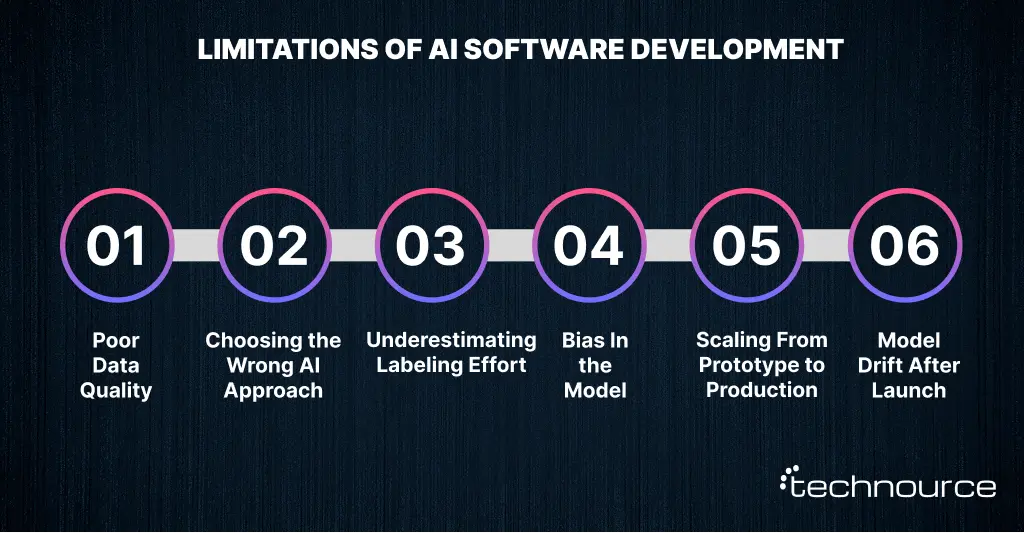
Common AI Software Development Challenges And What Actually Fixes Them
Every AI project hits rough patches. The teams that ship are the ones that saw the obstacles coming. Here’s what actually goes wrong, and what actually fixes it.
1. Poor Data Quality
Teams rush to model building before anyone’s seriously looked at the data. Fix: run a data quality audit before training starts. Tools like Great Expectations or Pandera automate validation. Set thresholds; if data fails them, the pipeline stops.
2. Choosing the Wrong AI Approach
Happens when teams follow trends instead of following the problem. A gradient boosting model on 500 clean records regularly beats a neural network on the same data. Complexity doesn’t equal capability.
3. Underestimating Labeling Effort
Labeling sounds simple. It’s slow, expensive, and inconsistent at scale. Budget 3x your initial estimate. Look into semi-supervised learning or active learning to reduce how much manual labeling you actually need.
4. Bias In the Model
Training data reflects historical human decisions, which carry historical biases. Audit your data for demographic representation before training. Run post-training bias checks with Fairlearn or IBM AI Fairness 360. Document everything; regulators in finance, healthcare, and hiring increasingly require it.
5. Scaling From Prototype to Production
A model that works perfectly in a notebook often doesn’t survive real traffic. Containerize with Docker from day one. Use Kubernetes for orchestration. Build proper pipelines instead of duct-taped scripts; the overhead is annoying early and essential later.
6. Model Drift After Launch
The world moves; your training data doesn’t. Set up automated monitoring with performance thresholds that trigger alerts and retraining. Treat model maintenance as a recurring operational cost, not a one-time fix.
AI Software Development Cost and Timeline: Real Numbers
Cost is the question every decision-maker wants answered, and “it depends” isn’t good enough. Here’s a real breakdown.
AI Software Type
Scope
Cost Range (USD)
Timeline
AI Chatbot
Intent recognition, FAQ automation
$15,000 – $50,000
6–12 weeks
Recommendation Engine
Behavior modeling, collaborative filtering
$30,000 – $80,000
10–20 weeks
Predictive Analytics Platform
ML model, data pipeline, dashboard
$50,000 – $150,000
16–28 weeks
Computer Vision App
Image classification, object detection
$40,000 – $120,000
14–24 weeks
Custom Generative AI Product
LLM fine-tuning or RAG-based app
$60,000 – $200,000+
20–40 weeks
Enterprise AI Platform
Multi-model, MLOps, security, scale
$200,000 – $1M+
6–18 months
Five things that move the cost dial most:
Model complexity: off-the-shelf API vs. custom-trained model
Data situation: clean and ready vs. needs significant prep work
Integration scope: new build vs. plugging into legacy systems
Team location: US engineers: $150–250/hr; India-based engineers: $40–80/hr for equivalent skill
Post-launch MLOps: ongoing monitoring and retraining aren’t free; budget for them from day one
Working with an AI software development company in India can realistically cut your total project cost by 50–65%. That’s why AI software development outsourcing to India has become the default move for cost-conscious startups and mid-market businesses validating their first AI product.
Build In-House vs. Outsource vs. Partner with an Agency
This is the decision most guides quietly sidestep. Let’s not.
Factor
Build In-House
Partner with an Agency
Upfront Cost
High: salaries, recruiting, infrastructure
Lower: project-based or retainer
Time to First Build
3–6 months to hire a capable team
2–4 weeks to kick off
AI Expertise Available
You build it from scratch
Day-one access to senior AI engineers
IP and Control
Full ownership
Requires clear contracts and SOW
Scalability
Scales with headcount
Scales with project scope
Best Suited For
Enterprises with long-term AI roadmaps
Startups, SMEs, and first AI projects
Building in-house makes sense when AI is genuinely core to your product, and you’re playing a long game with the budget to hire properly. Otherwise, especially for a first AI project, partnering with a custom AI software development agency gets you to market faster with less upfront risk.
What to Actually Look for in an AI Development Partner
Eight things worth pressure-testing before you sign anything:
1. Documented AI project portfolio: not generic software work
2. Experience with your specific AI type: NLP, computer vision, and generative AI need different skill sets
3. Data security and compliance: ask explicitly about GDPR, HIPAA, and SOC 2 for your industry
4. MLOps capability: Will they support the model post-launch or hand it off and disappear?
5. Milestone-based pricing with clear acceptance criteria
6. IP ownership in writing: you own the model, the data, and the pipeline
7. Clear communication processes for cross-timezone work
8. References you can actually call: not just testimonial quotes on a website
Conclusion:
They’re the ones who started with a clear problem statement. They fixed their data before touching an algorithm. They chose an approach that matched their context, not one that sounded impressive in a pitch deck. And they treated deployment as the beginning of the work, not the end.
If you’re ready to move forward, here’s your short version of everything above:
Write your problem statement in one sentence. If you can’t, clarify before you build anything.
Audit your data before you touch a model. Problems found in week two cost a fraction of what they cost in week twelve.
Decide early: custom model, fine-tuned model, or API-first? Each path has dramatically different cost and timeline implications.
Plan for MLOps from day one. A model with no monitoring is a model that’s getting worse quietly, every day.
Whether you build in-house or work with a custom AI software development services provider, the framework is the same. The difference is how fast you execute and how much you’re willing to pay for lessons you could have learned from someone who’s already been through it.
Technource has shipped AI projects across healthcare, fintech, retail, and logistics. If you’re figuring out where to start, our team offers no-commitment scoping calls, just an honest conversation about your use case and what it would realistically take to build. Let’s talk.
FAQs
Depends heavily on complexity and data readiness. A focused AI chatbot can take 6–12 weeks. A custom ML platform is typically 4–8 months. Enterprise AI systems run 12–18 months or longer. Teams with clean, labeled data ready to go move two to three times faster than those starting from scratch, which tells you where to invest time before the build even starts.
For custom model development, yes, Python dominates. But API-first approaches using OpenAI, Anthropic, or Google AI, and no-code platforms like Vertex AI AutoML, mean non-technical founders can meaningfully prototype AI features. For anything going to production at scale, professional developers are the right call.
Data quality. Not the algorithm, not the infrastructure. The data. A well-labeled, representative dataset running through a simple model will almost always beat a sophisticated model running on messy data. This is the lesson every team learns eventually, better to learn it before the project starts.
Anywhere from $15,000 for a basic AI chatbot to over $1M for an enterprise platform. The biggest variables are model complexity, data labeling requirements, integration scope, and team location. India-based AI agencies typically charge $40–80/hr versus $150–250/hr for US-based teams. For many businesses, that difference makes the project viable.
Traditional software follows rules you write, deterministic, predictable, and explicit. AI software learns its own rules from data, probabilistic, adaptive, and requiring ongoing maintenance. That adaptability is the value. The ongoing maintenance is the cost most people don’t fully account for upfront.
Absolutely, and it’s often the smarter first move. Adding AI features to an existing system via API or microservice is faster and lower-risk than a full rebuild. Most businesses start with one AI capability (a recommendation module, a fraud detection layer, an intelligent search feature) and expand from there once they see what works.
MLOps is the practice of managing AI models in production, monitoring their accuracy, detecting when they start degrading, automating retraining, and maintaining reliability over time. You should care because AI models are not static software. They drift as the world changes. MLOps is the difference between an AI investment that keeps delivering value and one that quietly becomes a liability six months after launch.