



Mobile app optimization is the ongoing work of making an app faster, more stable, lighter, and easier to use. This guide gives you 2026 benchmarks, 12 proven techniques, a checklist, real cost ranges, and a clear way to decide whether to optimize or rebuild.
- Google Play reduces visibility for apps where 1.09% or more of daily users hit a crash, or 0.47% hit an ANR.
- The median app runs at 99.95% crash-free sessions. Below 99.7%, ratings tend to fall under three stars.
- Cold start is the highest-return fix. Aim for under 2 seconds on mid-range Android, not just flagship phones.
- Most optimization projects cost $8K–$60K and take 3–12 weeks. A full rebuild only makes sense when architecture blocks every fix.
- Optimization is continuous. Performance gates in CI/CD stop gains from slipping back release by release.
Mobile is bigger than ever. But users are less patient than ever.
According to Sensor Tower’s State of Mobile 2026, global in-app purchase revenue grew 10.6% in 2025 to $167 billion. Downloads reached nearly 150 billion.
Users also spent 5.3 trillion hours in apps in 2025, per the Sensor Tower 2026 report release.
More attention means more competition for it. And the tolerance for a bad experience is now close to zero.
A 2026 Luciq user survey found 15.4% of users uninstall after a single crash. More than half leave after two or three.
That is why mobile app optimization is no longer a technical nice-to-have. It is a growth lever that affects installs, ratings, retention, and revenue.
This guide is written for founders, CTOs, and product owners. It covers what to measure, what to fix first, what it costs, and how to keep your app fast after launch.
What Is Mobile App Optimization?
Mobile app optimization is the continuous process of improving an app’s speed, stability, resource use, user experience, and security so more users install it, stay, and convert. It combines technical performance work with UX and conversion improvements.
It is not a one-time cleanup. Every release, SDK update, and new OS version can make an app slower or less stable.
Good optimization is measured in business terms. Think faster launches, fewer crashes, higher ratings, better Day-7 retention, and more completed purchases.
Mobile App Optimization vs App Store Optimization (ASO)
Mobile app optimization improves the app itself, while ASO improves the app’s store listing so more people find and download it. The two are linked because app quality now affects store ranking.
| Factor | Mobile App Optimization | App Store Optimization (ASO) |
|---|---|---|
| Focus | Performance, stability, UX, security inside the app | Title, keywords, screenshots, ratings on the store page |
| Main owner | Engineering + product | Marketing + growth |
| Key metrics | Cold start, crash-free rate, ANR rate, retention | Keyword rank, impressions, store conversion rate |
| Effect on ranking | Direct on Google Play via Android vitals | Direct via relevance and conversion |
| When to prioritize | High uninstalls, poor reviews, low retention | Low discovery, weak install volume |
If users install but leave, fix the app first. More store traffic will only send more people into a leaky experience.
Why Mobile App Optimization Matters for Business Growth
Mobile app optimization matters because poor performance directly cuts store visibility, installs, ratings, retention, and revenue. Every one of these effects is now measurable and documented.
Poor Performance Reduces Store Visibility
Google Play treats technical quality as a ranking signal. It calls these metrics core vitals.
- 1.09% crash threshold: If at least 1.09% of daily active users hit a user-perceived crash, the app is likely to be less discoverable. (Google Play Console Help)
- 0.47% ANR threshold: The same applies when at least 0.47% of daily users see an “App Not Responding” freeze. (Google Play Console Help)
- 8% per-device threshold: Cross 8% on a single phone model and Google may show a warning on your store listing for users of that device. (Android Developers)
This is where the old claim that app speed helps “Google search rankings” goes wrong. The real impact is on Play Store discovery, not web search.
Instability Drives Uninstalls and Lost Revenue
- 15.4% of users uninstall an app after one crash. (Luciq, 2026)
- 53.2% abandon purchases during major sales because of crashes or slowdowns. (Luciq, 2026)
- 77.5% say repeated performance issues damage how they see the brand. (Luciq, 2026)
For an eCommerce or fintech app, that is revenue walking out during your highest-traffic days.
Stability Shapes Your Store Rating
- 99.95% is the median crash-free session rate across apps. (Luciq Stability Outlook 2025)
- 99.7% crash-free sessions is roughly the floor for a 3-star rating. 99.85% is needed to exceed 4.5 stars. (Instabug data via Developer Tech)
The gap between a 3-star and a 4.5-star app is often just 0.15 percentage points of stability.
App Size Affects Installs
Google Play’s internal data showed that for apps, every 6 MB added correlated with about a 1% drop in install conversion. (Google Play, via Medium)
In emerging markets such as India and Brazil, a 10 MB cut correlated with about a 2.5% lift. This data is from 2017, so treat it as directional, not exact.
The direction still holds. Users on limited storage and costly data plans think twice before installing a heavy app.

The 5 Core Areas of Mobile App Optimization
The five core areas of mobile app optimization are speed, stability, resource efficiency, UX and conversion flow, and security. Weakness in any one of them can undo gains in the others.
1. Speed and Launch Performance
Speed covers how fast the app opens, how quickly screens load, and how instantly it responds to taps.
Launch time matters most. It is the first thing every user experiences, every single session.
2. Stability: Crashes, ANRs, and Hangs
Stability is how often the app crashes, freezes, or gets killed by the system.
It includes crashes, Android ANRs, iOS hangs, and out-of-memory terminations. Many standard tools miss the last one.
3. Resource Efficiency: Memory, Battery, Network, and Size
An efficient app uses less memory, drains less battery, sends fewer network requests, and takes less storage.
These problems are rarely visible on a developer’s flagship phone. They show up on the mid-range devices most of your users own.
4. UX and Conversion Flow
A fast app can still fail if onboarding is confusing or checkout takes seven steps.
UX optimization removes friction from the journeys that drive revenue: signup, first value, purchase, and renewal.
5. Security and Trust
Users abandon apps they don’t trust. Weak encryption, exposed APIs, and outdated libraries put data and reputation at risk.
Security also affects performance. Poorly implemented encryption or heavy anti-tamper checks can slow the app down.
Mobile App Performance Benchmarks: What “Good” Looks Like in 2026
A well-optimized app in 2026 launches cold in under 2 seconds, holds at least 99.95% crash-free sessions, and stays well below Google Play’s 1.09% crash and 0.47% ANR thresholds. The table below shows minimum, good, and excellent targets.
| Metric | Store Limit / Floor | Good Target | Excellent Target |
|---|---|---|---|
| Cold start time | 5s+ flagged as excessive (Android vitals) | Under 2s (p95) | Under 1.5s (p95) |
| Warm start time | 2s+ flagged as excessive | Under 1s | Under 700ms |
| User-perceived crash rate (Android) | 1.09% of daily users | Under 0.5% | Under 0.2% |
| User-perceived ANR rate (Android) | 0.47% of daily users | Under 0.2% | Under 0.1% |
| Crash-free sessions | 99.7% (≈3-star floor) | 99.95% (median) | 99.99% (top quartile) |
| Frame rendering | 16ms per frame for 60 fps | Few dropped frames on core flows | Smooth at 90–120 Hz |
| Per-device crash/ANR rate | 8% on one phone model | Under 2% | Under 1% |
Google itself calls its startup limits conservative and recommends aiming lower. Treat store thresholds as the floor, never the goal.
Always measure at the 95th percentile and segment by device class. An average hides the users most likely to leave.
How to Improve Mobile App Performance: 12 Proven Techniques
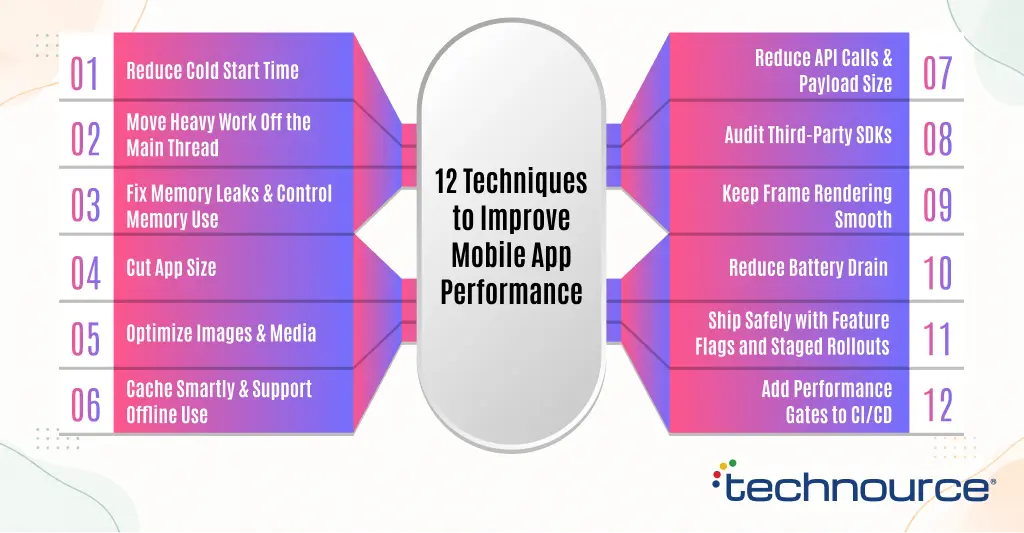
To improve mobile app performance, start by cutting cold start time, moving heavy work off the main thread, fixing memory leaks, and reducing app size. Then tighten caching, network calls, SDKs, and release safety.
The techniques below are ordered by typical business impact. The first four usually deliver most of the gains.
1. Reduce Cold Start Time
Cold start is the time from tap to the first usable screen. It is the single highest-return fix for most apps.
- Defer non-essential SDK initialization until after the first screen renders.
- Remove synchronous network calls from the launch path.
- Show real content fast, then load secondary data in the background.
- On Android, use Baseline Profiles and the Macrobenchmark library to measure and speed up startup.
2. Move Heavy Work Off the Main Thread
Most ANRs and UI hangs come from work that blocks the main thread. Examples include database reads, JSON parsing, and image decoding.
Move this work to background threads or coroutines. The main thread should only handle drawing and user input.
3. Fix Memory Leaks and Control Memory Use
Memory leaks slowly degrade performance until the system kills the app.
- Release references to screens and contexts when they close.
- Use LeakCanary on Android and the Leaks instrument in Xcode during testing.
- Downsample large images before loading them into memory.
4. Cut App Size
A smaller app installs faster, fails less often, and appeals to storage-conscious users.
- Use Android App Bundles so each device downloads only what it needs.
- Enable R8 code shrinking and remove unused resources.
- Convert PNGs to WebP and use vector assets where possible.
- Move rarely used features into on-demand modules.
5. Optimize Images and Media
Images are one of the most common performance bottlenecks after network calls.
Serve WebP or AVIF, size images to the actual display, and lazy-load anything below the fold. Use placeholders so users see structure while content loads.
6. Cache Smartly and Support Offline Use
Caching avoids repeat downloads and makes the app feel instant on return visits.
Cache static assets aggressively. For critical features, adopt an offline-first model that syncs when the network returns.
7. Reduce API Calls and Payload Size
Chatty apps make many small requests. Each one adds latency on mobile networks.
- Batch related requests into one call.
- Return only the fields the screen needs.
- Compress responses and use HTTP/2 or HTTP/3.
- Serve content through a CDN close to your users.
8. Audit Third-Party SDKs
Analytics, ads, chat, and attribution SDKs add startup time, memory, and network calls. Teams often blame their own code for problems an SDK caused.
Measure each SDK’s impact. Remove the ones that don’t earn their cost, and initialize the rest lazily.
9. Keep Frame Rendering Smooth
Google recommends rendering each frame within 16ms to hit 60 frames per second. Many phones now refresh at 90–120 Hz, which tightens the budget.
Flatten deep layout hierarchies, avoid overdraw, and test scrolling lists on older devices.
10. Reduce Battery Drain
Users uninstall apps they notice draining their battery.
Avoid stuck wake locks, batch background work with WorkManager or BackgroundTasks, and limit GPS polling to what the feature truly needs.
11. Ship Safely with Feature Flags and Staged Rollouts
Release new code to 1–5% of users first. Watch crash and ANR rates before expanding.
Feature flags let you switch off a broken feature instantly, without waiting for store review.
12. Add Performance Gates to CI/CD
Performance erodes a little with every release. Automated gates stop that drift.
Track cold start, memory peak, and app size on every build. Block the release if a metric regresses past a set limit. Our DevOps CI/CD services set up these gates as part of the delivery pipeline.

Android vs iOS App Performance Optimization: Key Differences
Android optimization focuses more on device fragmentation, ANRs, and memory limits on low-end hardware, while iOS optimization focuses more on main-thread hangs, launch time, and memory terminations on a narrower device range. If you’re comparing the platforms more broadly, our Android vs iOS guide covers the key differences to consider when choosing an approach for mobile app development. The core principles are the same.
| Factor | Android | iOS |
|---|---|---|
| Device range | Thousands of models, wide hardware spread | Limited, tightly controlled models |
| Key stability metric | User-perceived crash and ANR rate | Crash rate and hang rate |
| Store impact | Android vitals directly affect Play visibility | Ratings and reviews drive App Store ranking |
| Profiling tools | Android Studio Profiler, Macrobenchmark, Perfetto | Xcode Instruments, MetricKit, Organizer |
| Common bottleneck | Main-thread I/O on low-RAM devices | Heavy work during launch and view setup |
| Size tooling | App Bundles, R8, dynamic feature modules | App thinning, on-demand resources |
Android App Performance Optimization
Check Android vitals in Play Console weekly. It shows real crash, ANR, startup, and battery data from your users.
Test on the mid-range phones your users actually own. Your Play Console device report shows the real mix.
Watch per-device rates closely. An app can pass the overall threshold while failing badly on one popular model.
iOS App Performance Optimization
Use MetricKit and Xcode Organizer to collect launch, hang, and memory data from real devices.
Keep launch work minimal. Anything not needed for the first frame should wait.
Test on the oldest iOS version you support. Older iPhones have far less memory headroom.

UX Optimization: Turning a Fast App into a Converting App
UX optimization improves the journeys that drive revenue, mainly onboarding, key feature discovery, and checkout, by removing steps and confusion. Speed gets users in the door; UX decides whether they stay and pay.
Optimize Onboarding for First Value
Get users to the core benefit as fast as possible.
- Cut signup fields to the minimum. Ask for more later.
- Allow guest browsing before account creation where possible.
- Replace long tutorial carousels with in-context tips.
Simplify Checkout and Key Funnels
Map each funnel step and find where users drop.
Add saved payment methods, Apple Pay, and Google Pay. Every removed field lifts completion.
Personalize Content and Notifications
Show content based on real behavior, not generic defaults.
Send push notifications about things users care about, such as order updates or messages. Frequent, irrelevant alerts get your app muted or deleted.
A/B Test Before Rolling Out
Test one change at a time with a control group. Tie each test to retention or revenue, not just clicks.
A variant that wins on taps but hurts Day-30 retention is not a win.
Mobile App Security Optimization
Mobile app security optimization means protecting user data and app code without slowing the app down, using standards like OWASP MASVS as the baseline. Trust is part of performance, because users leave apps they don’t trust.
- Encrypt sensitive data at rest and in transit.
- Store tokens in the Keychain or Android Keystore, never in plain storage.
- Use certificate pinning for high-risk apps such as fintech and healthcare.
- Keep third-party libraries updated to close known vulnerabilities.
- Follow GDPR and HIPAA rules where they apply.
Run security scans in the same CI/CD pipeline as performance checks. That keeps both from being skipped under deadline pressure.
Mobile App Optimization Checklist
A complete mobile app optimization checklist covers launch time, stability, resource use, network, UX funnels, security, and release safety. Use the table below as a quarterly audit.
| Area | Check | Target | Tool |
|---|---|---|---|
| Launch | Cold start at p95 on mid-range devices | Under 2s | Macrobenchmark, Xcode Instruments |
| Stability | Crash-free sessions | ≥ 99.95% | Crashlytics, Sentry |
| Stability | Android ANR rate | Under 0.2% | Android vitals |
| Stability | Worst single device model | Under 2% | Android vitals |
| Memory | No leaks on core flows | Zero known leaks | LeakCanary, Instruments |
| Size | Download size trend per release | Flat or shrinking | App Bundle Explorer, App Store Connect |
| Network | Median API response on core screens | Under 300ms | Firebase Performance, Datadog |
| Battery | Stuck wake locks | None flagged | Android vitals, Energy Log |
| UX | Onboarding completion | Rising each quarter | Mixpanel, Amplitude |
| UX | Checkout drop-off by step | No step above 20% drop | Funnel analytics |
| Security | OWASP MASVS scan | No high-severity issues | MobSF, SAST tools |
| Release | Staged rollout + rollback plan | Every release | Play Console, feature flags |
Best Tools for Mobile App Optimization
The best mobile app optimization tools combine crash reporting, performance monitoring, platform profilers, and behavior analytics. Most teams need one tool from each group.
| Tool | Category | Best For |
|---|---|---|
| Firebase Crashlytics | Crash reporting | Free, real-time crash grouping for Android and iOS |
| Firebase Performance Monitoring | APM | Startup, network, and screen trace data |
| Sentry | Crash + APM | Error tracking with performance traces across mobile and backend |
| Android vitals (Play Console) | Store quality | The exact metrics Google uses for ranking |
| Android Studio Profiler + Macrobenchmark | Profiling | CPU, memory, and startup measurement on Android |
| Xcode Instruments + MetricKit | Profiling | Memory leaks, hangs, energy, and launch data on iOS |
| Datadog Mobile RUM / Embrace | Real user monitoring | Enterprise visibility linked to backend traces |
| Mixpanel / Amplitude | Product analytics | Funnels, retention, and cohort analysis |
| BrowserStack / Firebase Test Lab | Real device testing | Testing on devices your team doesn’t own |
Technical tools tell you what broke. Behavior tools tell you which user journey it broke. You need both views to prioritize.
How Technource Optimizes a Mobile App: Our 5-Phase Process
We treat optimization as a measured engineering project, not a list of generic tips. Every phase ends with numbers you can verify.
Phase 1: Baseline Audit (Week 1–2)
We pull real-user data from Play Console, App Store Connect, and your crash tools. Then we profile launch, memory, rendering, and network on real mid-range devices.
You get a scorecard against the benchmarks above, plus a list of the top issues by user impact.
Phase 2: Prioritize by Business Impact
Not every issue deserves a sprint. We rank fixes by users affected, revenue at risk, and effort.
A freeze during signup that hits 10% of new users beats a rare crash in settings.
Phase 3: Fix in Focused Sprints
We work in two-week sprints, starting with the highest-impact items. Typically that means cold start, top crash clusters, and main-thread blocking.
Phase 4: Validate with Staged Rollouts
Each fix ships to a small user percentage first. We compare metrics against the baseline before expanding.
Phase 5: Monitor and Prevent Regressions
We add performance gates to your CI/CD pipeline and set alerts on key vitals. That keeps the gains in place long after the project ends.
Common Mobile App Optimization Challenges
The most common mobile app optimization challenges are device fragmentation, emulator blind spots, unstable networks, legacy code, and pressure to ship features over fixes. Each one needs a deliberate plan.
Device Fragmentation
Android runs on thousands of models with different chips, memory, and OS versions.
Use your real device mix to pick test devices. Cover the top models that represent most of your user base.
Emulator and Simulator Blind Spots
Emulators don’t reproduce real thermal throttling, low memory, or interrupted networks.
Use real-device clouds for final checks. Test with low battery, incoming calls, and background apps running.
Unstable and Slow Networks
Many users switch between Wi-Fi, 4G, and weak signals during one session.
Test with network throttling. Design timeouts, retries, and offline states for every critical screen.
Legacy Code and Technical Debt
Older apps often carry outdated libraries and tangled architecture. Small fixes can break unrelated features.
Start with test coverage on critical flows. Then refactor in small, safe steps.
Feature Pressure vs Performance Work
Product teams often push new features ahead of performance fixes. Every new feature adds weight to launch time and memory.
Set a performance budget. A feature that breaks the budget must pay for itself or wait.
How Much Does Mobile App Optimization Cost?
Mobile app optimization typically costs $3,000–$8,000 for an audit, $8,000–$25,000 for targeted fixes, and $25,000–$60,000 for deep optimization across performance, stability, and UX. For comparison, mobile app development cost varies based on factors such as platform, features, complexity, and development approach. Timelines range from 2 to 12 weeks depending on app size and code health.
| Engagement Type | Typical Scope | Timeline | Indicative Cost |
|---|---|---|---|
| Performance audit | Real-user data review, profiling, prioritized fix list | 1–2 weeks | $3K–$8K |
| Targeted fixes | Cold start, top crash clusters, key ANRs | 3–6 weeks | $8K–$25K |
| Deep optimization | Performance + stability + size + UX funnels + CI gates | 6–12 weeks | $25K–$60K |
| Re-architecture / rebuild | New architecture, modern stack, migration | 3–6 months | $60K–$150K+ |
| Ongoing monitoring retainer | Monthly vitals review, regression fixes, OS updates | Monthly | $2K–$6K / month |
What Drives the Cost
- Codebase health: Clean, tested code is faster and cheaper to optimize.
- Platforms: Native Android plus iOS costs more than one cross-platform codebase.
- App complexity: Real-time features, media, and offline sync add work.
- Compliance: Healthcare and fintech apps need extra security and audit steps.
- Existing tooling: Apps with no crash reporting or analytics need setup first.
Compare cost against impact. If 2% more users stay each month, the fix often pays for itself within a quarter.
Should You Optimize or Rebuild Your App?
You should optimize when your app’s architecture is sound and problems cluster in specific areas, and rebuild when the architecture, framework, or tech debt blocks fixes across the board. Most apps need optimization, not a rebuild.
| Signal | Optimize | Rebuild |
|---|---|---|
| Architecture | Modular and maintainable | Tangled; small changes break other features |
| Framework | Still supported and current | Deprecated or near end of life |
| Issues | Concentrated in a few flows | Spread across the whole app |
| Fix cost | Well under 40% of a rebuild | Approaching or above rebuild cost |
| Roadmap | Current stack supports planned features | Planned features need a new architecture |
The honest answer comes from an audit, not a sales call. Our software product development team evaluates both paths and shows you the cost of each.
How AI Is Changing Mobile App Optimization
AI is changing mobile app optimization by grouping and prioritizing crashes automatically, spotting performance regressions before release, and personalizing in-app experiences on the device. It speeds up diagnosis, but it does not replace engineering judgment.
- AI-assisted crash triage: Tools now cluster similar crashes and rank them by user impact, cutting hours of manual sorting.
- Automated regression detection: Models flag unusual jumps in launch time or memory across builds.
- Smarter QA: AI-generated test cases cover more user paths with less manual scripting.
- On-device personalization: Recommendations run locally, which improves privacy and avoids network delay.
The same thinking applies beyond the app. AI automation services help improve workflow by connecting crash alerts, ticket creation, and release checks into one loop.
One caution: AI features themselves add weight. On-device models increase app size and memory, so they need the same performance budget as any other feature.
Future Trends in Mobile App Optimization (2026–2028)
The main mobile app optimization trends for 2026–2028 are stricter store quality enforcement, heavier AI features on devices, higher refresh-rate screens, and privacy-first analytics. Each one raises the performance bar.
Stricter Store Quality Enforcement
Google already measures quality per phone model. Expect more metrics, such as memory and battery, to affect visibility over time.
On-Device AI Raises the Performance Budget
Generative AI apps grew fast in 2025. As more apps add on-device models, memory and thermal limits become harder to manage.
90–120 Hz Screens Become Standard
Higher refresh rates shrink the time budget per frame. Animations that felt smooth at 60 Hz will look choppy.
Privacy-First Analytics
Tighter privacy rules limit third-party tracking. Teams will lean more on first-party and on-device analytics to measure performance.
Why Choose Technource for Mobile App Optimization
Technource is an AI-powered product engineering company with 13+ years of experience and 1,000+ projects delivered. We optimize apps against measurable targets, not opinions.
- Data-first audits: We start with your real-user vitals, not assumptions.
- Business-impact prioritization: We fix what costs you users and revenue first.
- Full-stack ownership: We optimize the app, APIs, backend, and CI/CD together, because slow apps often have slow backends.
- Regulated-industry experience: Healthcare, fintech, and eCommerce apps with strict security and compliance needs.
- Lasting results: Performance gates and monitoring keep gains from slipping after handover.
See how we’ve delivered for other businesses in our case studies.
Conclusion
Mobile app optimization is not a one-time cleanup. It is how you protect installs, ratings, retention, and revenue in a market with record usage and very low patience.
Start with what users feel first: launch time and stability. Measure against real thresholds, fix by business impact, and lock in gains with CI/CD gates.
If your app has solid architecture, focused optimization will usually beat a rebuild on cost and speed. If it doesn’t, an honest audit will show you that too. When optimization reveals deeper architectural limitations, working with a mobile app development company can help address those issues without compromising long-term performance.

FAQs
It is the ongoing process of improving an app’s speed, stability, resource use, UX, and security. The goal is more installs, better retention, and higher conversions. It covers both technical performance and the user journeys that drive revenue. Start with the fixes that affect every user: Aim for 99.95% crash-free sessions or higher, which is the industry median. On Android, keep the user-perceived crash rate well under Google Play’s 1.09% threshold, ideally below 0.5%. Under 2 seconds for a cold start at the 95th percentile is a good target. Android vitals flags cold starts of 5 seconds or more as excessive, but Google recommends aiming much lower. Most projects cost $8,000–$60,000. A standalone audit runs $3,000–$8,000, while a full rebuild can exceed $150,000. The final cost depends on code health, platforms, and app complexity. An audit takes 1–2 weeks. Targeted fixes take 3–6 weeks, and deep optimization takes 6–12 weeks. ASO improves your store listing so more people find and install the app. Mobile app optimization improves the app itself so users stay. On Google Play, app quality also affects store ranking, so the two are connected. Yes. Google Play data showed install conversion drops as app size grows, with the strongest effect in emerging markets where storage and data cost more. Optimize if the architecture is sound and issues sit in specific areas. Rebuild if the framework is outdated or technical debt blocks fixes everywhere. A performance audit gives you the cost of both paths before you commit. Continuously. Review vitals weekly, run a full audit every quarter, and re-test before every major OS release.


