ChatGPT isn’t the only AI tool worth paying for in 2026. Claude, Gemini, Copilot, Perplexity, Grok, DeepSeek, and Llama 4 each solve a gap ChatGPT leaves open — cost, privacy, real-time data, or ecosystem fit. This blog compares all seven, then breaks down when a custom-built AI tool beats every one of them.
Key Takeaways
Claude, Gemini, Copilot, Perplexity, Grok, DeepSeek, and Llama 4 each fix a different ChatGPT gap: privacy, cost, real-time data, or ecosystem fit.
The average enterprise now runs 4.2 AI models in production, up from 1.9 in 2023, so picking one AI tool is already the wrong question.
Off-the-shelf tools stop working once you need private data, a specific business workflow, or deep system integration.
Custom-built AI tools cost more upfront but remove per-seat licensing and give you full control over your data and model behavior.
A confirmed Technource GenAI project reference goes here, pending team input, to show how a custom build outperforms generic tools for business-specific problems.
Introduction
Your ChatGPT subscription is not the problem. The problem shows up when it can’t touch your internal data, gives a confident but wrong answer on a niche question, or your team pays for five different seats to patch its gaps.
That gap gets expensive fast. Teams pay for ChatGPT, then pay again for the tools that cover what it can’t do.
This blog compares seven ChatGPT alternatives worth using in 2026, then walks through when none of them are enough and a custom-built AI tool is the better call.
According to Gartner, the average enterprise now runs 4.2 AI models in production, up from just 1.9 in 2023. Multi-tool AI stacks are already the norm, not the exception.
What Are ChatGPT Alternatives?
ChatGPT alternatives are AI chatbots and language models that do the same core job as ChatGPT- holding a conversation, answering questions, writing, and coding, but are built around a different strength: lower cost, real-time data, tighter privacy, or deeper integration with a specific ecosystem.
The category splits into three practical groups. General-purpose chatbots like Claude and Gemini compete directly with ChatGPT on everyday tasks. Specialist tools like Perplexity focus on one job and do it better than a generalist can.
Self-hostable models like Llama 4 and DeepSeek’s open weights let technical teams run the AI on their own servers instead of a vendor’s.
Klarna built its own AI customer service assistant on a foundation model instead of routing tickets through a generic chatbot. The system now handles the equivalent workload of roughly 700 full-time agents and resolves most queries in under two minutes, according to Klarna’s own reporting.
That’s the pattern this blog works toward: use an off-the-shelf tool where it fits, and build custom where it doesn’t.
Why Look Beyond ChatGPT in 2026
Teams move off ChatGPT when they need a lower cost per seat, real-time information, tighter data privacy, or a tool built around one specific workflow. Before making that switch, an AI readiness assessment can help identify whether the organization is actually prepared for a new AI deployment.
ChatGPT still handles general tasks well, but it was never designed to be everyone’s only AI tool.
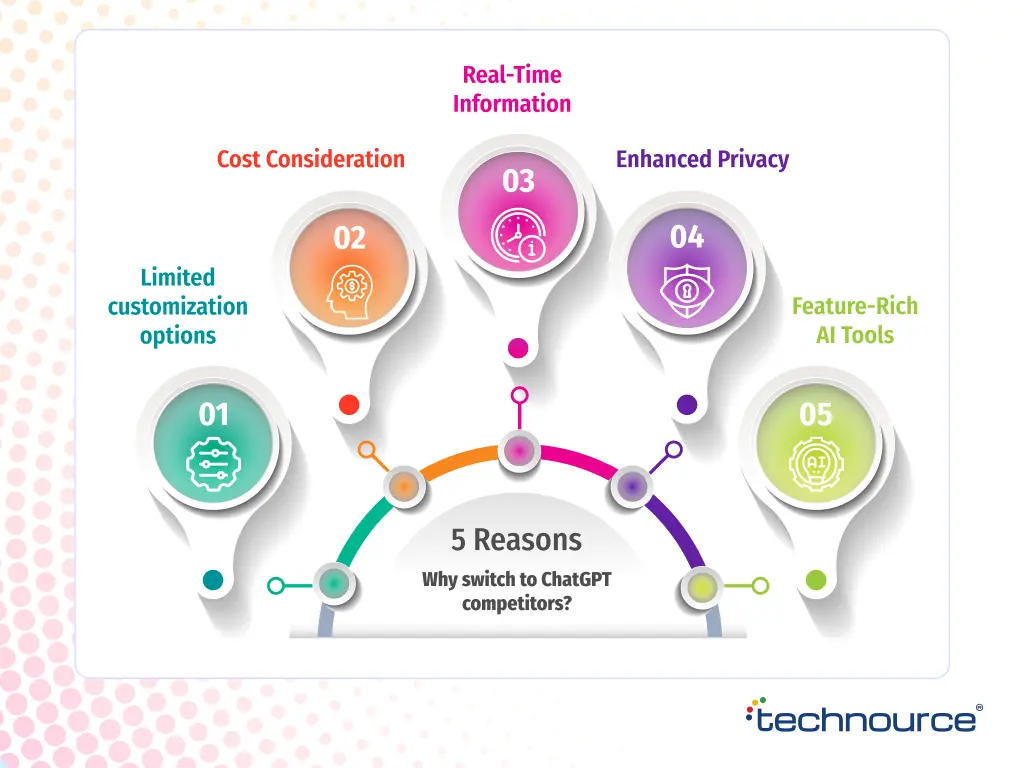
1. Limited Customization for Industry-Specific Work
ChatGPT answers generic prompts well. It struggles with industry-specific logic, like insurance underwriting rules or clinical documentation formats, unless you build a custom layer on top of it.
2. Subscription Costs Add Up Fast
At $20 per seat per month, a 50-person team pays $12,000 a year for ChatGPT Plus alone. Add specialized tools for research, coding, and image generation, and the real AI budget climbs well past that number.
3. No Real-Time Data Without Extra Cost
ChatGPT’s core model trains on data up to a cutoff date. Getting live information back requires a paid plan or a connected search tool, while several alternatives include this by default.
4. Data Privacy and Residency Requirements
Regulated industries like healthcare and fintech can’t send patient or transaction data to a public AI model without a signed data processing agreement. Some ChatGPT alternatives, and most custom-built tools, are designed around this constraint from day one.
5. Missing Native Integrations
ChatGPT connects to popular apps through plugins and a growing app ecosystem, but it wasn’t built to sit inside your internal CRM, ticketing system, or proprietary database. That gap is where most “AI doesn’t work for us” complaints actually come from.
7 Best ChatGPT Alternatives in 2026
The strongest ChatGPT alternatives in 2026 are Claude, Google Gemini, Microsoft Copilot, Perplexity AI, Grok, DeepSeek, and Llama 4, each built around a different strength rather than trying to beat ChatGPT at everything.
1. Claude – Best for Writing and Long-Context Reasoning
Claude, built by Anthropic, is the strongest ChatGPT alternative for long-form writing, code review, and tasks that need a large context window. It holds context across long documents better than most competing models, which matters for anyone reviewing contracts, codebases, or research papers in one sitting.
Content and development teams increasingly use Claude for first-draft writing and code review because it produces fewer factual slips over long outputs than earlier-generation models.
Key strengths: long-context accuracy, lower hallucination rate on extended text, strong coding support. Limitation: no native image or video generation inside the chat interface. Pricing: free tier available; Claude Pro runs $20 per month.
2. Google Gemini – Best for Google Workspace Teams
Gemini is the strongest ChatGPT alternative for teams already living inside Gmail, Docs, and Sheets, because it’s built directly into the Google Workspace toolbar. It also pulls in real-time Google Search results, which ChatGPT’s free tier doesn’t do by default.
Teams using Gemini inside Docs get draft summaries and rewrites without leaving the document, which saves the copy-paste step most AI workflows still require.
Key strengths: native Workspace integration, real-time search grounding, strong multimodal input. Limitation: output quality still varies more across prompt types than Claude or ChatGPT. Pricing: free with a Google account; Gemini Advanced costs $19.99 per month.
3. Microsoft Copilot – Best for Microsoft 365 Teams
Copilot is the strongest ChatGPT alternative for organizations standardized on Word, Excel, and Outlook, because it works inside those apps instead of a separate chat window. It can summarize a meeting in Teams and draft the follow-up email in Outlook without switching tools.
Consulting firms Accenture and Avanade rolled Copilot out internally to help employees analyze data and automate repetitive tasks across the Microsoft stack. Accenture has reported that a majority of employees using the tool saw a measurable productivity gain, with most also rating its suggestions as accurate and unbiased.
Key strengths: deep Microsoft 365 integration, enterprise-grade compliance controls, plugin support for tools like Kayak and OpenTable. Limitation: free-tier chat history disappears after a short window. Pricing: basic access is free; Copilot Pro costs $20 per user per month.
4. Perplexity AI – Best for Cited Research
Perplexity is the strongest ChatGPT alternative for research that needs a verifiable source, because every answer comes with clickable citations instead of a flat text block. That makes it useful for competitive research, market sizing, or fact-checking a draft before it goes out.
It also lets you switch between underlying models, including Claude and GPT-4, inside one interface, which is unusual among the tools on this list.
Key strengths: source citations on every answer, live web results, multi-model access in one place. Limitation: weaker at casual or creative conversation compared to ChatGPT or Claude. Pricing: free plan with daily limits; Perplexity Pro costs $20 per month.
5. Grok – Best for Real-Time Data from X
Grok, built by xAI, is the strongest ChatGPT alternative for anything that needs live social or news context, because it pulls directly from X’s real-time data feed. That makes it faster than most competitors at surfacing breaking news or current sentiment on a topic.
Key strengths: real-time X data access, strong reasoning and coding benchmarks, large context window at a low API price. Limitation: image generation quality lags behind Gemini and Copilot. Pricing: X Premium is $7 per month; Premium+ with full Grok access is $14 per month.
6. DeepSeek – Best Free Option for Coding and Math
DeepSeek is the strongest free ChatGPT alternative for coding, math, and reasoning-heavy tasks, because it matches paid competitors on benchmark performance without a subscription. Its open-weight models also let technical teams self-host if data residency is a concern.
Key strengths: unlimited free usage, strong performance on math and coding benchmarks, open-weight availability. Limitation: no built-in voice mode, and privacy policies are less transparent than Western competitors. Pricing: free plan with unlimited queries; a low-cost premium tier starts around $0.50 per month.
7. Llama 4 – Best Open-Source, Self-Hostable Option
Llama 4, built by Meta, is the strongest ChatGPT alternative for teams that want to self-host an AI model instead of sending data to a third-party server. Because it’s open-weight, developers can fine-tune it on internal data without exposing that data outside company infrastructure.
Key strengths: open-source and free to use, full multimodal support across text, image, audio, and video, self-hostable for data control. Limitation: without in-house ML expertise, deployment and fine-tuning take real engineering time. Pricing: free to download and run; commercial limits apply above very large user thresholds.
ChatGPT Alternatives Compared
Here’s how the seven tools stack up on the factors that actually decide which one fits your team.
Tool
Best For
Real-Time Data
Data Control
Starting Price
Claude
Long-form writing & code
Limited
Standard cloud
Free / $20/mo
Google Gemini
Google Workspace teams
Yes
Standard cloud
Free / $19.99/mo
Microsoft Copilot
Microsoft 365 teams
Yes
Enterprise-grade
Free / $20/mo
Perplexity AI
Cited research
Yes
Standard cloud
Free / $20/mo
Grok
Real-time / X data
Yes
Standard cloud
$7–$14/mo
DeepSeek
Free coding & math
Limited
Self-hostable
Free
Llama 4
Self-hosted, private AI
Depends on setup
Full (self-hosted)
Free
How to Choose the Right ChatGPT Alternative
Match the tool to your constraint, not the hype. Pick Claude for writing and code, Gemini or Copilot for your existing ecosystem, Perplexity for research, Grok for real-time data, and DeepSeek or Llama 4 if ChatGPT alternatives are the deciding factor for your budget or data control.
Team writes and codes daily: Claude fits best.
Already live inside Google Workspace: Gemini removes the most friction.
Standardized on Microsoft 365: Copilot is the natural fit.
Need sourced, defensible research: Perplexity is worth the seat.
Real-time context matters more than polish: Grok covers that gap.
Budget is the constraint: DeepSeek is free and benchmarks well.
Data residency is non-negotiable: Llama 4 self-hosted keeps data fully in-house.
How to Switch to a New AI Tool Without Losing Productivity
A clean switch takes four steps: audit what you actually use ChatGPT for, pilot the alternative with one team for two weeks, archive anything you need from ChatGPT’s history, then roll out gradually instead of cutting over all at once.
Step 1: Audit Your Actual Use Cases
List the five tasks your team runs through ChatGPT most often, whether that’s drafting emails, debugging code, or summarizing documents. The “best” alternative changes completely depending on whether your main use case is writing, research, or coding.
Skipping this step is the most common reason teams pick the wrong tool and switch back within a month.
Step 2: Run a Two-Week Pilot With One Team
Don’t roll a new AI tool out company-wide on day one. Give one team, ideally the heaviest AI users, two weeks with the new tool on real work.
Then compare output quality and time saved against their ChatGPT baseline before committing budget to a wider rollout.
Step 3: Archive What You Need Before You Switch
Most AI platforms don’t let you export conversation history in a usable format. Anything valuable in your ChatGPT history — saved prompts, useful outputs, custom instructions- needs to be copied out manually before you downgrade or cancel a seat.
Teams that skip this step routinely lose months of refined prompt work with no way to get it back.
Step 4: Roll Out in Waves, Not All at Once
Move one department at a time instead of switching the whole company in a single week. This keeps a working fallback in place if the new tool underperforms on a use case the pilot didn’t catch.
It also spreads the retraining curve, so support requests don’t spike all at once.
When Off-the-Shelf AI Tools Hit Their Limit
Every tool on this list is still a general-purpose chatbot. All of them hit the same wall once your business needs to build AI software to run inside your own systems, follow your own rules, and work with data none of these vendors should ever see.
Data Privacy and Compliance Ceiling
A fintech company processing transaction data or a healthcare provider handling patient records can’t route that data through a public model without addressing HIPAA compliance and a signed agreement. Even where vendors offer enterprise privacy tiers, the underlying model, hosting, and audit trail are still someone else’s infrastructure.
No Workflow-Specific Logic
General AI tools answer questions. They don’t know that your loan approval process requires four specific checks in a fixed order, or that support tickets need to route to three different teams based on keywords your competitors don’t use.
No Ownership of the Model or Its Behavior
When a vendor updates their model, your prompts can start behaving differently overnight with no warning. These kinds of unexpected changes are one reason AI projects fail, while a custom-built model or fine-tuned layer stays under your control, on your update schedule.
Integration Limits with Legacy Systems
Most off-the-shelf AI tools connect well to modern SaaS apps and poorly to older, internal, or industry-specific systems. If your core platform is a 15-year-old ERP or a proprietary claims system, none of the tools above will plug in without custom middleware.
Per-Seat Costs Scale Badly at Enterprise Size
Licensing 500 seats at $20 to $30 per month adds up to $120,000–$180,000 a year, recurring, with no ownership at the end of it. A custom-built tool has a higher upfront cost but a materially lower cost per user once you cross a few hundred seats.
Build vs Buy: Custom AI vs Ready-Made Tools
Here’s how the two approaches compare across the factors that decide which one is right for your team.
Criteria
Ready-Made Tool
Custom-Built AI
Setup time
Days
Weeks to months
Upfront cost
Low
Moderate to high
Recurring cost at scale
High (per-seat)
Low (infrastructure only)
Data control
Vendor-dependent
Full control
Workflow fit
Generic
Built for your exact process
Integration with legacy systems
Limited
Purpose-built
Ownership of model behavior
None
Full
Ready-made tools win when speed matters more than fit, and your data isn’t sensitive. A five-person startup validating an idea should not spend three months building a custom AI layer when a $20 seat solves the problem today.
Custom-built AI wins once your process, your compliance requirements, or your seat count make the generic option too expensive or too risky to keep using. The tipping point is rarely about team size alone; it’s about whether your workflow has business logic a generic model can’t infer from a prompt.
A useful gut check: if you’ve written the same detailed system prompt more than a handful of times to force a generic tool into your specific process, that’s usually the signal a custom build will pay for itself faster than another year of subscriptions.
How Technource Approaches Custom GenAI Builds
At Technource, custom Generative AI development starts with the workflow, not the model. We identify where generic AI tools fall short, map the data and decision points involved, and build the right solution, whether that means a custom AI chatbot, RAG system, AI agent, or LLM integration.
Our Generative AI development services focus on fitting AI into your existing systems and business rules while balancing accuracy, privacy, speed, and cost. Instead of forcing your process around an off-the-shelf tool, we build AI around the way your business actually works.
Risks and Challenges of Switching AI Tools
Switching AI tools carries real costs: lost conversation history, a retraining curve for your team, and inconsistent output quality while everyone adjusts to a new model’s behavior. None of these are reasons to avoid switching, but they’re reasons to plan it instead of doing it overnight.
1. Lost History and Context
Data and chat history rarely transfer between platforms, so a year of refined prompts in ChatGPT usually stays in ChatGPT. Teams that don’t archive this before switching often end up rebuilding prompt libraries from scratch.
2. The Retraining Curve
Every model responds to prompts a little differently, so a team fluent in ChatGPT typically loses one to two weeks relearning those patterns on a new tool. This cost is real but temporary, and it shrinks fast.
3. Vendor Lock-In on Some Platforms
A handful of AI platforms store prompts and custom instructions in proprietary formats that don’t export cleanly. That makes switching back, or switching again later, more expensive than the first move.
4. Inconsistent Output Quality After Model Updates
Vendors update their underlying models regularly, and a prompt that worked well last month can produce different output after an update, with no change on your end. Teams depending on one exact prompt pattern for production work should treat model updates as a recurring risk.
Future of AI Tools in 2026 and Beyond
Three trends are shaping where AI tools go next: multi-model stacks becoming the default, agentic AI adoption followed by a shakeout, and more enterprises fine-tuning their own models instead of renting a generic one.
Multi-Model Stacks Become the Default
LayerX’s 2026 enterprise usage data shows the average employee already runs 2.24 AI applications rather than standardizing on one, and that number has been climbing as teams specialize tools by task (LayerX State of AI Usage Report 2026). Expect “which AI tool should we use” to keep being the wrong question.
Agentic AI Adoption, Followed by a Shakeout
Gartner projects that more than 40% of current agentic AI projects will be cancelled by the end of 2027, driven by unclear ROI and weak governance rather than the technology itself failing. That points to a near-term correction toward fewer, better-scoped agent deployments.
Custom Fine-Tuning at Scale
As per-seat licensing costs climb past a few hundred users, more mid-size enterprises are expected to fine-tune open-weight models like Llama 4 or DeepSeek’s open releases on their own data instead of paying indefinitely for a subscription. This mirrors what happened with cloud infrastructure a decade ago: renting is the default until owning is cheaper.
Conclusion
Claude, Gemini, Copilot, Perplexity, Grok, DeepSeek, and Llama 4 each solve a specific ChatGPT gap, and picking the right one comes down to your budget, your ecosystem, and how sensitive your data is. None of them, though, are built to run inside your specific workflow on your own terms.
If your team has outgrown what a general-purpose chatbot can do, the next step isn’t another subscription. It’s a conversation with an AI development company about what a purpose-built AI tool would actually look like for your process.
FAQs
DeepSeek is the strongest free ChatGPT alternative for coding and reasoning tasks, with no query limits on its free tier. Llama 4 is the best free option if you need to self-host for data privacy.
The best choice depends on your existing tools: Copilot for Microsoft 365 shops, Gemini for Google Workspace, and Claude for teams centered on writing and development work.
Claude performs strongly on long-form writing and tends to hold context better across long documents. Many teams use it specifically for first drafts and editing.
Yes. Gemini, Perplexity, and Grok all pull real-time data by default, while ChatGPT requires a paid plan or connected search tool for the same capability.
Some do. Self-hosted options like Llama 4 keep data fully in-house, and several enterprise tiers across these tools offer stronger data handling agreements than free consumer plans.
Once your workflow needs private data handling, a specific multi-step business process, or integration with legacy systems, a custom-built AI tool becomes more practical than a general-purpose chatbot.
Custom builds cost more upfront than a subscription, but the cost per user drops sharply past a few hundred seats since there’s no recurring per-seat license.


 AI ConsultingStrategic AI Roadmaps