This guide covers 15 proven workflow automation benefits, from cost reduction and error elimination to AI-powered scalability. You will find real company outcomes, an ROI measurement framework, common implementation risks, and a clear breakdown of the advantages of workflow automation for startups, SMBs, enterprises, and SaaS companies. Whether you are evaluating your first automation investment or scaling an existing system, this guide gives you the full picture.
Workflow Automation Benefits: Quick Answer
Workflow automation delivers more than time savings, reducing errors by 50–80% and operational costs by up to 70%.
The importance of workflow automation is greatest for high-volume, repetitive tasks like approvals, data entry, compliance reporting, and customer communications.
In 2026, AI-powered workflow automation goes beyond task routing, enabling predictive decisions and real-time exception handling.
Workflow automation benefits vary by business type: startups gain speed, enterprises improve governance, and SaaS companies reduce churn through faster service.
Workflow automation ROI is typically achieved within 30–180 days, provided processes are optimized before automation.
Your team is skilled, your tools are modern, yet deadlines keep slipping, and errors keep coming back. The problem is not your people; it is the manual processes they are stuck running every day.
Manual operations cost more than most businesses realize. McKinsey estimates that 60–70% of routine business activities can be automated with technology that exists right now. Every hour your team spends on data entry, approval chasing, and status updates is an hour not spent on work that moves the business forward.
Workflow automation fixes this by replacing repetitive task sequences with systems that execute automatically, triggered by events, governed by logic, and built to scale. The workflow automation benefits go far beyond saving time.
Workflow Automation Benefits: Quick Overview
Here is a fast-scan view of the five benefit categories and what each one delivers in practice.
Benefit Category
What It Solves
Business Impact
Time & Efficiency
Hours lost to manual, repetitive work
60–70% reduction in admin time per process
Cost Reduction
Operational overhead and resource waste
40–75% lower cost per automated process
Accuracy & Compliance
Human error, missed approvals, audit gaps
Up to 80% error reduction (Gitnux, 2024)
Scale & Growth
Headcount bottlenecks as volume grows
Handle 5–10x volume with the same team size
Visibility & Decisions
Stale data, reactive management
Real-time dashboards replace end-of-month reports
In short, the advantages of workflow automation compound across every department. Operations run leaner, compliance happens automatically, and teams shift from reactive task execution to strategic work.
What Is Workflow Automation?
Workflow automation is the use of technology to execute a defined sequence of tasks automatically, triggered by an event, governed by conditional logic, and completed without manual intervention at each step.
It is not the same as general business process automation or RPA. Workflow automation operates at the task and process level. You define the trigger, set the conditions, and specify the actions. The system handles the rest every time that triggers fires.
A practical example: a new client submits a contract. Workflow automation immediately creates a CRM record, notifies the account manager, generates a welcome email, and schedules an onboarding call, all within seconds. No one touches a single step manually.
How Workflow Automation Works: The 3-Part Structure
Every automated workflow runs on three components. Understanding this structure is what separates successful implementations from ones that break in production.
Trigger: The event that starts the workflow: form submitted, payment received, file uploaded, or schedule reached
Condition: The logic that determines what happens next: if invoice exceeds $10,000, route to CFO; else auto-approve
Action: The task that executes automatically: send notification, update record, create ticket, assign task
Most failed automation projects break at the condition layer. The trigger fires correctly, but the logic is incomplete, so edge cases either route to the wrong person or fall through entirely.
Why the Importance of Workflow Automation Has Grown in 2026
The workflow automation market is projected to reach $26.57 billion by 2027, growing at a CAGR of 23.4% according to Acumen Research and Consulting. That growth is not driven by large enterprises alone, 67% of companies now use some form of business process automation, and 31% have fully automated at least one major function.
The importance of workflow automation has accelerated because the cost of manual operations has outpaced revenue growth for most businesses. Staff costs, error-correction overhead, and compliance demands have made manual processes economically unsustainable at any meaningful scale.
In 2026, AI integration has pushed workflow efficiency improvement into a new category entirely. Modern platforms embed predictive logic directly into workflow decisions, so instead of routing a task, the system predicts which tasks will breach SLA and escalates them before the deadline is missed.
The Real Cost of Not Automating
Most business cases for automation focus on what you gain. Few calculate what you lose by staying manual.
IBM reports that manual data entry costs US businesses an average of $4.6 billion annually in error correction alone.
A single delayed approval cycle in a $50M revenue business can hold up $200,000–$500,000 in receivables for 5–10 extra days every month.
The digital transformation benefits of automation are not abstract efficiency gains. They are a direct line to revenue protection, competitive speed, and operational resilience.
15 Workflow Automation Benefits Your Business Should Be Capturing
Here is the full breakdown of every major workflow automation benefit, with the business outcome, real company example, and what it means in practice.
#
Benefit
Core Problem Solved
Measurable Outcome
1
Eliminates repetitive task time
Manual handoffs, data entry, and status chasing
2.5 hrs/day reclaimed per employee (McKinsey)
2
Reduces operational costs
Overhead from low-value manual work
40–75% cost reduction per process (Deloitte)
3
Cuts human error at the source
Data entry mistakes, missed steps
80% error reduction in automated workflows
4
Speeds up approvals
Multi-step sign-off delays
5–7 day cycles drop to same-day
5
Real-time operational visibility
Stale reports, no process insight
Live dashboards replace weekly status meetings
6
Scales without headcount
Staff bottlenecks during growth
5–10x volume handled by the same team
7
Improves compliance automatically
Skipped steps, audit trail gaps
100% process adherence, auto audit logs
8
Strengthens team collaboration
Lost handoffs, email-based coordination
54% improvement in collaboration (Forrester)
9
Enhances customer experience
Slow response times, inconsistent service
Hilton cut service response from 12 min to 4 min
10
Powers business process optimization
No visibility into process performance data
20–35% additional gains in year 2
11
Improves documentation and audit trails
Incomplete manual records
Full timestamped logs are built automatically
12
Enables data-driven decisions
Decisions based on lagged manual reports
Real-time performance data at the leadership level
13
Reduces employee burnout
Repetitive low-value work causes disengagement
11–30% time savings per employee (Salesforce)
14
Powers SaaS workflow automation
Manual handoffs, data entry, and status chasing
2.5 hrs/day reclaimed per employee (McKinsey)
15
Eliminates repetitive task time
Manual customer success at scale fails
CSMs manage 300+ accounts vs 50 manual
16
Future-proofs with AI automation
Static rule-based systems cannot adapt
80% of orgs targeting full end-to-end automation (HBR)
Now let’s break down each benefit in detail.
1. Eliminates Time Lost to Repetitive Tasks
The average knowledge worker loses 2.5 hours per day to tasks that could be fully automated, according to McKinsey. Across a 50-person team, that is 125 hours of capacity gone every single day.
Workflow automation replaces manual handoffs for recurring work, approvals, notifications, data entry, report generation, and status updates. Employees stop spending time on work that adds no decision value.
Unilever automated its candidate screening process across 180 countries using AI-powered workflows. Hiring time dropped by 75%, and HR teams reclaimed thousands of hours annually that were previously spent reviewing CVs manually.
2. Reduces Operational Costs
Workflow automation ROI is measurable, and the numbers are significant. Businesses that automate core operational processes report 40–75% reductions in the cost of executing those processes, depending on volume and complexity.
The savings come from three sources: fewer staff hours on low-value tasks, lower error-correction costs, and faster process cycles that reduce working capital requirements.
Deloitte’s Global RPA Survey found that 59% of organizations that implemented workflow automation reported reduced operational costs within the first year of deployment. Workflow automation ROI turns positive fastest in finance, HR, and IT operations, the three departments with the highest volume of rule-based repetitive work.
3. Cuts Human Error at the Source
Manual processes are error-prone by design. When humans are responsible for data entry, routing, and follow-up across dozens of daily tasks, mistakes are not a question of effort; they are a function of volume and fatigue.
Automated systems execute the same logic every time with no variation caused by distraction or urgency. According to Gitnux, 92% of businesses with automated workflows reduced errors by up to 80%.
In healthcare billing, UiPath and Omega Healthcare demonstrated that AI-powered document processing cut billing turnaround time by 50% and pushed accuracy to 99.5%. In financial services, this accuracy improvement directly reduces audit findings and compliance penalties.
4. Speeds Up Approvals and Decision Cycles
Slow approvals are one of the most common bottlenecks in operations. A purchase order requiring three sign-offs can sit in email inboxes for 5–7 days. A contract needing legal review can delay a deal’s close by weeks, with real revenue consequences.
Workflow automation routes approvals instantly based on predefined rules, sends automated reminders, and escalates to a backup approver if no action is taken within a set window. The average approval cycle drops from days to hours.
This is one of the highest-value advantages of workflow automation for deal-driven teams — sales, procurement, legal, and finance. Faster approvals mean faster revenue recognition and fewer deal losses to competitors who move more quickly.
5. Delivers Real-Time Visibility Across Operations
When processes run manually, status lives in someone’s inbox or a spreadsheet. Leadership makes decisions based on stale data. Teams waste time chasing updates that should surface automatically.
Workflow automation centralizes process visibility. Every task, approval, and exception is tracked in real time with timestamps, assignees, and completion rates. Operations leaders can see exactly where work is bottlenecked and which processes are missing SLA targets.
This real-time visibility is one of the most impactful workflow automation benefits for enterprises managing complex, multi-department operations. It replaces anecdotal status updates with data-driven process intelligence.
6. Scales Operations Without Adding Headcount
One of the most strategic advantages of workflow automation, especially for growth-stage companies, is the ability to scale process volume without proportionally increasing staff.
Workflow automation for startups and workflow automation for enterprises solve the same scaling problem at different volumes. A startup automating customer onboarding can go from handling 50 new accounts per month to 500 without hiring additional operations staff.
Amazon uses automated fulfillment workflows to handle millions of daily orders. B2B SaaS companies automate customer success workflows, health score monitoring, renewal triggers, and churn alerts to manage thousands of accounts per CSM without losing engagement quality.
7. Improves Regulatory Compliance Automatically
Compliance is one of the highest-risk areas for manual process failure. A missed approval, an unsigned document, or a skipped verification step can result in regulatory penalties that far exceed the cost of the error itself.
Workflow automation enforces compliance at the process level. Approval gates cannot be skipped. Required documents cannot be bypassed. Regulatory checkpoints are built into the workflow logic, so compliance happens automatically, not as an afterthought.
This is one of the most critical workflow automation benefits for FinTech, Healthcare, Legal, and Financial Services businesses. Automated audit trails provide regulators with complete, timestamped records of every action taken in every process.
8. Strengthens Cross-Team Collaboration
Manual handoffs between teams are where work gets lost. A task completed by engineering sits waiting for QA. A contract approved by law never notifies sales. An invoice cleared by finance does not trigger the fulfilment team.
Automated workflows eliminate these gaps by enforcing structured handoffs. When one team completes their step, the next team is automatically notified with the context they need and a clear deadline.
A Forrester Consulting study found that 54% of companies that implemented digital workflow automation reported measurable improvement in employee collaboration. Cross-functional projects that previously required daily status meetings now run with automated updates and exception alerts.
9. Enhances Customer Experience Through Faster Service
Customers do not see your internal processes. They see response times, accuracy, and consistency. Every internal delay, a slow support ticket, a delayed shipment notification, or an overdue renewal becomes a visible customer experience failure.
Workflow automation makes internal operations faster and more reliable. Support tickets route automatically to the right team. Renewal reminders trigger before contracts lapse. Complaint escalations happen without a manager manually intervening.
Hilton Hotels implemented automated workflow systems for guest request management and reduced average service response time from 12 minutes to under 4 minutes. That improvement directly increased guest satisfaction scores and repeat booking rates.
10. Accelerates Business Process Optimization
Business process optimization is not a one-time project; it is an ongoing practice. Workflow automation makes continuous optimization possible by generating process performance data that does not exist in manual operations.
Every automated workflow produces data: cycle times, error rates, bottleneck locations, exception frequencies, and approval durations. This data gives operations teams the evidence to make targeted improvements, not guesses based on anecdotal observation.
Organizations that treat workflow automation as a performance intelligence system, not just a task execution tool, achieve 20–35% additional efficiency gains in year two compared to year one.
11. Improves Documentation and Audit Trails
In manual environments, documentation is a secondary activity. Someone has to remember to log what happened, when, and who approved it. In practice, documentation is inconsistent and unreliable.
Automated workflows create documentation as a by-product of execution. Every action is logged with a timestamp, user ID, decision rationale, and outcome. The audit trail builds itself with no additional effort from any team member.
For businesses that face external audits, financial, regulatory, or contractual, this is one of the most practically valuable workflow automation benefits. Auditors receive complete, consistent records in minutes rather than waiting days for teams to reconstruct paper trails.
12. Enables Data-Driven Decision Making
Automated workflows feed data into dashboards and analytics systems in real time. Leaders no longer wait for end-of-month reports to understand operational performance. They see task completion rates, cycle times, and exception volumes updated continuously.
A VP of Operations who sees that invoice processing times spiked 40% this week can identify the root cause immediately rather than discovering the problem three weeks later in a finance review.
The advantages of workflow automation extend into strategic planning as well. Historical process data informs capacity planning, hiring decisions, and SLA commitments, all of which improve when grounded in actual operational performance data.
13. Reduces Employee Burnout and Improves Retention
Repetitive, low-skill work is one of the primary drivers of employee burnout, particularly among high-performing individuals who feel their capabilities are wasted on mechanical tasks.
Workflow automation removes this friction. When employees no longer spend hours on work, a system can execute in seconds; they have time for problem-solving, customer-facing work, and creative thinking. Job satisfaction improves, and turnover decreases.
According to Salesforce, 74% of IT leaders say automation helped employees save 11–30% of their time. Organizations that redeploy that time toward meaningful work consistently report improvements in employee engagement scores and reductions in voluntary turnover.
14. Powers SaaS Workflow Automation at Scale
SaaS workflow automation addresses a specific set of challenges unique to software businesses: subscription management, trial conversion sequences, feature adoption nudges, churn prediction, and automated support escalation.
SaaS companies use automated workflows to trigger onboarding sequences based on in-app behavior, flag at-risk accounts when usage drops below a threshold, route support tickets by priority, and send renewal reminders 60 and 30 days before contract end dates.
At scale, SaaS workflow automation is the difference between a customer success team that manages 50 accounts per person and one that manages 300, without sacrificing the engagement quality that drives retention.
15. Future-Proof Operations With AI-Powered Automation
The final and most forward-looking of the workflow automation benefits is the platform it creates for AI integration. Rule-based automation handles predictable processes well. Modern AI workflow automation tools extend these capabilities by handling ambiguity, learning from outcomes, and adapting without manual reconfiguration.
In 2026, the most competitive businesses are embedding large language models and predictive AI directly into workflow logic. An AI-powered approval workflow does not just route a request — it evaluates it against historical data, flags anomalies, and recommends a decision.
According to Harvard Business Review, 80% of organizations are now working toward full end-to-end automation. The digital transformation benefits of early AI-powered workflow adoption compound over time, and the system continuously improves accuracy and reduces exception handling overhead with every process execution.
Workflow Automation Benefits by Business Type
The advantages of workflow automation are not identical across every business model. The processes that matter most, and the ROI timeline, differ depending on team size, operational complexity, and growth stage.
Business Type
Top 3 Benefits
Primary Use Cases
ROI Timeline
Startups
Speed, cost reduction, scalability
Onboarding, billing, lead routing
30–60 days
SMBs
Error reduction, compliance, visibility
Approvals, reporting, HR workflows
60–90 days
Enterprises
Scale, governance, cross-team sync
ERP integration, audit trails, risk management
90–180 days
SaaS Companies
Churn reduction, delivery speed, support automation
Subscription mgmt, ticketing, deployments
45–90 days
Workflow Automation for Startups
For startups, speed is the competitive advantage. Workflow automation for startups removes operational drag during the growth phase, when headcount is limited, but process volume is rising fast.
A FinTech startup, Technource, needed to onboard business clients through a multi-step KYC verification process that previously took 8–12 business days. By restructuring the onboarding workflow and automating document collection, verification triggers, and status notifications, we reduced client onboarding time to under 48 hours. Client drop-off during onboarding fell by 34%.
Workflow Automation for Enterprises
For enterprises, governance and scalability are the primary drivers. Workflow automation for enterprises must handle high process volumes, complex approval hierarchies, multi-system integrations, and regulatory compliance across multiple jurisdictions.
IBM automated its procurement workflows across 170 countries, integrating supplier management, purchase order approval, and invoice reconciliation into a single automated system. The result was a 40% reduction in procurement cycle time and a significant drop in maverick spending, purchases made outside approved processes.
What Can Go Wrong With Workflow Automation?
No guide on workflow automation benefits is complete without an honest account of implementation risks. Automation amplifies whatever exists in the underlying process — good or bad.
Risk
What Goes Wrong
How to Prevent It
Automating a broken process
Errors replicate faster and at higher volume
Map and fix the process before automating
Over-automation
Edge cases fall through with no human review
Build human-in-the-loop checkpoints for exceptions
Integration failures
Data stalls between disconnected systems
Use middleware with error handling and retries
Team resistance
Low adoption; staff create manual workarounds
Involve teams early, show wins fast, train properly
Security gaps
Automated flows expose sensitive data
Enforce role-based access and audit logging from day one
The Process-First Rule
The single most important principle in implementation: never automate a broken process. If the manual version is inconsistent, unclear, or disputed, automating it will not fix it; it will execute the broken version faster, at scale, with less visibility into what is going wrong.
Before any automation project begins, the process must be mapped, reviewed for gaps, tested manually with documented outcomes, and signed off by all stakeholders. Automation is the final step, not the starting point.
How to Measure Workflow Automation ROI
Workflow automation ROI is straightforward to calculate, but only if you establish a baseline before implementation. Most organizations that report disappointing outcomes failed to measure the current state accurately before they started.
The ROI Measurement Framework
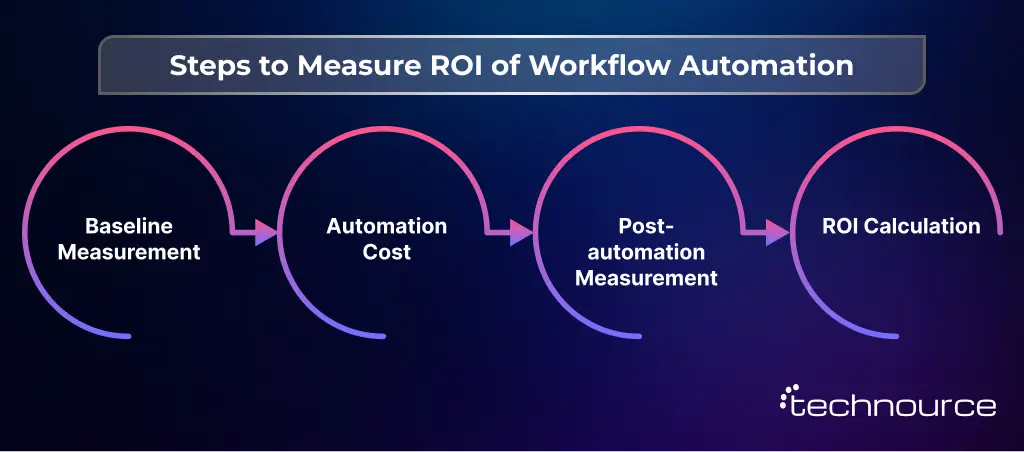
Use this four-step process to measure workflow automation ROI accurately.
1. Baseline Measurement: Document the current process: steps, time per step, error rate, staff hours per week, and cost per execution
2. Automation Cost: Total implementation cost, including platform licensing, development, integration, testing, and training
3. Post-automation Measurement: Re-measure the same metrics at 30, 90, and 180 days after go-live
4. ROI Calculation: (Annual savings from automation minus annual cost of automation) divided by annual cost of automation, multiplied by 100
What the Numbers Typically Look Like
Metric
Before Automation
After Automation (Typical)
Invoice processing time
3–5 days
4–8 hours
Employee onboarding steps
22 manual tasks
6 manual tasks
Data entry error rate
8–12%
0.5–1%
Approval cycle time
5–7 days
Same day
Admin hours per person/week
15–20 hours
3–5 hours
Annual cost per process
$25,000–$80,000
$6,000–$18,000
Using the invoice processing example: a company processing 500 invoices per month, each previously requiring 45 minutes of staff time at $40/hr, spends $180,000 annually on that one process. After automation drops staff time per invoice to 8 minutes, the cost falls to $32,000, a $148,000 annual saving before accounting for error reduction and faster payment cycles.
Workflow efficiency improvement compounds over time. As teams stop handling exceptions caused by manual errors, they have the capacity to optimize other processes. Organizations running continuous improvement cycles on their automated workflows report 20–35% additional efficiency gains in year two.
ROI Timeline by Process Type
High-volume, low-complexity (invoice processing, data entry): ROI in 30–60 days
Medium-complexity approval workflows (procurement, HR, legal): ROI in 60–90 days
Complex multi-system integrations (ERP, CRM, compliance): ROI in 90–180 days
AI-powered adaptive workflows: ROI builds over 6–12 months as the system learns
Why Trust Technource for Workflow Automation Development?
Whether your automation goal is a single approval process or a full AI-powered operating system, building reliable, scalable workflows on that foundation is an engineering challenge, not just a configuration task. That is where the right development partner changes your outcome.
Technource is an AI-powered product engineering company that turns automation goals into production-ready systems. With 13+ years of experience, 1,000+ projects delivered, 70+ tech experts, and 300+ clients served, our team builds workflow automation that scales with confidence.
Here is why teams choose us:
Process-first delivery:We design and fix the underlying process before writing a single line of automation logic
Modular architecture: We build systems where compliance rules, approval logic, and integrations can update independently without re-engineering the entire workflow
AI-powered decision logic: We embed adaptive AI into workflows — not just routing, but learning systems that improve with every execution cycle
Compliance by default: We deliver full audit trail infrastructure and role-based access controls from day one, not as post-launch additions
Proven outcomes: Our FinTech loan origination automation cut processing time from 11 days to 2.5 days and reduced staff hours per application from 4.2 hours to 45 minutes
Still running critical operations manually while your competitors automate? Talk to our workflow automation team and let us map the right architecture for your business.
Conclusion
The 15 workflow automation benefits in this guide share one common thread: they compound over time. Cost reductions grow as process volumes increase. Error elimination improves as automation logic matures.
Business process optimization accelerates as performance data accumulatesBusiness process optimization accelerates as performance data accumulates, especially when implemented with the expertise of an experienced AI development company.
The importance of workflow automation in 2026 is not about keeping up with technology trends. It is about building an operational infrastructure that scales cleanly, stays compliant without manual overhead, and frees your team to focus on work that actually drives business value.
Start with the right foundation, a correctly designed process, modular automation architecture, and clear ROI measurement from day one. Businesses that do this consistently outperform competitors who automate reactively without a strategy.
Ready to build workflow automation that delivers measurable results? Technource designs and engineers AI-powered workflow systems for SaaS platforms, FinTech products, and enterprise operations. Let’s connect to discuss your automation roadmap.
FAQs
The primary workflow automation benefits are time savings, cost reduction, error elimination, faster approvals, real-time process visibility, and scalability without proportional headcount growth. For most businesses, the highest-ROI benefits come from automating approval workflows, data entry, compliance reporting, and customer communication sequences.
How does workflow automation support business process optimization?
Workflow automation supports business process optimization by generating performance data, cycle times, error rates, and bottleneck locations that manual processes cannot produce. Operations teams use this data to identify exactly where to intervene, test improvements, and measure results. Each cycle makes the process faster and more reliable than the last.
Workflow automation ROI typically ranges from 150% to 400% in the first year for high-volume processes, according to Deloitte. The fastest returns come from finance and HR workflows — invoice processing, onboarding, and approval routing. ROI turns positive within 30–90 days for rule-based processes and within 6–12 months for complex AI-powered workflows.
Workflow automation for startups primarily delivers speed and cost efficiency, allowing small teams to operate at higher volumes without proportional hiring. Workflow automation for enterprises delivers governance, compliance, and cross-system scalability, enabling large operations to maintain consistency and auditability across dozens of departments. Both benefit from faster approvals and fewer errors, but the implementation approach differs significantly.
AI extends workflow automation from rule-based task routing into adaptive decision-making. Where a standard workflow follows fixed logic, an AI-powered workflow evaluates context, learns from outcomes, and adjusts behavior over time. This enables predictive escalation, anomaly detection, and personalized customer interactions at scale, capabilities that rule-based automation cannot deliver.
Processes requiring significant human judgment, empathy, or creative problem-solving should not be fully automated. Complex client negotiations, nuanced customer complaints, strategic decision-making, and novel problem-solving all require human input. Automation works best for high-frequency, rule-based, repetitive work. Broken or poorly defined processes should be fixed before automation is considered.
Simple automation implementations, a single approval process, or a data routing workflow can be live within 2–4 weeks. Mid-complexity projects involving multiple systems typically take 6–12 weeks. Enterprise-grade automation with AI integration and compliance infrastructure generally requires 3–6 months for full deployment.
The five most common risks are: automating a broken process, over-automation without human checkpoints, integration failures that create data silos, team resistance leading to low adoption, and security gaps in automated data flows. All five are preventable with proper process design, phased implementation, and early team involvement.