AI in product development cuts time-to-market by up to 50% for early adopters
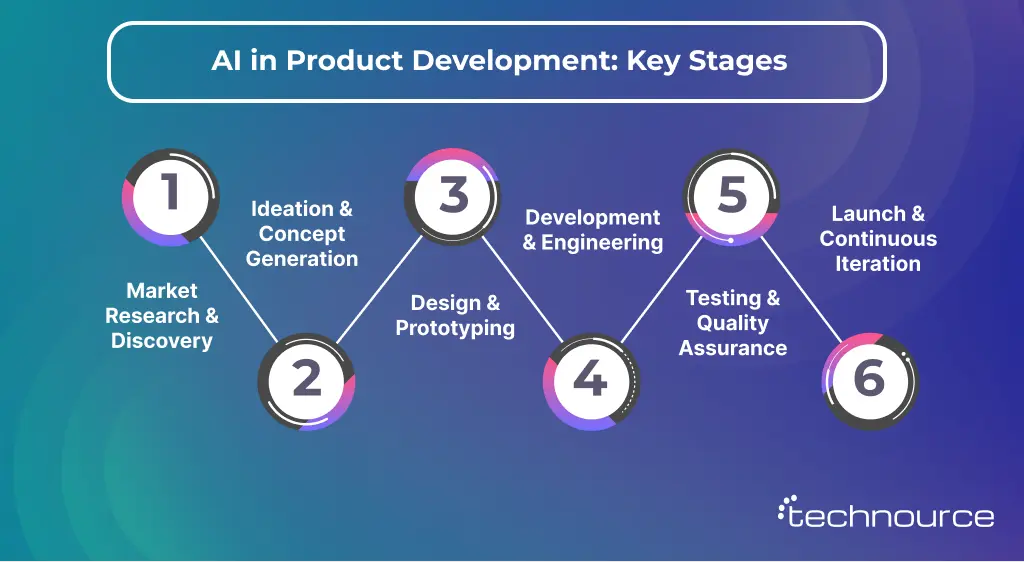
The AI product development process spans six stages. From research to post-launch iteration
Generative AI is now reshaping ideation, prototyping, and documentation in real ways
Measuring AI success requires product-specific KPIs, not vague business metrics
The biggest gaps competitors miss: GenAI depth, tool-to-stage mapping, and a real implementation roadmap — all covered here
Here’s a number worth sitting with: 40% of all new products fail. That’s not a market research footnote; it translates to $215 billion in wasted innovation spent every single year in the US alone.
Teams closing that gap aren’t exactly working harder. It’s more like they’re leaning into AI for product development to make smarter choices at each point before that first wireframe, during QA, and well after launch, too. And yes, the distance between teams using AI and teams that don’t is getting wider every quarter.
This guide lays out how AI for product development really works, not just the “vaguely promising” version. You’ll see the stages, the tools, concrete examples, and a roadmap you can actually follow, not some theoretical framework that falls apart as soon as your first sprint hits.
Many businesses today are also partnering with an AI development company to accelerate adoption and reduce early-stage risks.
What Is AI in Product Development?
Basically, AI in product development uses artificial intelligence, machine learning, NLP, computer vision, and generative AI across the entire product lifecycle. This approach reflects a broader shift toward AI in product design and development, where intelligence is embedded from ideation to iteration.
The old model was mostly reactive: build something, ship it, gather feedback, then fix. AI-powered product development sort of flips that pattern around. It helps you figure out what customers need before you build, spot defects before they go out, and tune features before users start complaining. That shift from reactive to predictive is where the real payoff shows up.
Traditional vs. AI-Augmented Product Development
Stage
Traditional
AI-Augmented
Research
Manual surveys, focus groups
NLP-driven review and sentiment analysis
Ideation
Brainstorming sessions
AI-ranked concepts by market fit
Prototyping
Manual wireframes
AI-generated designs from prompts
Testing
Handwritten QA scripts
Auto-generated test cases, predictive defect detection
Launch
Fixed release plan
AI-driven feature flags, real-time rollout control
Iteration
Quarterly roadmap reviews
Continuous ML feedback loops
Artificial intelligence in product development doesn’t replace your product team; it gives them leverage they didn’t have before.
AI-Powered Product Development Process: Step-by-Step Guide
AI and product development aren’t separate workflows anymore. AI threads through every stage. Here’s where it actually shows up, and what it genuinely changes.
Stage 1: Market Research and Discovery
Before anyone even opens Figma or writes a spec in the first place, AI helps teams understand the market in a way that feels… deeper than any classic focus group could do. NLP tools scan customer reviews, support tickets, social conversations, and competitor feedback to surface the actual unmet need, like really not what people say they want, but what they keep repeating. And it happens in hours, not weeks. Just that alone removes one of the priciest product mistakes: shipping something nobody actually needed, even if the slides looked convincing.
What makes AI-driven discovery different is the scale. Teams often rely on AI consulting services at this stage to structure data pipelines and ensure insights are actionable rather than overwhelming. A human researcher can process maybe 50 interviews in a week, if everything goes smoothly. Meanwhile, an AI research tool can process 5,000 data points overnight and cluster them into ranked, practical themes by morning. The signal-to-noise ratio improves a lot when you stop leaning on gut feel like it’s a strategy.
What AI does at this stage:
Mines reviews and forums for unmet needs at scale
Cluster complaints and tickets into actionable themes
Scores market opportunities by frequency, urgency, and sentiment
Flags emerging trends before they hit mainstream awareness
Stage 2: Ideation and Concept Generation
Ideation is still very human, and AI just makes it sharper, not repetitive. GenAI tools help teams explore feature ideas, weird edge case scenarios, and positioning angles fast. Then AI scoring models rank those concepts based on predicted market fit, technical feasibility, and competitive differentiation, so creative sessions turn into decisions backed by something more than opinions.
This is also where implementing AI in product design starts to show real impact. Early-stage concepts can be translated into design directions using AI-assisted wireframing, layout suggestions, and UX pattern recommendations, helping teams move from abstract ideas to tangible product experiences much faster.
One detail most guides kind of skip entirely: training your PMs on prompt engineering for ideation. That can cut brainstorming time by 60 to 70%. Structured prompts that generate feature specs, user personas, and Jobs-To-Be-Done frameworks are a learnable skill, and honestly, a real advantage over teams still doing three-hour whiteboard marathons with zero supporting data, or barely any.
The other shift is validation speed. This is especially valuable for teams focused on building AI software, where rapid iteration determines whether ideas reach production or fail early. With AI, you can generate a draft feature spec, run it through a scoring model, and pressure-test it against competitive positioning data in a single day. That compression changes how many ideas a team can evaluate in a quarter, and how many bad ones get filtered before engineering time is wasted.
Stage 3: Design and Prototyping
AI-enhanced design tools, like really changed what you can do in the early stages of prototyping. Many modern teams combine these tools with AI integration solutions to connect design outputs directly with development workflows. Uizard creates whole wireframes just from plain text, kind of descriptions. Figma AI, on the other hand, helps suggest component layouts based on what you already have in your design system. And for hardware, generative CAD tools generate hundreds of structural variations, optimized for things like mass, strength, or cost in a way that takes less time than the manual back-and-forth iteration ever could.
But the more subtle shift is the feedback loop situation. AI tools can pull behavioral data from existing products, heatmaps, scroll depth, session recordings, and so on, then use those signals to guide decisions from the very beginning. Instead of building from assumptions, teams end up building from how people actually behave, in practice.
What product development AI brings to design:
Wireframes from natural language prompts in minutes
UX patterns informed by real user behavioral data
Generative design variants for physical product components
Automated design-to-code handoff that reduces developer rework
AI-assisted accessibility checks before designs hit engineering
Stage 4: Development and Engineering
This is where AI for product development delivers some of its most measurable ROI. Organizations that succeed here often invest in hiring AI developers who can work alongside AI tools rather than treat them as separate systems. GitHub Copilot and Cursor handle boilerplate, suggest completions, and generate full functions from comments. Shipping speed goes up. Context-switching goes down. Junior engineers write cleaner code faster because they have an intelligent assistant catching errors in real time. This shift toward AI-assisted coding also connects to >strong>vibe coding in software development, where developers use natural-language prompts to guide AI tools in generating and refining code.
Here’s something competitors consistently skip: AI-assisted API design and architecture suggestions. Tools like Amazon CodeWhisperer recommend architectural patterns based on your codebase — not just autocomplete. That reduces technical debt before it accumulates, not after it becomes a refactor nightmare that derails a quarter.
What AI brings to engineering:
Code generation and completions via GitHub Copilot and Cursor
Architecture-level suggestions from Amazon CodeWhisperer
Auto-generated and continuously updated code documentation
AI-powered code review that catches security issues and anti-patterns
Stage 5: Testing and Quality Assurance
Manual QA feels slow and kind of endless, repetitive, too, and honestly, it still has blind spots, no matter how experienced the team is. AI flips that model. Platforms like Mabl and Testim can create test cases automatically, run complete regression suites, and self-repair when UI changes cause existing tests to fail. So nobody is stuck rewriting a test script just because a button moved, or an element shifts an inch.
Then there are predictive quality models, which go even further by flagging modules that are statistically likely to have defects, based on code complexity, change history, and past bug trends. The upshot is that you can see a 60 to 80% reduction in manual QA work. QA engineers, freed from the whole script maintenance grind, can spend more time on exploratory testing and edge case analysis — basically the kind of work that still needs human judgment.
Stage 6: Launch and Continuous Iteration
AI-driven product development kinda doesn’t stop at launch; it keeps going, and honestly, it gets faster after it. Teams focused on building AI agent ecosystems rely heavily on real-time feedback loops to continuously improve system performance. Real-time anomaly detection watches performance the second a feature ships, like no pause, no mercy. And AI-powered experimentation platforms, things like Statsig, run tons of A/B tests at the same time, so the “winners” show up far earlier than classic sequential split testing ever could.
Also, the most underrated bit is the ML feedback loop part. It takes what users do after you ship, and feeds it right back into your roadmap. Instead of waiting for quarterly reviews, teams get this steady stream of AI-curved signals about what’s actually working, what’s breaking, and what people do versus what the team thought they would do. It’s more like direction than reporting.
Key Benefits of AI for Product Development
The business case for AI-powered product development isn’t theoretical anymore. Here’s what teams are actually experiencing.
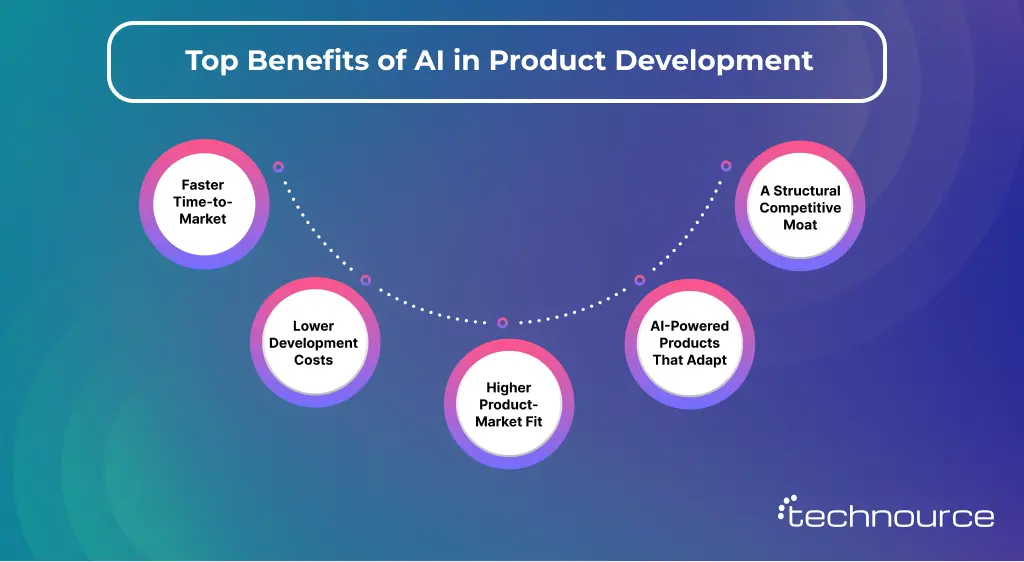
1. Faster Time-to-Market:
AI cuts development cycles by up to 50 percent for early adopters. Ideation, prototyping, and QA all compress when AI runs across the full workflow rather than being bolted on at a single stage.
2. Lower Development Costs:
Fewer bad ideas reach engineering. Fewer bugs escape to production. Fewer manual processes eat engineering hours. The cost savings stack across every sprint and compound over time.
3. Higher Product-Market Fit:
When ideation is data-driven instead of opinion-driven, products launch with built-in validation. AI research tools surface what customers actually want, not what teams assume based on incomplete data and confirmation bias.
4. AI-Powered Products That Adapt:
Static products are losing ground fast. AI-powered products personalize in real time — onboarding flows, dynamic pricing, smart recommendations. Each user gets a progressively better experience the longer they use the product, which drives retention without additional marketing spend.
5. A Structural Competitive Moat:
This is the angle most guides completely miss. AI in product development doesn’t just make you faster, it builds advantages that compound. When your product learns from millions of user interactions, and your competitor doesn’t, that gap grows every single month. Speed is temporary. Embedded intelligence is structural.
According to a Forbes survey, 44% of businesses say AI improves decision-making, and 48% say it helps them avoid costly mistakes, directly impacting ROI across every stage of the product lifecycle.
Generative AI for Product Development
Generative AI creates, not just predicts.
Forward-thinking teams integrate it early, often supported by an AI consulting solution to manage risks like hallucination and bias. None of the top competitors dedicate real space to this. Generative AI for product development isn’t an extension of traditional ML; it’s a fundamentally different capability. Traditional AI analyzes and predicts. Generative AI creates. That distinction matters at every stage of your product process.
Where GenAI is genuinely changing workflows:
Requirements Documentation — where GenAI drafts full PRDs from user interview transcripts in a way less time. That 90-minute research session turns into a structured spec draft by the end of the day, somehow.
Synthetic User Data — when real data is limited, GenAI can generate datasets that include those tricky edge cases without revealing any actual user information.
Product Copy and Microcopy — error messages, onboarding tooltips, push notifications. GenAI drafts variations and tests them at a scale that a normal copywriting team can’t do by hand, not really
LLM-Powered Product Features — Smart search, AI chat, personalized recommendations. These are now core product features, not infrastructure afterthoughts.
The risks to manage actively: GenAI hallucinations in specs cascade into real engineering problems downstream. IP ownership of AI-generated design work remains legally uncertain in most jurisdictions. Public GenAI tools trained on open data can surface biased outputs in customer-facing features.
The answer isn’t to avoid GenAI, it’s to govern it. Set human review checkpoints for any output that feeds into specs, code, or customer-facing copy. Maintain a written internal policy on which tools are approved for which use cases and enforce it consistently.
Top AI Tools for Product Development in 2026
Choosing the right tools depends on your workflow gaps.
Teams working with an AI software development company often benefit from pre-validated tool stacks mapped to each development stage.
Most guides give you a tool list with no context. Here’s the breakdown that maps tools to the stages where they actually belong — the only mapping that helps you make a real decision.
Stage
Tool
What It Does
Best For
Research
Dovetail AI
Synthesizes interviews, tags themes automatically
Product managers
Research
Speak
Transcribes and analyzes user calls for patterns
Research teams
Ideation
ChatGPT and Claude
Feature brainstorming, PRD drafts, JTBD mapping
PMs and founders
Design
Uizard
Full wireframes generated from text prompts
Designers
Design
Figma AI
Layout and component suggestions from design system
Design teams
Development
GitHub Copilot
Code generation, completions, inline suggestions
Developers
Development
Cursor
Codebase-aware AI pair programming
Engineering teams
Testing
Mabl
Auto-generates, runs, and self-heals test suites
QA teams
Analytics
Amplitude AI
Behavioral pattern detection and cohort analysis
Growth teams
Launch
Statsig
AI-driven feature flags and parallel A/B testing
Full product teams
Choosing the right AI tools for product development comes down to where your process has the most friction and what your team can realistically adopt. Start with one tool in one stage. Prove value. Then expand deliberately rather than all at once.
Real-World Examples of AI in Product Development
AI in product development isn’t limited to large enterprises. Even lean teams are building AI software faster by combining off-the-shelf tools with focused execution.
Here’s how companies are actually using product development AI — including the small-team example every other guide ignores.
1. Netflix: Netflix’s recommendation engine is the product. It analyzes viewing patterns, content metadata, and session behavior to personalize the homepage for 260 million subscribers. Netflix estimates the system saves over one billion dollars annually in reduced churn. That’s not a background feature — it’s a core business asset built on AI from day one.
2. BMW:BMW used generative design AI to redesign a structural bracket in its i8 roadster. The output was 44 percent lighter while maintaining full structural integrity. Months of manual CAD iteration compressed into weeks — and the result shipped in a production vehicle.
3. Spotify: Discover Weekly is a masterclass in using AI as a retention mechanic. By combining listening history with collaborative filtering across hundreds of millions of users, Spotify built a playlist that feels personal and refreshes every Monday. Users have a standing reason to open the app every single week.
4. Airbnb: Smart Pricing uses ML to recommend optimal listing prices based on local demand, competitor rates, seasonality, and booking history. It directly increases host revenue — Airbnb’s core business model. The AI builds host trust in the platform, which drives supply growth on the marketplace side.
The Small Team Nobody Talks About — A three-person SaaS startup doesn’t have a data science team. But with Claude for spec drafts, Dovetail for research synthesis, and Mabl for automated QA, that team moves like an engineering org three times its size. AI in product development isn’t an enterprise-only advantage; it’s the great equalizer for lean teams.
Challenges of AI-Driven Product Development
Legacy workflows remain a major blocker. This is where robust AI integration solutions help bridge the gap between traditional systems and modern AI workflows.
Every guide covers the benefits. Almost none tell you what actually goes wrong — and what to do about it.
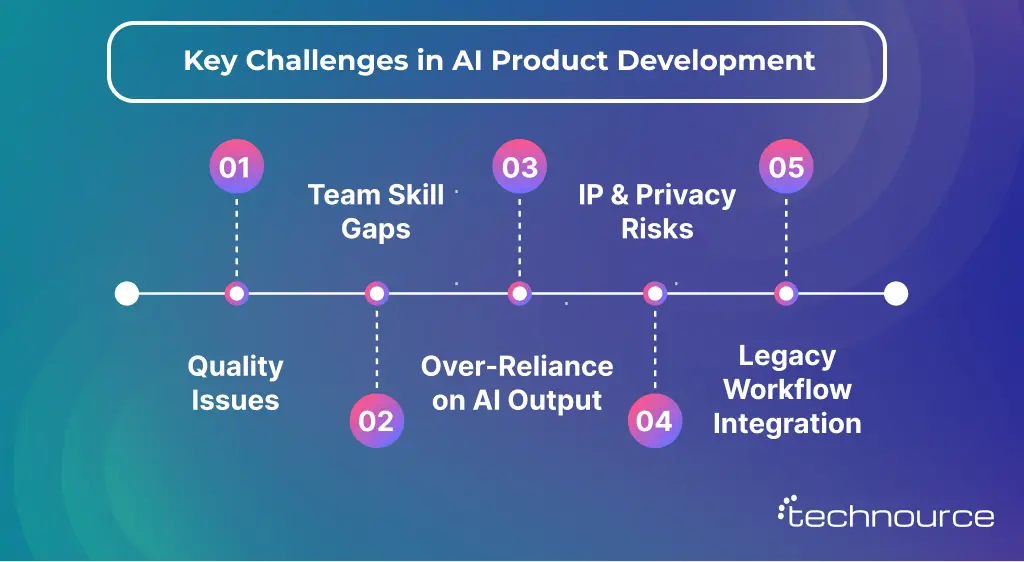
1. Quality Issues
AI output is only as good as the data it learns from. Poorly structured training data produces biased outputs and flawed recommendations that look plausible but lead product decisions in the wrong direction. Fix it: Run a data audit before any AI tool touches your workflow. Use synthetic data generation responsibly when real user data is limited or privacy-restricted.
2. Team Skill Gaps
Most product teams weren’t built for AI-augmented workflows. PMs don’t know how to prompt effectively. Engineers don’t know how to critically audit AI-generated code. These gaps slow adoption more than any tool limitation. Fix it: Invest in role-specific AI literacy — practical workshops, not deep technical training. Prompt engineering for PMs. Output review protocols for QA. These skills close faster than most leaders expect.
3. Over-Reliance on AI Output
Blind trust in AI recommendations is genuinely dangerous. Models confidently produce wrong answers, biased rankings, and flawed specs without flagging their own uncertainty. Fix it: Build human-in-the-loop checkpoints at every stage where AI output influences a real decision. AI proposes; humans approve. Non-negotiable in regulated industries.
4. IP and Privacy Risks
GenAI tools can surface IP-infringing outputs or expose sensitive business logic if inputs aren’t carefully controlled. This is a legal and reputational risk, not a hypothetical one. Fix it: Use private model deployments for proprietary data. Establish a written policy specifying which tools are approved, what data can be shared externally, and who reviews AI outputs before they reach production.
5. Legacy Workflow Integration
Rigid waterfall processes and monolithic architectures don’t play well with iterative, fast-moving AI-powered development cycles. The tools are ready. The workflows often aren’t. Fix it: Choose API-first AI tooling that plugs into existing infrastructure. Phase your rollout — one tool, one stage, clear success criteria — before scaling across the full process.
How Technource Can Help
At Technource, we help businesses move beyond AI experimentation and build practical, scalable AI-powered product workflows. From AI-driven research and intelligent automation to GenAI integrations and product engineering, our team works closely with startups and enterprises to implement AI where it creates a measurable business impact.
Whether you’re validating an idea or scaling an existing platform, our AI product development services are designed to reduce time-to-market, improve product quality, and accelerate innovation.
How to Measure AI Success in Product Development
This is the section every competitor skips. Without defined metrics, AI adoption becomes a cost center with no accountable outcome.
Speed Metrics:
Time-to-first-prototype before versus after AI integration
Sprint velocity change measured in story points per sprint
Time from validated concept to production-ready build
Quality Metrics:
Defect escape rate — bugs that reach production
AI-generated test coverage percentage versus manual baseline
Mean time to detect and resolve post-launch issues
Product-Market Fit Metrics:
Feature adoption rate within the first 30 days of launch
NPS delta across AI-informed sprints
Cost per validated feature versus the pre-AI baseline
Business Metrics:
Revenue per product feature launched
Churn reduction tied to AI-personalized product experiences
Time-to-value for new users through AI-optimized onboarding
You don’t need a sophisticated BI platform to start. A consistently updated spreadsheet with pre-AI baselines and post-AI measurements gives you the directional clarity to maintain internal buy-in and keep the program moving.
A McKinsey report found that 84% of executives agree innovation is the key to growth — yet most companies still lack a defined framework for measuring innovation ROI. That gap is exactly where AI initiatives quietly die.
Best Practices for AI-Driven Product Development
These aren’t generic tips recycled from every other blog. These separate teams are doing AI well from teams doing AI theater.
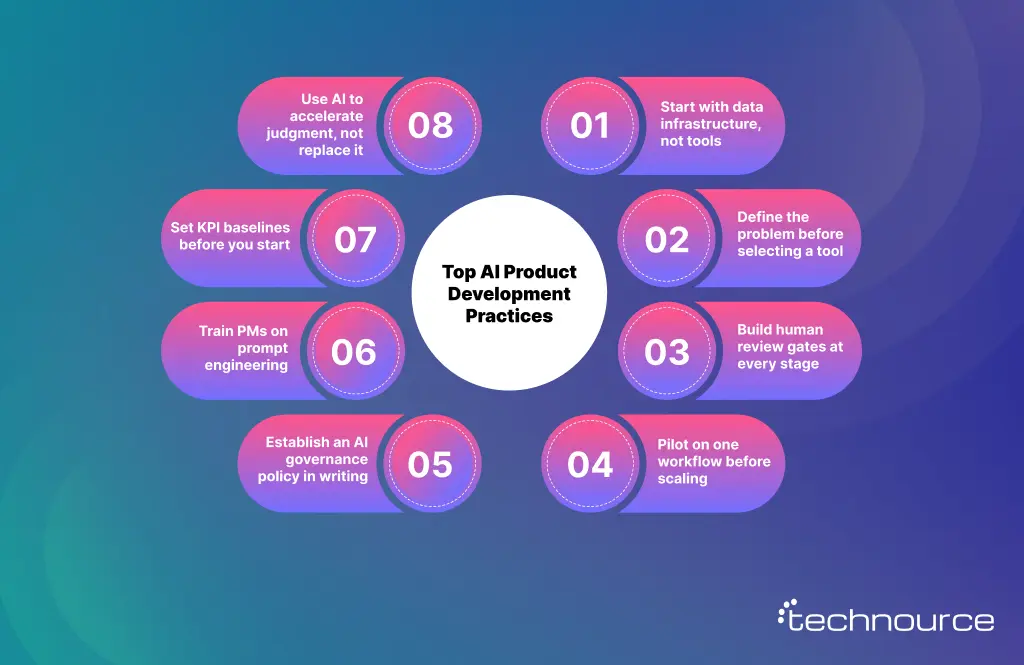
1. Start with data infrastructure, not tools — AI on top of bad data produces bad output. Fix the data layer first.
2. Define the problem before selecting a tool — “We want to use AI” isn’t a strategy. “We want to cut QA cycle time by 50 percent.”
3. Build human review gates at every stage: AI proposes; humans decide. Especially critical early in adoption.
4. Pilot on one workflow before scaling: Pick your lowest-risk, highest-friction process for the first experiment.
5. Establish an AI governance policy in writing: Which tools are approved? What data can be shared? Who reviews AI-generated specs? Write it down before problems surface.
6. Train PMs on prompt engineering: Output quality tracks directly with input quality. This is a teachable skill with immediate returns.
7. Set KPI baselines before you start: You can’t prove improvement without a starting point. Measure where you are today.
8. Use AI to accelerate judgment, not replace it: The best product decisions still come from humans who deeply understand users and business context. AI gets you there faster. It doesn’t get there for you.
Following these best practices for AI-driven product development is what separates case studies from cautionary tales in every organization that has tried to adopt AI at scale.
How to Implement AI in Your Product Development Process
Knowing what AI can do is one thing. Actually embedding it in your workflow is another. Here’s a phased roadmap that works for teams of any size.
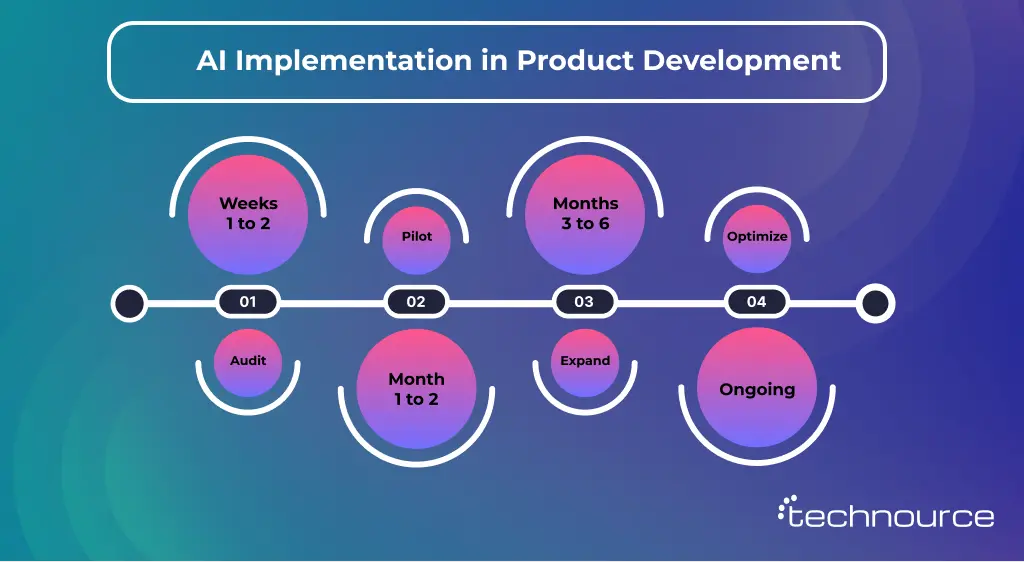
Phase 1: Audit – Weeks 1 to 2
Map your current product development lifecycle end-to-end. Find the three highest-friction, highest-volume manual tasks; those are your AI entry points. Common candidates: user research synthesis, test case generation, requirements documentation. Choose based on where the pain is clearest, not where AI sounds most impressive.
Phase 2: Pilot – Month 1 to 2
Pick one stage. Pick one tool. Define success metrics upfront using the framework in the previous section. Run for six to eight weeks without changing anything else in the workflow. Resist the urge to pilot everything simultaneously; focus produces cleaner results and cleaner data.
At the end of the pilot, compare defined metrics against your pre-AI baseline. If improvement is meaningful, you have your internal business case for expanding. If it’s not, you’ve learned something valuable about tool selection or problem definition — and that knowledge still moves you forward.
Phase 3: Expand – Months 3 to 6
Roll AI out across two to three additional stages based on pilot learnings. Begin cross-functional training so knowledge lives in the team, not one person. Document new AI-augmented workflows explicitly, in a living document the whole team can reference and update, not a Slack thread from six months ago.
Phase 4: Optimize – Ongoing
Reassess your AI tool stack every quarter. Models improve fast; something mediocre six months ago may now be best-in-class. Build a lightweight, continuous evaluation process rather than a one-time selection, and revisit every two years when the contract is up for renewal.
This roadmap scales regardless of company size. The phases are the same. The timeline may compress or extend based on team bandwidth. The principles don’t change.
Conclusion
As a software product development company, AI in product development has moved well past the hype phase. The teams winning right now aren’t experimenting with AI as a novelty — they’ve made it a fundamental part of how products get built, tested, and improved every single sprint.
The cost of waiting is real. Every sprint where competitors are running AI-assisted research, automated QA, and ML-driven iteration is a sprint where the gap widens. And unlike most competitive gaps, this one compounds in the wrong direction the longer you delay.
Start with one stage. Define one metric. Ship one meaningful improvement. That’s how every successful AI transformation begins, not with a strategy deck, but with a deliberate first step that proves the value and earns the mandate to go further.
FAQs
AI in product design uses artificial intelligence technologies: machine learning, generative algorithms, computer vision, to enhance the design process. It’s not about AI replacing designers; it’s about AI handling repetitive tasks, generating variations, optimizing parameters, and providing data-driven insights so human designers can focus on creative problem-solving and strategic decisions. Think of it as an exceptionally fast, tireless assistant that handles the mechanical parts of design while you handle the thinking.
Costs vary dramatically based on approach. Individual product design AI tools range from free tiers (Figma AI basics) to $29-99/month (mid-tier tools like Galileo AI, Uizard) to $680/year (Autodesk Fusion 360) to $15K-50K annually (enterprise platforms like nTopology). For full AI product design services from agencies, expect $5K-15K for small projects, $15K-50K for medium complexity, and $50K+ for comprehensive enterprise implementations. Most teams start with $100-300/month tool subscriptions and scale based on ROI.
No, and that’s not the goal. AI excels at repetitive tasks, optimization within defined parameters, pattern recognition, and rapid iteration. It can’t do what human designers do best: understand nuanced user needs, make creative leaps, navigate ambiguous problems, balance competing stakeholder interests, or apply contextual judgment. The most effective approach combines AI’s computational power with human creativity and strategic thinking. Teams using AI-driven design aren’t replacing designers, they’re making designers more effective by removing the boring parts of the job.
Here are top tools by category:
For generative design, Autodesk Fusion 360 (physical products) and nTopology (advanced geometries).
For UI/UX, Figma AI integrates directly into existing workflows.
For rapid prototyping, Galileo AI and Uizard. For visual asset creation, Adobe Firefly.
For testing and optimization, Maze AI and Attention Sight.
For personalization, Dynamic Yield and Optimizely.
The “best” tool depends on your specific needs, most teams use 2-4 tools covering different aspects of their workflow rather than one comprehensive solution.
Realistic timeline: 1-2 weeks for initial tool setup and basic training, 4-6 weeks to develop team proficiency, 3-6 months for full integration and optimization. Quick wins happen fast, you might save hours on your first project. But systematic AI product development process integration requires time for team learning, workflow adjustment, and iterative improvement. Don’t expect overnight transformation, but do expect measurable benefits within the first month if you’re using appropriate tools for your bottlenecks.
Not necessarily. Many product design AI tools are designed for designers, not developers, no coding required. However, you might hire AI developers or specialists if you’re: building custom AI solutions, integrating multiple complex systems, training custom AI models on proprietary data, or implementing enterprise-scale automation. For most teams, working with existing tools doesn’t require dedicated AI development expertise. For advanced implementations, partnering with an AI development company makes sense rather than building internal AI development capabilities from scratch.
Virtually every industry sees benefits, but particularly:
Automotive: Generative design for components, performance optimization,
Healthcare: Custom medical devices, regulatory compliance
Fashion: Virtual fitting, material simulation
E-commerce: Personalization at scale, conversion optimization
Industrial Manufacturing: Material optimization, cost reduction.
The common thread: industries where iteration speed, optimization complexity, or personalization at scale provides a competitive advantage.
AI in product development means applying artificial intelligence — machine learning, NLP, computer vision, and generative AI — across the full product lifecycle. It covers market research, ideation, design, engineering, testing, launch, and ongoing iteration. It’s not a single tool; it’s an intelligent layer across every stage of how products get built.
AI reduces manual effort at every stage, speeds up research and prototyping, catches defects earlier in QA, enables data-driven ideation, and provides continuous feedback after launch. The combined result is faster time-to-market, lower development costs, and products that better match what users actually need.
Top options include Dovetail AI for research, Uizard and Figma AI for design, GitHub Copilot and Cursor for engineering, Mabl for QA, Amplitude AI for analytics, and Statsig for launch experimentation. The right choice depends on where your process has the most friction. Start with one and prove value before expanding.
Audit your current lifecycle to find the highest-friction manual tasks. Pick one stage, one tool, define success metrics upfront, and run a focused six to eight-week pilot. Measure results against your baseline before expanding to other stages.
The five most common challenges are data quality issues, team skill gaps, over-reliance on AI output without human review, IP and data privacy risks from generative tools, and difficulty integrating AI into legacy workflows. Each has a practical fix — covered in the challenges section above.
Generative AI for product development enables teams to create — not just analyze. It drafts specs from user research, generates synthetic test data, produces wireframes from prompts, writes product copy at scale, and powers AI features inside the product itself, like smart search and conversational interfaces.
The most important best practices for AI-driven product development: fix your data infrastructure first, define specific problems before evaluating tools, maintain human review gates at every AI-assisted stage, pilot before scaling, establish a written AI governance policy, train PMs on prompt engineering, set KPI baselines before you start, and use AI to accelerate judgment — not replace it.


 AI ConsultingStrategic AI Roadmaps