
This guide shows how to convert on-premises software to SaaS without stalling your roadmap or your customers. You will see five conversion approaches, how to pick a tenancy model, an 8-step migration process, and what a first SaaS release costs at each stage. It closes with three Technource SaaS builds and their measured results.
Key Takeaways
- To convert on-premises software to SaaS with Technource, budget $5,000–$10,000 for an architecture PoC, $20,000–$50,000 for a first multi-tenant release of a mid-complexity or complex product, and $60,000–$100,000 for an enterprise-grade release.
- A first SaaS release typically ships in 8–24 weeks, depending on complexity. Converting every module of a large product usually takes 6–12 months.
- The key decision is the tenancy model. Start with a pooled (shared) database with isolation enforced at the data layer, and add a silo tier for regulated or enterprise tenants.
- Dependencies are the top blocker: 54% of organizations name understanding application dependencies as their biggest cloud migration challenge (Flexera, 2026).
- Technource SaaS builds delivered 65% faster e-prescribing approvals (Telepath) and 70% faster hiring and verification (Worecs)
Your customers no longer want to install, patch, and host your software.
They want a login, automatic updates, and a predictable monthly invoice. Vendors that convert on-premises software to SaaS meet that demand and turn one-off license deals into recurring revenue.
Budgets support the shift. Worldwide software spending will stay above $1.4 trillion in 2026, according to Gartner.
Yet most vendors underestimate the move. Comparing on-premises and cloud costs is a top migration challenge for 43% of organizations (Flexera, 2026).
Hosting is rarely the problem. The real work is turning one-install-per-customer code into a secure multi-tenant product without breaking the customers who still run the old version.
What Does It Mean to Convert On-Premise Software to SaaS?
Converting on-premise software to SaaS means re-engineering a product that customers install on their own servers into a cloud service that you host, update, and bill by subscription. The change touches architecture, deployment, pricing, support, and security in one program.
A hosted copy of the old installer is not SaaS. True SaaS runs one codebase for many customers, ships updates continuously, and meters usage per tenant.
| Factor | On-Premise Software | SaaS |
|---|---|---|
| Deployment | Installed on customer servers | Hosted by the vendor in the cloud |
| Updates | Customer-scheduled, often once a year | Continuous, rolled out to all tenants |
| Pricing | Perpetual license plus maintenance fee | Subscription, usage-based, or both |
| Infrastructure cost | Paid by the customer | Paid by the vendor |
| Customization | Code changes per install | Configuration and feature flags |
| Versions in the field | Many, each needing support | One live version for every tenant |
| Data location | Customer premises | Vendor cloud, isolated per tenant |
Why Are Software Vendors Moving From On-Premise to SaaS?
Software vendors move to SaaS to earn predictable recurring revenue, ship updates faster, and cut the cost of supporting many versions in the field. Customers gain lower upfront cost, no server upkeep, and access from any device.
| Benefit | What Changes | Business Impact |
|---|---|---|
| Recurring revenue | License deals become monthly or annual subscriptions | Forecastable revenue that investors value |
| Faster releases | One codebase deploys to every tenant | Features ship in days, not yearly upgrade cycles |
| Lower support load | One live version replaces many installs | Fewer version-specific bugs and hotfixes |
| Usage insight | Telemetry from every tenant | Roadmap decisions based on real feature use |
| Wider market | Browser access and self-serve onboarding | Smaller buyers can purchase without an IT team |
Benefits for the Software Vendor
- Predictable cash flow: Subscriptions replace lumpy license quarters with steady monthly or annual billing.
- One product to maintain: Engineering stops back-porting fixes to five or six old versions.
- Pricing flexibility: Plans, add-ons, and usage tiers can change without shipping a new installer.
- Faster feedback: Product teams see which features customers actually use.
Benefits for Your Customers
- Lower upfront cost: No servers, licenses, or install projects before go-live.
- Always current: Security patches and new features arrive without an upgrade project.
- Access anywhere: Teams work from a browser or mobile app instead of one office network.
- Less IT overhead: Backups, uptime, and scaling become the vendor’s job.
Planning to move your product to SaaS but not sure where to start?

Is Your On-Premise Product Ready for SaaS?
An on-premise product is ready for SaaS when its core logic can run as a shared service, its data can be separated by customer, and enough customers want a hosted option to justify the build. Score your product against the six signals below before you commit budget.
| Readiness Signal | Ready for SaaS | Needs Work First |
|---|---|---|
| Architecture | Layered or modular code with clear APIs | UI, logic, and data tightly coupled |
| Customer demand | Customers ask for hosted access or monthly billing | Most buyers require air-gapped installs |
| Customization | Differences handled by configuration | Separate code branches per customer |
| Data model | Records easy to tag with a tenant ID | Shared tables with no customer key |
| Licensing | Features can be switched on by plan | License checks hard-coded in the installer |
| Team skills | Cloud, DevOps, and security skills available | No cloud operations experience |
Three or more answers in the right-hand column usually mean a refactor or rebuild must come before any multi-tenant launch.
What Are the Main Ways to Move an On-Premise Product to SaaS?
There are five main ways to move an on-premises product to SaaS: rehost, replatform, refactor, rebuild, and run a hybrid model. The five approaches differ in how much code changes and how close the result gets to true multi-tenant SaaS.
| Approach | What Changes | Effort | Best For |
|---|---|---|---|
| Rehost (hosted single-tenant) | Same code on cloud VMs, one instance per customer | Low | A quick hosted offer while the real move is planned |
| Replatform | Managed databases, containers, and cloud storage; minimal code change | Low to medium | Cutting hosting overhead fast |
| Refactor to multi-tenant | Tenant context, shared services, identity, and billing added to existing code | Medium to high | Products with sound core logic |
| Rebuild cloud-native | New architecture, often services-based, written from scratch | Highest | End-of-life stacks or heavy technical debt |
| Hybrid | SaaS for most customers, managed or on-prem edition for a few | Varies | Vendors with government or air-gapped buyers |
Rehosting gives you a hosted product, not a SaaS product. Each customer still runs a separate instance, so infrastructure and support costs grow with every new account.
Refactoring or rebuilding produces a cloud-native application that scales across tenants on shared infrastructure.
Single-Tenant vs Multi-Tenant: Which SaaS Architecture Fits?
Multi-tenant SaaS architecture fits most converted products because one shared deployment serves every customer, which keeps hosting and support costs low. Single-tenant deployments fit customers that contractually require dedicated infrastructure, such as some healthcare, financial, and public-sector buyers.
| Tenancy Model | Data Isolation | Cost to Run | Best For |
|---|---|---|---|
| Pool (shared schema) | Tenant ID on every row, enforced by row-level security | Lowest | Many SMB and mid-market tenants |
| Bridge (schema per tenant) | Separate schema for each customer | Low to medium | Mid-market tenants needing per-tenant backups |
| Silo (database per tenant) | Separate database for each customer | Medium to high | Regulated or high-value enterprise tenants |
| Dedicated stack | Separate application and database | Highest | Strict residency or contract terms |
Each of the pool, bridge, and silo models trades running cost against isolation strength.
Technource’s Recommendation
Start with a pooled model and enforce tenant isolation in the database layer, not only in application code. Add a silo tier for enterprise or regulated tenants later, so one codebase serves both.
In the Telepath project, every healthcare organization runs its own branded portal on a subdomain or custom domain while sharing one platform underneath.
What Components Does the SaaS Version of Your Product Need?
The SaaS version of an on-premises product needs nine components the installed version never had: tenant management, identity and SSO, subscription billing, usage metering, automated provisioning, feature flags, observability, a CI/CD pipeline, and audit logs. Missing any of them turns operations into manual work.
| Component | Who Uses It | Why It Matters |
|---|---|---|
| Tenant management | Vendor admins | Creates, configures, suspends, and deletes customer accounts |
| Identity and SSO | All users | Supports the SAML and OIDC logins enterprise buyers expect |
| Subscription billing | Finance, customers | Handles plans, invoices, trials, and failed payments |
| Usage metering | Product, finance | Tracks seats, API calls, or transactions per tenant |
| Automated provisioning | Vendor operations | New tenants go live in minutes, not install projects |
| Feature flags and entitlements | Product team | Replaces per-customer code branches with configuration |
| Observability | Engineering, support | Logs, metrics, and traces tagged by tenant |
| CI/CD pipeline | Engineering | Ships tested releases to every tenant without downtime |
| Audit logs | Customers, compliance | Records who did what, for security reviews |
In the Worecs project, a granular role-based access model at module and action level removed permission conflicts between admins, recruiters, and candidates.
Which AI Features Are Worth Adding During the SaaS Conversion?
The AI features worth adding during a SaaS conversion are the ones that use data the new platform now centralizes: in-app assistants, document extraction, anomaly and churn alerts, smart search, and AI-powered workflow automation. Pick one or two tied to a clear customer metric, not a long list.
| AI Feature | What It Does | Risk / Impact |
|---|---|---|
| In-app AI assistant | Answers how-to questions and drafts content inside the product | Medium risk; needs guardrails and tenant-scoped data |
| Document and data extraction | Reads uploaded files and fills records | High impact on manual entry; needs human review for edge cases |
| Anomaly and churn alerts | Flags unusual usage or at-risk accounts | High impact on retention; needs clean usage data |
| Smart search | Finds records across modules in plain language | Medium impact; needs per-tenant indexes |
| AI-powered workflow automation | Runs multi-step tasks such as approvals and follow-ups | High impact; needs audit logs and approval steps |
The SaaS move is the right moment for AI because tenant data finally sits in one governed platform. Well-scoped AI integration services add these features to an existing codebase without a separate rebuild.
Keep tenant data separated inside AI features too. A shared vector index without tenant filters can surface one customer’s data in another customer’s answers.
AI features are scoped separately from the core conversion; an AI MVP on the new platform costs $10,000–$50,000.
Want AI features your customers will pay for in the new SaaS plan?

What Tech Stack Works Best for On-Premise to SaaS Conversion?
Most 2026 SaaS conversions run on AWS, Microsoft Azure, or Google Cloud, use containers on Kubernetes or a managed container service, and store tenant data in PostgreSQL with row-level security. Keep the existing backend language where the core logic is sound, and modernize the layers around it.
| Layer | Common Choices | Note |
|---|---|---|
| Cloud | AWS, Microsoft Azure, Google Cloud | Follow your buyers’ procurement preferences |
| Compute | Kubernetes (EKS, AKS, GKE), AWS ECS, serverless functions | Containers ease the move away from installers |
| Database | PostgreSQL, MySQL, SQL Server, MongoDB | PostgreSQL row-level security suits pooled tenancy |
| Backend | Node.js, Python, .NET, Java, Laravel | Reuse the current language if the logic is sound |
| Frontend | React.js, Angular, Vue.js | A web client replaces desktop installers |
| Identity | Auth0, Amazon Cognito, Microsoft Entra ID, Keycloak | Must support SAML and OIDC for enterprise SSO |
| Billing | Stripe Billing, Chargebee, Recurly | Supports subscription and usage-based plans |
| DevOps | GitHub Actions, GitLab CI, Terraform | Infrastructure as code makes tenant setup repeatable |
| Observability | Datadog, Grafana, OpenTelemetry | Tag every signal with a tenant ID |
Cloud choice usually follows existing contracts, so compare AWS, Azure, and GCP on managed database and compliance coverage before you commit.
How Do You Handle Security and Compliance When Moving to SaaS?
Moving to SaaS shifts security responsibility from your customer to you, so the platform needs tenant isolation, encryption, access controls, and audit logging from the first release. Enterprise buyers will also ask for evidence, such as a SOC 2 report, before they sign.
The stakes are high. The global average cost of a data breach reached about $5 million in 2026, and about $11.5 million in the US (IBM, 2026).
| Framework | Applies When | Key Requirement |
|---|---|---|
| SOC 2 | You sell to US mid-market and enterprise buyers | Independent audit of security controls over time |
| HIPAA | Your SaaS stores or processes PHI for US covered entities | Business associate agreement and HIPAA-required safeguards |
| GDPR | You process personal data of people in the EU | Lawful basis, data processing agreements, data subject rights |
| PCI DSS | Your SaaS stores, processes, or transmits cardholder data | A compliant payment provider to reduce scope |
| ISO 27001 | You sell to European or global enterprises | A certified information security management system |
This section is general information, not legal or regulatory advice. Confirm your obligations with qualified counsel.
Healthcare vendors should map every PHI flow against a HIPAA compliance checklist before migrating any customer data.
Not sure if your SaaS design will pass your buyers’ security reviews?
On-Premise to SaaS Migration: An 8-Step Process
On-premises to SaaS migration runs in eight steps, from product assessment to retiring old versions. Several steps overlap: architecture design starts during assessment, Steps 4 and 5 run in parallel, and pilot onboarding begins in the final refactoring sprint. A first SaaS release typically ships in 8–24 weeks.
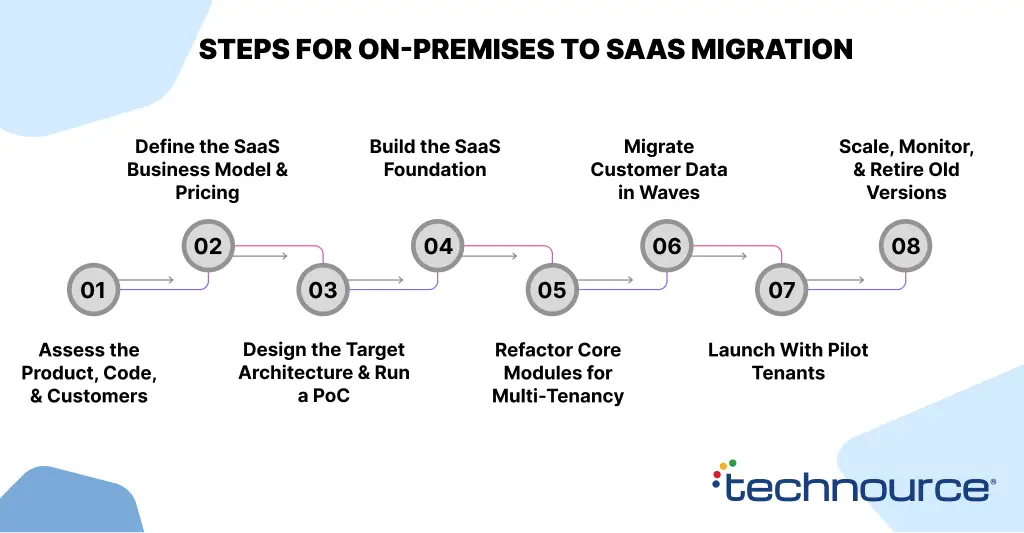
Step 1: Assess the Product, Code, and Customers (2–3 Weeks)
Map modules, integrations, data models, and every dependency on local servers. Interview your top customers about hosting, compliance, and pricing expectations.
Dependency mapping deserves the most time. Hidden links to local file systems, Windows services, or customer databases cause most migration delays.
Output: a chosen conversion approach, a module priority list, and a risk register.
Step 2: Define the SaaS Business Model and Pricing (1–2 Weeks)
Choose plans and the value metric customers recognize: seats, transactions, or usage.
Decide what happens to perpetual license holders: a migration credit, a discounted first year, or a support end date.
Step 3: Design the Target Architecture and Run a PoC (2–4 Weeks)
Pick the tenancy model, identity approach, and data partitioning strategy. Prove tenant isolation and performance with 2–3 test tenants before scaling the build.
An architecture PoC costs $5,000–$10,000 and removes the biggest technical unknowns early.
Step 4: Build the SaaS Foundation (3–6 Weeks)
Set up tenant management, SSO, subscription billing, provisioning, CI/CD, and tenant-tagged monitoring. These shared services never existed in the installed product.
Step 5: Refactor Core Modules for Multi-Tenancy (4–8 Weeks per Module)
Add tenant context to every query, cache key, file path, and background job. Replace local file storage with object storage and move scheduled tasks to queues.
Start with the module most customers use daily. The rest can follow in later releases.
Step 6: Migrate Customer Data in Waves (1–2 Weeks per Wave)
Script extraction, map records to the tenant-aware schema, validate totals, and keep a rollback plan for each wave. Run at least one dry run per wave.
Move friendly customers with clean data first, then larger or heavily customized accounts.
Step 7: Launch With Pilot Tenants (2–4 Weeks)
Onboard 3–5 pilot customers and track onboarding time, error rates, and support tickets. Many vendors scope this pilot with MVP development services so the first release stays small and measurable.
Step 8: Scale, Monitor, and Retire Old Versions (Ongoing)
Add autoscaling, per-tenant quotas, and cost tracking as tenant numbers grow. Publish an end-of-support date for on-premise versions early, so customers can plan their move.
How Much Does It Cost to Convert On-Premise Software to SaaS?
Converting on-premise software to SaaS costs $5,000–$10,000 for an architecture PoC, $20,000–$50,000 for a first multi-tenant release of a mid-complexity or complex product, and $60,000–$100,000 for an enterprise-grade first release. Full conversion of a large product is priced per module after an assessment.
| Build Type | Typical Scope | Cost (USD) | Timeline |
|---|---|---|---|
| Architecture PoC | Tenancy model, isolation test, 2–3 test tenants | $5,000–$10,000 | 2–4 weeks |
| Mid-complexity SaaS release | One core module, pooled tenancy, SSO, subscription billing | $20,000–$30,000 | 8–12 weeks |
| Complex SaaS release | Several modules, integrations, usage metering, data migration | $30,000–$50,000 | 12–16 weeks |
| Enterprise SaaS release | Silo tier, enterprise SSO, audit logs, compliance controls | $60,000–$100,000 | 16–24 weeks |
| Full product conversion | All modules refactored, all customers migrated | Custom | 6–12 months |
Ongoing cloud, third-party service, and maintenance costs depend on tenant count, usage, and compliance scope.
What Drives the Cost of an On-Premise to SaaS Conversion?
| Cost Driver | Why It Adds Cost |
|---|---|
| Code coupling | Tightly coupled monoliths need more refactoring before tenant context fits |
| Number of modules | Every module needs tenant-aware data access and fresh testing |
| Tenancy model | Silo and dedicated tiers add provisioning and operations work |
| Integrations | Each ERP, CRM, or payment link must be rebuilt as a cloud integration |
| Data migration | Inconsistent customer databases need cleanup and mapping |
| Compliance scope | HIPAA, SOC 2, or GDPR controls add design, logging, and review effort |
| Customization debt | Per-customer code branches must become configuration |
Hidden and Ongoing Costs to Budget
Once you host the product, the infrastructure bill is yours. Organizations estimate that 29% of their cloud spend is wasted (Flexera, 2026).
- Cloud infrastructure: Compute, storage, data transfer, and backups grow with tenant count.
- Third-party services: Identity, billing, email, and monitoring tools charge per user, tenant, or call.
- Security and audits: Penetration tests, SOC 2 audits, and security tooling recur every year.
- Operations and on-call: Uptime and incident response become your team’s responsibility.
- Dual running: You support on-premises and SaaS editions side by side during the transition.
- Customer migration: Incentives, onboarding help, and data migration support cost time and money.
Refactor or Rebuild: Which Path Should You Choose?
Refactor when the core business logic is sound, and the stack is still supported. Rebuild when the stack is end-of-life, the code has little test coverage, or the product needs a different data model.
| Factor | Refactor | Rebuild |
|---|---|---|
| Time to first SaaS release | Faster, because proven logic is reused | Slower, because everything is new |
| Delivery risk | Lower functional risk, more legacy debt | Higher delivery risk, cleaner result |
| Upfront cost | Lower | Higher, with lower long-term upkeep |
| Technology stack | Supported languages and frameworks | End-of-life stack, such as VB6 or Classic ASP |
| Team knowledge | Original developers still available | Knowledge lost, little documentation |
| Customer impact | Familiar workflows preserved | Chance to fix poor UX, but users must relearn |
Technource’s Recommendation
Use the strangler pattern. Wrap the existing product with new SaaS services, then replace modules one at a time behind the same API.
Customers keep working while each module moves, and you avoid a big-bang rewrite that freezes the roadmap for a year.
What Are the Biggest Challenges in On-Premise to SaaS Migration?
The biggest challenges in on-premises to SaaS migration are hidden dependencies, tenant data isolation, customer data migration, per-customer customizations, and the revenue dip as license sales turn into subscriptions. Understanding application dependencies is the top cloud migration challenge for 54% of organizations, followed by assessing technical feasibility at 44% (Flexera, 2026).
| Challenge | Real Consequence | How to Solve It |
|---|---|---|
| Hidden dependencies | Features break after leaving local servers | Code scans and runtime tracing during Step 1 |
| Tenant data leaks | One customer sees another customer’s records | Database-level isolation, tested in every CI run |
| Custom code per customer | Separate branches block a single release train | Move differences into configuration and feature flags |
| Data migration errors | Missing or duplicated records at cutover | Dry runs, validation scripts, and a rollback plan per wave |
| Revenue dip | Cash flow drops as upfront license fees shrink | Offer annual prepay and keep on-prem renewals during transition |
| Noisy tenants | One heavy customer slows everyone | Rate limits, per-tenant quotas, and autoscaling |
| Team mindset | Engineers still plan in yearly releases | Train the team on continuous delivery and on-call |
Common Mistakes to Avoid When Converting On-Premise Software to SaaS
The most common mistakes are treating a hosted single-tenant copy as SaaS, porting every legacy feature, leaving pricing until launch, and moving all customers at once. Each mistake inflates cost or delays revenue.
- Stopping at lift-and-shift: Hosted single-tenant copies keep per-customer costs and never reach SaaS margins.
- Porting every feature: Usage data usually shows a small core of features drives most value. Migrate those first.
- Skipping the PoC: Tenancy designed on paper often hides isolation and performance gaps until customers move. A 2–4 week PoC exposes them first.
- Pricing as an afterthought: Billing logic shapes metering, entitlements, and data design from day one.
- Big-bang customer migration: Move customers in waves, starting with friendly accounts.
- No end-of-support date: Running two products indefinitely doubles engineering and support costs.
- Underestimating operations: Uptime, backups, and incident response now sit with your team.
Which KPIs Should You Track After the SaaS Launch?
Track six KPIs after launch: customer migration rate, net revenue retention, tenant onboarding time, uptime and error rate, cloud cost per tenant, and feature adoption. Together they show whether the SaaS model is paying off.
| KPI | What It Shows | How to Measure |
|---|---|---|
| Customer migration rate | Share of on-prem customers now on SaaS | Migrated accounts divided by total active accounts |
| Net revenue retention | Expansion minus churn and downgrades | Billing data, reviewed monthly and yearly |
| Tenant onboarding time | How fast new customers reach first value | Signup to first key action, from product analytics |
| Uptime and error rate | Platform reliability per tenant | Monitoring dashboards and SLA reports |
| Cloud cost per tenant | Unit economics of hosting | Tagged cloud spend divided by active tenants |
| Feature adoption | Which modules customers rely on | Product telemetry by tenant and plan |
How to Choose an On-Premise to SaaS Development Partner
Shortlist legacy system modernization companies that have shipped multi-tenant SaaS products, migrated live customer data, and can show their tenant isolation design in writing. Ask for live SaaS case studies with measured outcomes, not slide decks.
| Question to Ask | Good Answer | Red Flag |
|---|---|---|
| Which multi-tenant products have you shipped? | Live SaaS products with named tenancy models | Only hosted single-tenant projects |
| How do you enforce tenant isolation? | Database-level controls plus automated tests | “We filter by customer ID in the code” |
| How do you migrate customer data? | Waves, dry runs, validation, and rollback | One cutover weekend for every customer |
| How do you price the work? | Phased: PoC, first release, then per module | One fixed price before any assessment |
| Who owns the code and IP? | You own the code, infrastructure scripts, and docs | A proprietary framework you must license |
| What happens after launch? | DevOps, monitoring, and support options | Handover with no operations plan |
Technource brings 14+ years of product engineering experience and holds 4.9/5 ratings on Clutch and GoodFirms.
What Are the Future Trends in On-Premise to SaaS Conversion?
Four trends shape SaaS conversions in 2026: AI built into the platform, usage-based pricing, hybrid deployment options, and FinOps discipline from the first release.
AI-Native SaaS Platforms
Vendors now design AI features into the SaaS architecture from day one. Assistants and AI agents take on multi-step tasks such as approvals, follow-ups, and report drafting.
Usage-Based and Hybrid Pricing
More vendors pair a base subscription with usage charges. Metering built during the conversion makes that pricing possible later.
Hybrid and Managed Deployment Options
Pure SaaS is not the only end state. Hybrid cloud is used by 73% of organizations (Flexera, 2026), and many vendors keep a managed edition for regulated buyers.
FinOps From the First Release
Cost per tenant is becoming a product metric, not just a finance report. Teams tag cloud spend by tenant so pricing tiers stay profitable as usage grows.
How Technource Delivers Measurable Results in SaaS Development
Each project below solved the same problem every converted product faces: many organizations on one platform, with strict data separation.
How Technource Built Telepath, a Branded Online Pharmacy Platform With 65% Faster E-Prescribing Approvals
We built Telepath, a SaaS pharmacy platform that lets healthcare organizations launch branded online pharmacies with e-prescriptions and telehealth.
Each organization needed its own branded portal, secure prescribing, and smooth handoffs to pharmacies and shipping partners.
Technource built a multi-tenant architecture that gives each organization its own portal on a subdomain or custom domain.
We integrated DoseSpot for secure e-prescribing, Agora for telehealth appointments, and Carepoint, TransitionRx, and Easypost for pharmacy coordination and shipment tracking. The stack included React.js, Node.js, MySQL, AWS S3, and Paytheory.
Measurable Result
- 65% faster e-prescribing approvals
- Multiple organizations running independent branded pharmacies from one shared platform
- Connected pharmacy and shipping workflows with real-time order tracking
- Audit logs and pharmacy order tracking for compliance
- Integrated payments and automated cart recovery to improve purchase conversions
How Technource Built Worecs, a Cloud Recruitment and Onboarding Platform With 70% Faster Hiring and Verification
We built Worecs, a cloud-based recruitment and onboarding platform for an Australian client serving agencies with high-volume hiring.
The client wanted to replace paper-based forms and manual checks with one platform for recruiters, candidates, and administrators.
Technource built granular role-based access at the module and action level, a dynamic form builder, and E-Worecs, a secure e-signature module with encrypted keys and timestamp validation.
Beky Check API integration with webhook callbacks delivers instant verification updates. The stack included React.js, Laravel, MySQL, and AWS cloud infrastructure.
Measurable Result
- 70% faster recruitment and verification process
- 60% reduction in administrative workload
- Paper-based onboarding forms replaced with legally binding e-signatures stored in the cloud
- Admins, recruiters, and candidates working in one interface without permission conflicts
- Instant reference and license verification updates through webhook callbacks
Technource’s Approach to On-Premise to SaaS Conversion
- Assess before you architect: Map dependencies, data, and customer demand before choosing an approach.
- Automate every tenant setup: Provisioning scripts, SSO, and billing are ready before the first pilot customer arrives.
- Migrate module by module: The strangler pattern keeps customers working while the platform changes.
- Price and meter from day one: Billing and usage tracking shape the architecture, so they come first.
- Measure after launch: Migration rate, retention, and cost per tenant decide what ships next.
Conclusion
Three decisions shape whether you convert on-premises software to SaaS on budget: the conversion path, the tenancy model, and the customer migration plan.
Get those right, and a first SaaS release can ship in 8–24 weeks for $20,000–$50,000, or $60,000–$100,000 for an enterprise-grade build.
Technource is an AI-powered SaaS product development company that builds multi-tenant SaaS platforms for healthcare software providers, fintech teams, and other regulated industries.
If you are planning the move, contact us for a short consultation that maps your architecture, budget, and timeline.
Ready to turn your on-premises product into a scalable SaaS platform?
FAQs
A first SaaS release typically ships in 8–24 weeks: 8–12 weeks for a mid-complexity product, 12–16 weeks for a complex product, and 16–24 weeks for an enterprise-grade release. Converting every module of a large product usually takes 6–12 months, because teams move one module and one customer wave at a time. Costs start at $5,000–$10,000 for an architecture PoC. A first multi-tenant release costs $20,000–$30,000 for a mid-complexity product, $30,000–$50,000 for a complex product, and $60,000–$100,000 for an enterprise-grade release. Full conversion of a large product is priced per module after an assessment, and hosting costs depend on tenant count. For a broader breakdown of the factors that influence pricing, see our guide to SaaS development costs. Single-tenant SaaS gives each customer a separate application and database, while multi-tenant SaaS serves all customers from one shared deployment with isolated data. The four common tenancy models run from a pooled shared schema, with the lowest running cost, to a dedicated stack per tenant, with the highest. Most vendors start pooled and add a silo tier later. No. Running the existing installer on AWS or Azure is rehosting, which creates a hosted single-tenant product. Each customer still gets a separate instance, so costs grow with every account. True SaaS adds nine components the installed product never had, including tenant management, subscription billing, and usage metering, on one shared codebase. Refactor when the core logic is sound, and the stack is still supported. Rebuild when the stack is end-of-life or the code has little test coverage. Most vendors refactor first using the strangler pattern, replacing one module at a time. A refactored module typically takes 4–8 weeks, so customers keep working while the platform changes. Migrate customer data in waves, not in one cutover. Each wave takes 1–2 weeks and includes scripted extraction, mapping to the tenant-aware schema, validation, at least one dry run, and a rollback plan. Start with friendly customers whose data is clean, then move to larger or heavily customized accounts once the process is proven. No single certification is legally required for every SaaS product, but buyers often expect one. US mid-market and enterprise buyers usually ask for a SOC 2 report, and European buyers may ask for ISO 27001. Healthcare SaaS handling PHI needs HIPAA-required safeguards. A data breach costs about $5 million on average globally (IBM, 2026 Price by the value metric customers recognize, such as seats, transactions, or API calls. A base fee plus metered charges is a common B2B model. Decide the plan structure in Step 2 of the migration, which takes 1–2 weeks, before you build. Pricing shapes metering, entitlements, and the data you collect per tenant, so changing it later means rework. Yes. A hybrid model keeps a managed or on-premises edition for regulated or air-gapped customers while everyone else moves to SaaS. Hybrid setups are common: 73% of organizations already use hybrid cloud (Flexera, 2026). Run both editions from one codebase and publish an end-of-support date for older versions.
Related Insights and Articles