
Blog Summary
This guide explains how headless commerce development works in 2026, what each build tier costs, and how long each build takes. It shows the signals that say you are ready to migrate, the SEO checks that protect your rankings, and when staying on your current platform is the smarter call. You will also see two Technource eCommerce case studies with measured results.
Key Takeaways
- Headless commerce development costs $20,000–$30,000 for a headless storefront on your existing backend, $30,000–$50,000 for a custom storefront with CMS, search and ERP sync, and $60,000–$100,000 for multi-storefront or B2B builds.
- A headless storefront on an existing backend launches in 8–12 weeks. Custom builds take 12–20 weeks, multi-storefront or B2B builds take 16–24 weeks, and full enterprise replatforms take 6–12 months.
- Migrate when two or more readiness signals apply, such as theme limits blocking releases or a second sales channel on the roadmap. Move one storefront surface at a time instead of switching everything in one release.
- The headless commerce platform market is worth about $2.4 billion in 2026 and is projected to pass $6 billion by 2031 (Mordor Intelligence, 2026).
- Technource eCommerce builds delivered 65% faster product discovery for Equipt and 60% better customer service efficiency for Tojarcom.
Your marketing team wants a new landing page live this week. Your platform’s theme says next quarter.
That gap is why headless commerce development has moved from enterprise experiment to a mid-market plan.
According to Mordor Intelligence, the headless commerce platform market will grow from about $2.4 billion in 2026 to over $6 billion by 2031, at roughly 21% a year.
Yet most headless projects do not stumble on the frontend. They stumble on integrations, data, and SEO.
In the MACH Alliance Enterprise Technology Report, 37% of enterprise technology leaders named integration complexity as a primary concern when adding AI to their architecture (2026).
The build plan matters more than the framework you pick.
What Is Headless Commerce Development?
Headless commerce development is the process of building an online store where the customer-facing storefront is separated from the commerce engine and connected to it through APIs. The storefront can be a website, mobile app, or kiosk, while catalog, cart, pricing, checkout, and orders stay in one backend.
Teams build the storefront in a framework such as Next.js, keep or replace the commerce platform, and connect content, search, payments, and ERP through the same API layer. Compared with traditional ecommerce software development, the frontend and backend ship on separate release cycles.
| Layer | What It Does | Common Tools |
|---|---|---|
| Storefront (head) | Renders pages, product listings, and checkout UI | Next.js, Shopify Hydrogen, BigCommerce Catalyst, React Native |
| API layer | Moves product, price, cart, and order data as JSON | GraphQL, REST, API gateway |
| Commerce engine | Runs catalog, pricing, promotions, cart, checkout and orders | Shopify, BigCommerce, commercetools, Medusa, Adobe Commerce |
| Content layer | Manages landing pages, banners, and editorial content | Contentful, Sanity, Strapi |
| Business systems | Holds inventory, fulfillment and customer data | ERP, OMS, PIM, CRM |
How Does Headless Commerce Architecture Work?
Headless commerce architecture works by having the storefront request only the data it needs from commerce and content APIs, then render the page on the server or at the edge. A product page pulls price and stock from the commerce engine and marketing copy from the CMS in the same request cycle.
The Four Layers of a Headless Stack
Each layer has one job, which lets teams change one layer without breaking another.
- Presentation layer: the storefront customers see, rendered with server-side rendering (SSR) or incremental static regeneration (ISR) so pages load fast and stay crawlable.
- API layer: the contract between storefront and backend. Well-designed REST APIs or GraphQL endpoints decide how fast and how safely data moves.
- Commerce engine: the system of record for catalog, pricing, cart, checkout, and orders.
- Content and integration layer: a headless content management system, plus search, payments, ERP and analytics, each connected through its own API.
Headless vs Composable vs MACH
Headless, composable, and MACH describe three levels of the same idea, not three competing options.
| Term | What It Means | What You Get |
|---|---|---|
| Headless | Storefront decoupled from the commerce engine | Frontend freedom on one backend |
| Composable | Backend split into swappable services such as search, CMS, and payments | Best-of-breed tools per function |
| MACH | Microservices, API-first, cloud-native and headless: a four-part standard | The technical rules composable stacks follow |
Every composable stack is headless, but a headless stack can still run on one monolithic backend.
Headless vs Traditional Ecommerce: What’s the Difference?
Traditional ecommerce bundles the storefront and the commerce engine in one platform, while headless ecommerce separates them and connects them through APIs. Traditional platforms launch faster on templates. Headless storefronts give full control over design, speed, and channels but need developers to build and maintain the frontend.
| Factor | Traditional | Headless |
|---|---|---|
| Storefront design | Limited to themes and templates | Any design in any framework |
| Release risk | Frontend and backend deploy together | Each layer deploys on its own |
| New channel (app, kiosk) | Second build or plugin workaround | Same APIs, new frontend |
| Page speed control | Set by the platform | Set by your rendering and caching choices |
| Time to first launch | Days to weeks | 8–12 weeks for a headless storefront |
| Team needed | Store admin, optional developer | Frontend, API, and DevOps skills |
The time-to-launch row is why templates still win for simple, single-channel stores.
Why Are Ecommerce Brands Investing in Headless Commerce?
Ecommerce brands invest in headless commerce to ship storefront changes weekly instead of quarterly, sell on more channels from one backend, and control page speed. The payoff grows with the number of channels and the release pace a brand needs.
According to WP Engine, 73% of businesses surveyed were using headless architecture in 2024, up 14% from 2021.
| Benefit | What Changes | How It Works |
|---|---|---|
| Faster releases | Frontend deploys without full backend regression testing | Separate CI/CD pipelines per layer |
| Omnichannel from one backend | Web, app, marketplace and kiosk share catalog and pricing | One set of commerce APIs |
| Page speed control | SSR, ISR and edge caching are set by your team | Core Web Vitals measured per template |
| AI readiness | Search, personalization and AI agents plug into APIs | Catalog exposed as structured data |
| Lower lock-in | Swap search, CMS or payments without replatforming | Composable services behind one API layer |
Speed is the benefit with the clearest revenue link. According to Deloitte, a 0.1-second faster mobile site lifted retail conversions 8.4% and average order value 9.2% (2020).
Benefits for Ecommerce and Marketing Teams
Marketing teams publish landing pages, bundles, and campaigns from the CMS without waiting for a platform release.
Merchandisers can test layouts by customer segment while checkout, pricing and inventory keep running untouched.
Benefits for Engineering Teams
Engineers pick the framework, testing tools, and hosting that fit the product, not the platform’s theme engine.
Smaller, decoupled deployments reduce the chance that a banner change takes checkout down.
Planning a headless storefront but not sure where to start?

When Should You Migrate to Headless Commerce?
Migrate to headless commerce when at least two readiness signals apply: your theme blocks releases, you are adding a second sales channel, page speed is costing conversions, or B2B rules outgrow your platform. With one signal or none, optimizing your current platform is usually cheaper.
Signs You’re Ready
Score each signal honestly. Two or more is the threshold we use in scoping calls.
| Signal | What It Looks Like | Why It Matters |
|---|---|---|
| Theme limits block releases | Simple page changes wait weeks for developers | Release pace caps growth |
| Second channel planned | App, marketplace or kiosk within 12–18 months | One backend avoids duplicate builds |
| Slow key templates | Product or category pages miss Core Web Vitals | Speed affects conversion and rankings |
| B2B complexity | Account pricing, quotes, and approval flows | Templates handle these poorly |
| Multiple brands or regions | Separate stores with duplicated catalogs | Shared APIs remove duplicate work |
| Developer capacity | In-house team or long-term partner | Someone must own the frontend |
When Headless Is the Wrong Choice
Headless is the wrong choice for a single web store that converts well on a template and has no developer to own the frontend. Stay on your current platform when:
- Your conversion problem is traffic, pricing, or offer, not experience.
- You change the storefront only a few times a year.
- No one can maintain the storefront, hosting, and integrations after launch.
- The main reason to switch is that a competitor went headless.
Technource’s Recommendation
Start with one surface on your existing backend, usually product detail and category pages, and measure speed and conversion against the old templates. Scope it like a lean project with the right MVP development services: one surface, one metric, one release. Expand only when that surface proves its numbers.
Phased vs Big-Bang Migration: Which Is Safer?
Phased migration is safer for most live stores because it moves one storefront surface at a time while the old platform keeps taking orders. Big-bang migration switches everything in one release, which shortens the project but puts all revenue and rankings at risk on launch day.
| Factor | Phased Migration | Big-Bang Migration |
|---|---|---|
| Revenue risk | Limited to one surface at a time | Whole store at once |
| SEO risk | Redirects tested in batches | Every URL changes on one day |
| Time to first live surface | 8–12 weeks | Full project length |
| Total timeline | Longer overall | Shorter if nothing slips |
| Best for | Live stores with traffic and revenue | New brands or very small catalogs |
SEO Migration Checklist for Going Headless
Rankings drop after a headless launch when crawlers get empty pages or broken URLs.
According to Google Search Central, a medium-sized site can take a few weeks for most pages to move in Google’s index after URL changes, and rankings can fluctuate during that time.
Run these checks before each surface goes live.
| Check | What to Do | Why It Matters |
|---|---|---|
| Rendering | Use SSR or ISR for product, category, and content pages | Crawlers see full HTML, not empty shells |
| URL map | Keep URLs, or 301-redirect every old URL to its new match | Preserves link equity and traffic |
| Metadata | Carry over titles, descriptions, canonicals, and hreflang | Avoids duplicate and missing tags |
| Structured data | Rebuild Product, Offer, Review and Breadcrumb schema | Keeps rich results and AI answers |
| XML sitemaps | Generate sitemaps from commerce and CMS APIs | Gets new pages crawled quickly |
| Core Web Vitals | Keep LCP at 2.5 seconds or less (Google) | Speed is part of page experience |
| Monitoring | Compare crawl stats and rankings daily for 30 days | Catches drops before revenue does |
Treat web performance optimization as a launch gate, not a post-launch task.
Not sure your rankings will survive the move to headless?

Which AI Features Are Worth Building Into a Headless Store?
The AI features worth building into a headless store are semantic search, personalized recommendations, an AI shopping assistant, AI-generated product content, and agent-ready catalog APIs. Headless makes each one easier because AI services read and write through the same APIs as the storefront.
According to the MACH Alliance, 78% of organizations with fully scaled composable architecture report clear AI ROI, compared with 13% of those still in early planning (2026).
| AI Feature | What It Does | Impact / Risk |
|---|---|---|
| Semantic search | Matches intent, typos, and synonyms | Better search conversion; needs clean product data |
| Personalized recommendations | Ranks products by behavior and context | Larger baskets; needs consent-aware tracking |
| AI shopping assistant | Answers product and order questions in chat | Fewer tickets; must not guess price or stock |
| AI product content | Drafts descriptions, alt text and translations | Faster catalog launches; needs human review |
| Agent-ready catalog APIs | Lets AI shopping agents read products and place orders | New channel; needs auth, rate limits and fraud checks |
Most teams add these through AI integration services on top of the existing API layer, without rebuilding the commerce engine.
Want AI search and recommendations without rebuilding your backend?
What Tech Stack Is Best for Headless Commerce Development?
Most 2026 headless builds use Next.js or a platform storefront kit such as Shopify Hydrogen or BigCommerce Catalyst for the frontend, an API-first commerce engine, a headless CMS, a search service, and edge hosting. The best stack is the one your team can run after launch.
| Layer | Common Choices | Note |
|---|---|---|
| Frontend | Next.js, Remix, Nuxt, Hydrogen, Catalyst | Pick strong SSR and ISR support first |
| Mobile | React Native, Flutter | Reuse the same commerce APIs |
| Commerce engine | Shopify, BigCommerce, commercetools, Medusa, Adobe Commerce | See the comparison below |
| CMS | Contentful, Sanity, Strapi | Marketing owns content |
| Search | Algolia, Elasticsearch, Klevu | Plan for semantic search |
| Hosting and CDN | Vercel, Netlify, AWS, Cloudflare | Edge caching for speed |
| APIs | GraphQL, REST, webhooks | Version every contract |
A progressive web app storefront fits well when mobile web traffic dominates, and an app-store release is not yet justified.
Choosing a Commerce Engine
Your commerce engine decides how far headless can go, so choose it for backend fit, not storefront features.
| Platform | Best For | Watch Out |
|---|---|---|
| Shopify (Hydrogen) | D2C brands already on Shopify | Checkout and data model limits remain |
| BigCommerce (Catalyst) | Mid-market B2C and B2B | Fewer pre-built options outside its ecosystem |
| commercetools | Enterprise composable stacks | Needs strong engineering and integration budget |
| Medusa | Custom builds needing open-source control | You host and maintain it |
| Adobe Commerce | Complex catalogs already on Magento | Heavier upgrade and hosting effort |
Brands already invested in Shopify development solutions often start with Hydrogen to keep checkout, payments, and apps in place.
Which Integrations Does a Headless Store Need?
A headless store needs integrations for payments, ERP, inventory or OMS, product information (PIM), search, CMS, shipping and analytics. Each one connects through its own API, so integration planning, not frontend design, usually sets the project timeline.
| Integration | Standard or Tool | Typical Use |
|---|---|---|
| Payments | Stripe, Adyen, PayPal | Checkout, refunds and payouts |
| ERP | SAP, Microsoft Dynamics 365, NetSuite | Orders, invoices and stock |
| OMS and inventory | Platform OMS or a dedicated OMS | Order routing and stock sync |
| PIM | Akeneo, Salsify | Product data across channels |
| Search | Algolia, Elasticsearch | Product discovery |
| Shipping | DHL, Royal Mail, carrier APIs | Rates, labels and tracking |
| Analytics and CDP | GA4, Segment, Mixpanel | Funnels and personalization data |
In the Tojarcom project, the DHL and Slice APIs replaced manual order and tracking updates, so customers saw live shipment status without staff re-entering data.
How to Build a Headless Commerce Store: Step-by-Step
Building a headless commerce store takes seven steps, from discovery to phased launch. Phases overlap, so a headless storefront on an existing backend takes 8–12 weeks and a custom build takes 12–20 weeks.
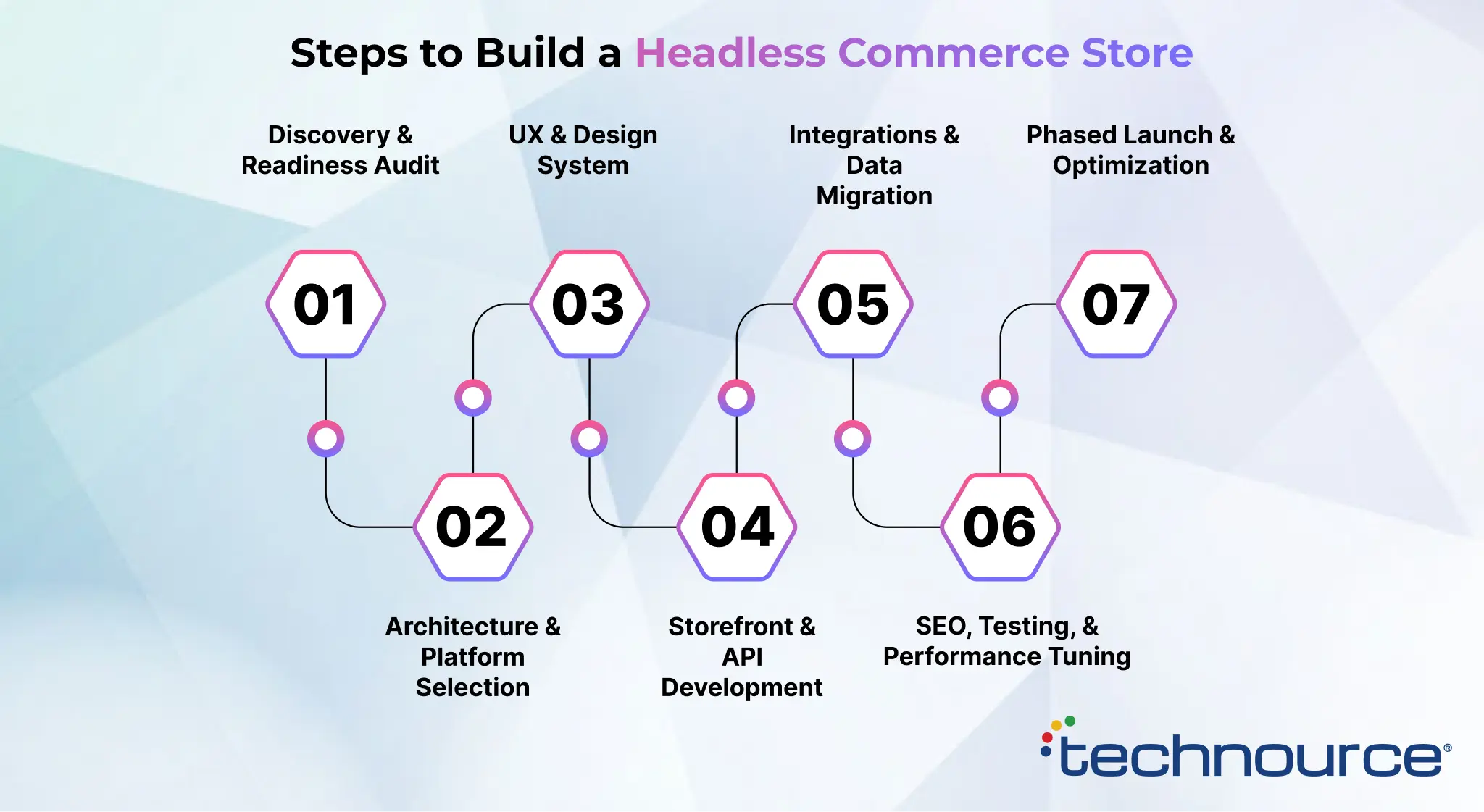
Step 1: Discovery and Readiness Audit (1–2 Weeks)
Audit current templates, traffic, Core Web Vitals, integrations, and URL structure. Pick the first surface to decouple and the metric it must improve.
Step 2: Architecture and Platform Selection (1–2 Weeks)
Decide whether to keep the current commerce engine or replace it. Define API contracts, rendering strategy, hosting, and the full integration list.
Step 3: UX and Design System (2–3 Weeks)
Design the first surface and build a reusable component library. A design system keeps later surfaces consistent and faster to ship.
Step 4: Storefront and API Development (2–10 Weeks)
Plan 2–6 weeks for a storefront on an existing backend and 4–10 weeks for a custom build. Build pages, cart flows, and API connections in sprints. Cache product and category data at the edge, and keep checkout on the platform’s hosted flow until the new frontend proves itself.
Step 5: Integrations and Data Migration (2–4 Weeks, Overlaps Step 4)
Connect payments, ERP, search and CMS, then move products, customers and content. Plan data migration services with field mapping and test runs so order history and SKUs stay intact.
Step 6: SEO, Testing, and Performance Tuning (2–3 Weeks)
Run the SEO migration checklist, load tests, and checkout tests on real devices. Fix any template that misses its Core Web Vitals target before launch.
Step 7: Phased Launch and Optimization (Ongoing)
Route a share of traffic to the new surface, compare conversion and speed, then roll out fully. Repeat the cycle for the next surface.
How Much Does Headless Commerce Development Cost?
Headless commerce development costs $20,000–$30,000 for a headless storefront on an existing backend, $30,000–$50,000 for a custom storefront with CMS, search and ERP sync, and $60,000–$100,000 for multi-storefront or B2B builds. Full enterprise replatforms are quoted after discovery.
| Build Type | Scope | Cost (USD) | Timeline |
|---|---|---|---|
| Headless storefront | New frontend on an existing Shopify or BigCommerce backend: catalog, cart, checkout handoff | $20,000–$30,000 | 8–12 weeks |
| Custom headless build | Custom storefront, headless CMS, search and ERP sync | $30,000–$50,000 | 12–20 weeks |
| Multi-storefront or B2B | Several brands or regions, B2B portal, custom checkout | $60,000–$100,000 | 16–24 weeks |
| Enterprise replatform | Composable stack, multi-region, full data migration | Custom | 6–12 months |
What Drives Headless Commerce Cost?
Integrations and data, not page count, move the budget most.
| Cost Driver | Why It Adds Cost |
|---|---|
| Number of integrations | Each API needs mapping, error handling, and tests |
| Catalog and data quality | Messy product data must be cleaned before migration |
| Custom checkout | Payments, tax, and fraud rules need extra build and testing |
| Number of storefronts | Each brand, region, or language adds templates and QA |
| B2B rules | Account pricing, quotes and approvals add backend logic |
| SEO migration size | More URLs mean more redirects and monitoring |
Scope shapes headless budgets the same way it shapes web app development costs: every added integration and user role adds build and test time.
Hidden and Ongoing Costs to Budget
Headless moves several costs from the platform subscription onto your own budget. Plan for these from day one; the amounts depend on traffic, catalog size, and vendors.
- Commerce platform subscription or license, often tied to sales volume.
- Frontend hosting and CDN usage.
- Headless CMS and search licenses.
- Monitoring, security patches and framework upgrades.
- A developer or partner who owns storefront releases after launch.
Build vs Buy: Custom Headless, Platform Starter, or Stay Monolithic?
Choose a custom headless build when you need multiple channels, B2B logic or full design control. Use a platform starter such as Hydrogen or Catalyst when you want headless speed on your current platform, and stay monolithic when one template-based store meets your goals.
| Factor | Custom Headless | Platform Starter | Stay Monolithic |
|---|---|---|---|
| Upfront cost | $30,000–$100,000 | $20,000–$30,000 | Theme and app fees |
| Time to launch | 12–24 weeks | 8–12 weeks | Days to weeks |
| Design freedom | Full | High, within platform APIs | Theme limits |
| Channel reach | Any channel | Web first | Mostly web |
| Lock-in | Lowest | Tied to platform backend | Highest |
Technource’s Recommendation
Start with a platform starter if your backend already works and your problem is speed or design. Move to a custom headless build once a second channel, B2B rules or a backend replacement is on the 12-month roadmap.
What Are the Biggest Challenges in Headless Commerce Development?
The biggest challenges in headless commerce development are integration complexity, SEO loss during migration, higher ongoing ownership, and broken preview workflows for marketers. Each one is solvable when it is planned before the storefront build starts.
| Challenge | Real Consequence | How to Solve It |
|---|---|---|
| Integration complexity | Orders, stock or prices fall out of sync | Contract-test every API and stage integrations early |
| SEO loss | Organic traffic drops after launch | Run the SEO migration checklist for each surface |
| Ownership cost | No one maintains the frontend after launch | Budget a team or partner before kickoff |
| Marketer workflow | Editors lose visual page preview | Choose a CMS with live preview |
| API performance | Slow pages despite a new frontend | Cache at the edge and batch API calls |
| Security surface | More endpoints to protect | Token auth, rate limits and scoped API keys |
Common Mistakes to Avoid When Going Headless
The most common headless mistakes are migrating everything at once, leaving SEO until launch, rebuilding a backend that works, and going live without a team to own the storefront. Avoid these five:
- Big-bang launches: moving every page in one release puts all revenue at risk on a single day.
- SEO as an afterthought: client-side-only rendering and missing redirects cause ranking drops.
- Rebuilding a working backend: replacing the commerce engine when only the storefront is slow doubles the cost.
- No performance budget: without LCP and payload targets, new frontends slow down again within months.
- No owner after launch: headless storefronts need regular framework, security and dependency updates.
Which KPIs Should You Track After Going Headless?
Track page speed (LCP), conversion rate, organic traffic retention, release frequency, API error rate and average order value after going headless. Compare each one against the pre-migration baseline for at least 30 days.
| KPI | What It Shows | How to Measure |
|---|---|---|
| Largest Contentful Paint (LCP) | Real-user loading speed | Search Console field data against the Core Web Vitals target |
| Conversion rate | Whether faster pages sell more | Analytics, split by template and device |
| Organic traffic retention | Whether migration kept rankings | Search Console clicks against the baseline |
| Release frequency | How fast teams ship changes | Deploys per week from CI/CD |
| API error rate | Integration health | Monitoring and alerting tools |
| Average order value | Impact of search and recommendations | Commerce platform reports |
How to Choose a Headless Commerce Development Company
Choose a headless commerce development company that has shipped API-driven commerce builds, plans SEO migration up front, prices integrations separately and hands over code you own. Ask for live examples and a written migration plan before signing.
| Question to Ask | Good Answer | Red Flag |
|---|---|---|
| Which commerce builds can we see live? | Live stores or apps with named integrations | Only mockups or templates |
| How do you protect SEO during migration? | URL map, SSR plan and a monitoring window | “SEO is handled after launch” |
| How do you price integrations? | Itemized per system | One vague lump sum |
| Will we own the code and API contracts? | Yes, full repository access | Proprietary framework you can’t leave |
| What happens after launch? | Support plan with a release cadence | No post-launch plan |
| Do you recommend phased or big-bang? | Depends on revenue risk, with reasons | Always big-bang |
Technource has 14+ years in software product development and is rated 4.9/5 on Clutch and 4.9/5 on GoodFirms.
What Are the Future Trends in Headless Commerce?
The main headless commerce trends for 2026–2028 are AI shopping agents that buy through APIs, platform storefront kits that lower entry cost, composable stacks reaching mid-market brands, and edge rendering as the default for speed.
AI Shopping Agents Need Machine-Readable Catalogs
AI assistants are starting to search, compare and buy on behalf of shoppers. Stores with clean product data and secure catalog and checkout APIs are ready for that channel, while template-only stores must retrofit it.
Platform Storefront Kits Lower the Entry Cost
Shopify Hydrogen and BigCommerce Catalyst give teams a working headless starter on their existing backend. The first project shifts from a full replatform to a storefront rebuild.
Composable Stacks Reach the Mid-Market
Mid-market brands increasingly pair one commerce engine with separate search, CMS and payment services. The pattern used to be limited to enterprise budgets.
Edge Rendering Becomes the Default
Rendering pages close to the shopper on CDN edge networks is becoming standard for headless storefronts. Expect performance budgets to appear in more build contracts.
How Technource Delivers Measurable Results in eCommerce Platforms
Technource builds API-driven commerce platforms where storefronts, apps and business systems share one backend. Two recent eCommerce projects show the pattern.
How Technource Built Equipt, a UK Equestrian Marketplace That Delivers 65% Faster Product Discovery
We built Equipt for a UK startup that wanted one trusted marketplace for buying and selling equestrian gear. Saddles, boots and feed each needed different listing details, and the platform had no logistics system of its own.
Our team built a Laravel backend that serves a web platform and Flutter apps for iOS and Android. Dynamic categories load only the fields each product type needs. Royal Mail, Evri and TrackingMore APIs calculate shipping, create labels and track parcels, Stripe Connect handles seller payouts, and GDPR controls cover consent, data export and deletion.
Measurable Result
- 65% faster product discovery with advanced filters
- 70% better order and dispute handling efficiency
- 3 shipping and tracking APIs automating rates, labels and parcel tracking
- Live on web, iOS and Android from one backend
How Technource Built Tojarcom, a Cross-Border eCommerce Platform That Delivers 60% Better Customer Service Efficiency
We built Tojarcom for a Jordan-based client so shoppers in Jordan, the UAE and Saudi Arabia can buy from US and European stores that do not deliver to them. Surprise customs and shipping costs, plus missing tracking, were eroding customer trust.
We built a Laravel backend with an Angular web app and connected three external APIs: Google Programmable Search to browse international products in one place, the Slice API to pull vendor order and shipping data automatically, and the DHL API to generate air waybills for live tracking. Purchase officers calculate six cost components, so customers see the full price before paying.
Measurable Result
- 65% faster cross-border shopping
- 60% improved customer service efficiency
- 6-part cost breakdown shown before every purchase
- Role-based workflow across 6 teams, from customer service to accounting
Technource’s Approach to Headless Commerce
Five principles guide every headless build we scope:
- Decouple one surface first: start with product or category pages and prove the metric before moving checkout.
- Integrations before pixels: map every API, data field and failure case before design sign-off.
- SEO parity is a launch gate: no surface goes live without its URL map, rendering and schema checks.
- Performance budget in writing: LCP and payload targets are agreed at kickoff, not after launch.
- You own the code: repositories, API contracts and infrastructure stay in your accounts.
Conclusion
Headless commerce development pays off when three decisions are right: whether you are ready, how you migrate and what you build first.
Migrate when two or more readiness signals apply, move one surface at a time, and protect SEO at every step. If your backend already works, start with a $20,000–$30,000 headless storefront on top of it.
Technource is an AI-powered product engineering company that builds API-driven commerce platforms as part of its ecommerce development services, from a first headless storefront to multi-storefront B2B.
If you are weighing a move to headless, contact us for a short scoping call that maps your readiness, budget, and timeline.
Ready to turn your store into a fast, flexible headless storefront?
FAQs
Headless commerce development is building an online store where the storefront is separated from the commerce engine and connected through APIs. Teams build the frontend in a framework like Next.js and keep catalog, cart, pricing and checkout in one backend. A headless storefront on an existing backend typically launches in 8–12 weeks. Headless commerce costs $20,000–$30,000 for a headless storefront on an existing Shopify or BigCommerce backend, $30,000–$50,000 for a custom storefront with CMS, search and ERP sync, and $60,000–$100,000 for multi-storefront or B2B builds. Platform fees, hosting, CMS and search licenses are ongoing costs on top. A headless storefront on an existing backend takes 8–12 weeks. Custom builds take 12–20 weeks, multi-storefront or B2B builds take 16–24 weeks, and full enterprise replatforms take 6–12 months. Phased migrations put the first surface live sooner because they move one part of the store at a time. Headless commerce is usually not worth it for a small single-channel store that converts well on a template and has no developer. It becomes worth it when two or more readiness signals apply, such as theme limits blocking releases, slow product pages or a mobile app on the roadmap. Shopify is not headless by default, but it supports headless builds through the Storefront API and the Hydrogen framework. Teams keep Shopify’s checkout, payments and apps while building a custom frontend. A headless storefront on an existing Shopify backend typically costs $20,000–$30,000 and launches in 8–12 weeks. Headless commerce separates the storefront from the commerce engine. Composable commerce goes further and splits the backend into swappable services such as search, CMS and payments. Every composable stack is headless, but a headless stack can still run on one backend. Composable stacks follow MACH, a four-part standard: microservices, API-first, cloud-native and headless. Headless commerce helps SEO when pages are server-rendered and fast, and hurts it when migration skips redirects or relies on client-side rendering. Keep URLs or 301-redirect them, rebuild schema, and keep LCP at 2.5 seconds or less, the Core Web Vitals threshold set by Google. Yes. You can keep your current commerce engine, such as Shopify or BigCommerce, and replace only the storefront through its APIs. A headless storefront on an existing backend costs $20,000–$30,000 and launches in 8–12 weeks, and checkout can stay on the platform until the new frontend proves its numbers. A typical headless stack has four layers: storefront, API, commerce engine and content. Most 2026 builds use Next.js, Hydrogen or Catalyst for the storefront, an API-first engine such as Shopify, BigCommerce or commercetools, a headless CMS like Contentful or Sanity, and edge hosting. Pick the stack your team can maintain. Headless commerce costs more to build and run than a template store, needs developers to maintain the frontend, adds more APIs to secure and can hurt SEO if migration is rushed. Integration is the biggest risk: 37% of enterprise technology leaders name it a primary concern, according to the MACH Alliance (2026).
Related Insights and Articles