There are multiple methods for decimal to binary conversion, including repeated division and using remainders. It also covers shortcuts for whole numbers and delves into the conversion of decimal fractions. You will get to know real-life applications, such as the importance of binary in computer science. Also, explore the best decimal-to-binary converter in this blog.
All apps and software development companies require an understanding of binary numbers. It is the base of all programming languages and digital technology, and it forms the basis for data storage, binary code, and the inner workings of computer processors. So, before you partner with aAI-powered software development companyunderstand the significance of binary conversions.
Understanding the Binary Systems
A binary system is a fundamental numbering system. It is a base-2 system, which means it only uses two digits: 0 and 1. Unlike the decimal system (base-10) that we commonly use which has 10 digits (0-9). The binary system operates with two values.
In a binary system, each digit in the decimal system represents an increasing power of 2, similar to how each digit in the decimal system represents a power of 10. In the binary number, select the far right digit, that holds the least value (2^0). And each subsequent digit to the left represents a value that is double that of the previous one.
For example: The binary number “1010” can be interpreted as
This presentation is the foundation of digital computing.
Steps to Convert Decimal Numbers to Binary
Explore the steps below and easily convert decimal numbers to binary.
Step1: Start with the decimal number:
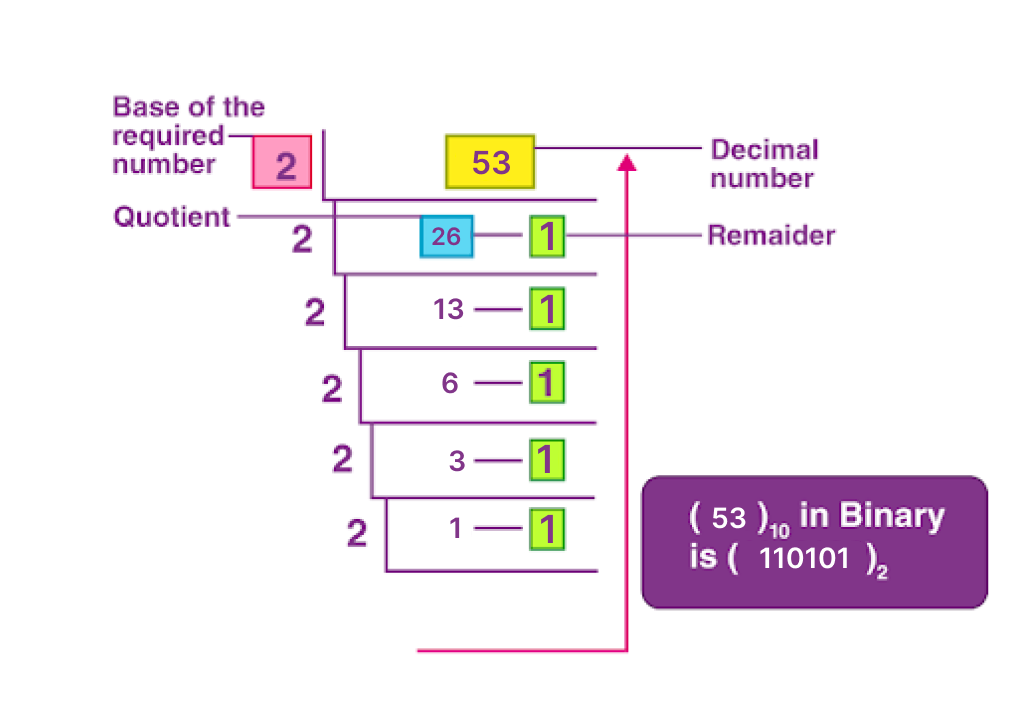
Begin with the decimal number you want to convert. For this example, let’s use 53.
Step2: Divide by 2:
Divide the decimal number by 2 or (53/2).
Step3: Note the quotient and remainder:
Write down the quotient and remainder. In this case, 53 is divided by 2. It is equal to 26 with 1 remainder.
Step4: Repeat the process:
Take the quotient from the previous step and divide it by 2
Note down the new quotient and remainder
For example, 26 divided by 2 equals 13 with the remainder of 0
Step5: Continue the division:
Keep dividing the quotient by 2 and noting the quotient and remainder until the quotient becomes 0
Step6: Read all the remainder:
Now read all remainders from bottom to top. In our example, all remainders are 110101.
Step7: This is the binary representation:
The sequence of remainders (110101) is the binary representation of the number 53.
So, the decimal number 53 in binary is 110101. This process works for converting any decimal number to its binary equivalent.
Have a look at the following video to watch
Convert Binary Numbers to Decimal
Converting binary numbers to decimal is a simple process. Here are the steps to convert a binary number to its decimal equivalent.
Step1- Start with the binary number:
Begin with the binary number you want to convert. For this, we can use 10101.
Step2- Assign power of 2:
Start from the right and assign a power of 2 to each bit. The rightmost bit has the power of 2^0, the next one to the left has 2^1, the next 2^2, and so on; increasing by 1 for each bit to the left.
Step3- Multiply and sum:
To find the decimal value of a binary number, you need to multiply each digit by its corresponding power of 2 and then add the results together.
Step4- This is the decimal representation:
The sum from the previous step is the decimal representation of the binary number.
Let’s understand it with the help of the below representation:
Binary number= 10101
Starting from the right:
1 * 2^0 = 1
0 * 2^1 = 0
1 * 2^2 = 4
0 * 2^3 = 0
1 * 2^4 = 16
Sum the results:
1+0+4+0+16=21
So, the binary number 10101 is equal to the decimal number 21.
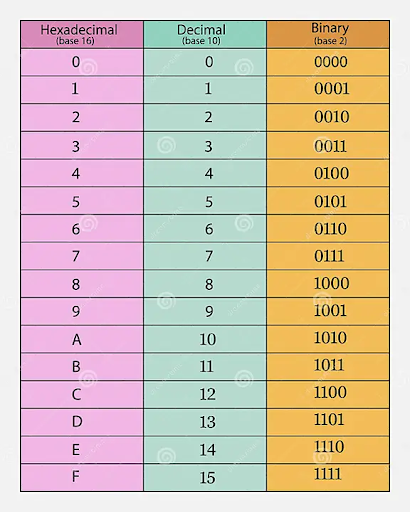
Decimal to Binary Table
Here is the table to quickly have an overview of decimal to binary conversion.
Decimal to binary converters provide several vital purposes. When done manually, it can be tedious and prone to errors, especially for long binary representations. Tools ensure precision and accuracy in the conversion process, reducing the risk of errors in digital applications.
You can save time from Complex calculations. Developers often work with binary data foron-demand app development.So, tools simplify the integration of binary data into their code.
Here are the examples of Decimal to Binary to converter tools that I generally use.
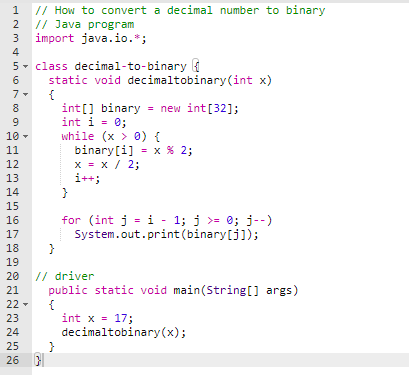
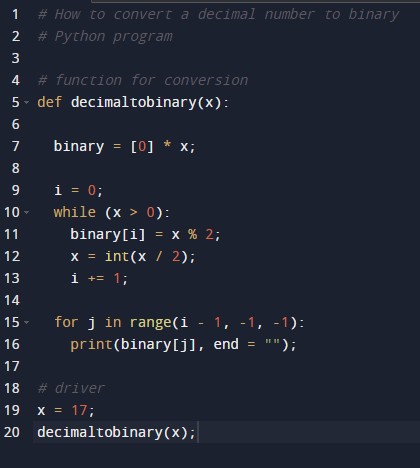
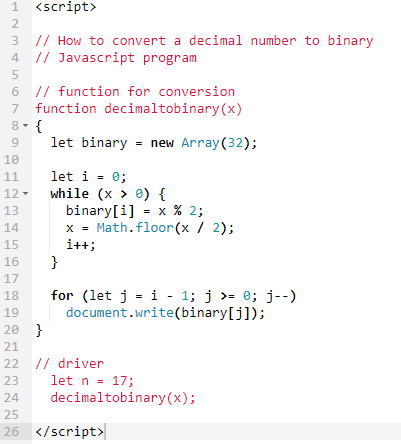
Here are some code examples to convert Decimal numbers to Binary.
Decimal to Binary in Java:
Decimal to Binary in Python:
Decimal to Binary in JavaScript:
Conclusion:
Converting decimal numbers to binary is a fundamental skill in computer science. While it can be done manually converter tools and codes simplify the process. Understanding this conversion is crucial for coding and digital technology. You should embrace this skill to be updated with digital age changes.
Chetan Patel is a Team Leader and seasoned Software Architect at Technource with over 12 years of experience in back-end development, database architecture, and server optimization. He specializes in PHP, Laravel, and MySQL, and brings strategic oversight to complex software projects. His expertise extends to emerging technologies like AI/ML, SaaS, Blockchain, and IoT, allowing him to craft future-ready solutions. Chetan's leadership fosters innovation and ensures scalable, high-performance software delivery aligned with evolving industry standards.
Request Free Consultation
Amplify your business and take advantage of our expertise & experience to shape the future of your business.